Digital Security Essentials
Understanding Digital Security
Your Digital Front Door
Every online account you create is like a door into your personal life. Your email, social media, and banking apps all hold sensitive information. Digital security is about putting strong locks on those doors to keep intruders out. Without good security, you're leaving these doors wide open for anyone to walk through.
Protecting your digital self doesn't require being a tech expert. It starts with understanding the common ways attackers try to get in and learning the simple, powerful tools you can use to stop them.
Common Threats to Watch For
Attackers use various tricks to gain access to your accounts and data. Most rely on deception or exploiting weak security practices. Here are a few of the most common threats you'll encounter.
Phishing
noun
A type of online scam where criminals impersonate legitimate organizations via email, text message, or other means to trick you into revealing sensitive information.
Think of phishing like a fisherman casting a lure. The attacker sends a fake message that looks real, hoping you'll bite. It might be an email pretending to be from your bank, claiming there's a problem with your account and you need to log in immediately through their link. That link, however, leads to a fake website designed to steal your username and password.
A good rule of thumb: Never click on urgent links from emails or texts. Instead, go directly to the official website by typing the address yourself.
Malware
noun
Short for "malicious software," it's any software intentionally designed to cause damage to a computer, server, client, or computer network.
Malware is an umbrella term for nasty programs like viruses, spyware, and ransomware. It can get onto your device if you download a file from a shady website or click a malicious link. Once inside, malware can do all sorts of things, from stealing your personal information to locking up your files and demanding a ransom to get them back.

Then there are data breaches. This is when a company's secure database is broken into, and customer information is stolen. This information, which often includes usernames, emails, and passwords, is then frequently sold online. If you reuse the same password for multiple websites, a breach at one company can give attackers the key to all your other accounts.
Your First Line of Defense
The simplest and most critical part of your digital security is your password. A strong password is like a complex lock on a vault door, while a weak one is like leaving the key under the mat.
Strong passwords are the first line of defense in any data breach.
So what makes a password strong?
- Length: Longer is always better. Aim for at least 12-15 characters.
- Complexity: Use a mix of uppercase letters, lowercase letters, numbers, and symbols.
- Uniqueness: Never, ever reuse passwords across different sites. Each account needs its own unique password.
A weak password is the opposite. It's short, simple, uses common words like password123, or contains personal information that's easy to guess, like your birthday or pet's name. Attackers use automated programs that can guess millions of these simple passwords in seconds.

Adding a Second Lock
Even with a strong password, your account can still be vulnerable. That's where two-factor authentication, or 2FA, comes in. It's like adding a deadbolt to your front door. Even if a thief picks the first lock, they still can't get in.
2FA works by requiring two pieces of evidence to prove your identity. It combines something you know (your password) with something you have (like your phone or a physical security key). When you log in, after entering your password, the website will ask for a temporary code that's sent to your phone or generated by an authenticator app. Without that code, no one can access your account, even if they have your password.
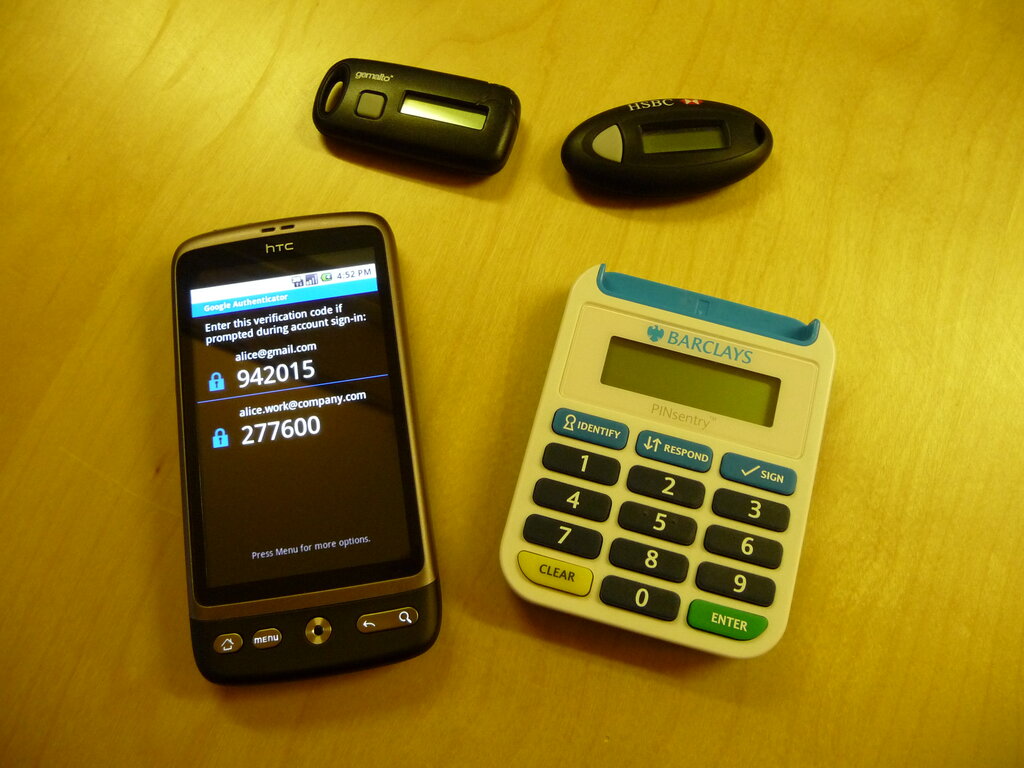
This simple step is one of the most effective ways to secure your online life. It protects you against phishing, malware, and data breaches because even if your password is stolen, your account remains safe.
But good passwords are not enough! You need another layer of protection. You need 2FA.
Understanding these basic threats and defenses is the foundation of good digital security. By using strong, unique passwords and enabling 2FA wherever possible, you can build a strong defense against the vast majority of online attacks.
What is the primary goal of a phishing attack?
Which of the following describes the strongest password?