Digital Security Essentials
Understanding Digital Security
Your Digital Front Door
Think of your online accounts—email, social media, banking—as doors to different rooms in your digital home. Each door protects something valuable, from personal conversations to financial information. Just like you wouldn't use a flimsy lock on your front door, you shouldn't use a weak password for these accounts. Unfortunately, many people do, leaving their digital lives vulnerable.
Understanding the threats is the first step to protecting yourself. The most common dangers aren't always complex hacks you see in movies. They're often simple tricks designed to fool you into giving up your keys.
Common Online Threats
Three of the most frequent threats you'll encounter are phishing, malware, and data breaches.
Phishing
noun
An attempt to trick you into revealing sensitive information, like passwords or credit card numbers, by pretending to be a trustworthy entity.
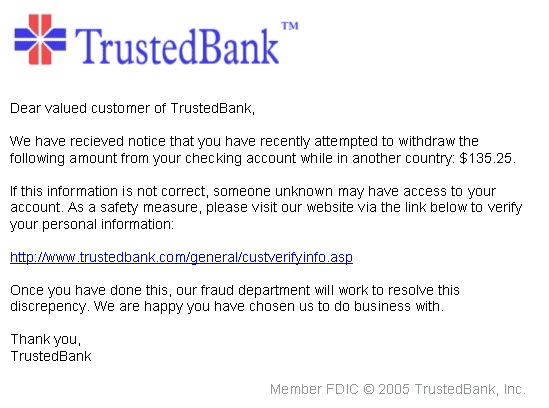
Phishing is like a wolf in sheep's clothing. You might get an email that looks like it's from your bank, a delivery service, or a social media site. It often creates a sense of urgency, telling you to click a link to avoid your account being closed or to claim a prize. But the link leads to a fake website designed to steal the login information you enter.
Malware, short for malicious software, is another danger. It's any software intentionally designed to cause damage to a computer, server, or network. This includes viruses that can corrupt your files or spyware that secretly records your keystrokes to capture passwords.
Finally, there are data breaches. This is when a company you have an account with gets hacked, and its user data—including usernames, emails, and passwords—is stolen. You might have perfect security habits, but if a service you use has a breach, your information can still end up in the wrong hands. These stolen credentials are often bought and sold by criminals online.
Why One Leaked Password Matters
A single compromised password can cause a domino effect, especially if you reuse passwords across different sites. Imagine your password for a small online forum is leaked in a data breach. If you use that same password for your email, a criminal can now access your inbox.
From there, they can reset the passwords for your other important accounts, like banking and social media, by using the "forgot password" feature. This can lead to identity theft, financial loss, and having your private conversations and photos exposed. Your email account is often the master key to your entire digital life.
This chain reaction is preventable. The two most powerful tools at your disposal are strong, unique passwords and two-factor authentication.
Your Security Toolkit
A strong password is your first line of defense. So what makes a password strong? It’s not about replacing an 'a' with an '@' or an 's' with a '$'. Modern password-cracking tools can guess these simple substitutions in seconds.
True strength comes from length and randomness. A longer password has exponentially more possible combinations, making it much harder to guess or crack through brute force.
A great technique is to create a passphrase—a short, memorable sentence. For example, CorrectHorseBatteryStaple is far stronger than P@ssw0rd1!. It's long, easy for you to remember, but very difficult for a computer to guess.
| Weak Password | Strong Password |
|---|---|
password123 | Lions&Zebras-Eat_Kalahari$grass |
Fluffy | MyFirstCatWasNamedFluffy |
QWERTY | 4RandomWordsMakeASecurePassphrase |
But even the strongest password can be stolen in a data breach. That’s why you need a second layer of defense: two-factor authentication, or 2FA.
2FA requires two pieces of evidence to prove your identity when you log in. It's based on the principle of combining something you know (your password) with something you have (like your phone or a physical security key).
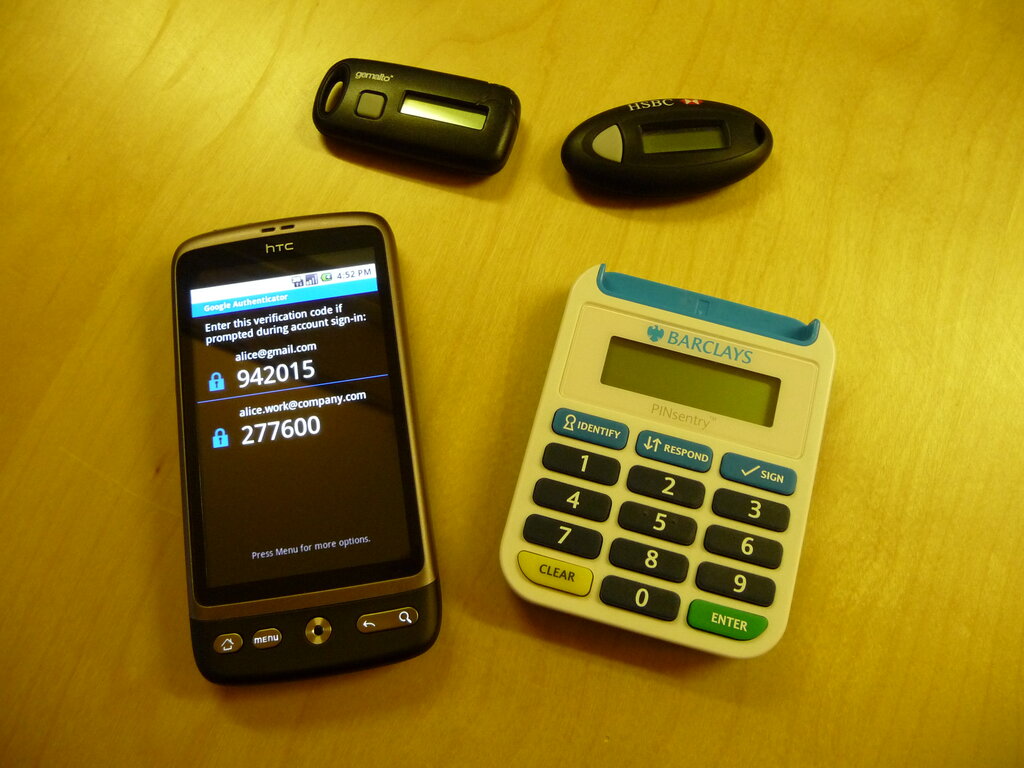
When you log in with 2FA enabled, you first enter your password. Then, you're prompted to provide a second piece of information, usually a temporary code sent to your phone or generated by an authenticator app. This means that even if a criminal steals your password, they can't get into your account without also having physical access to your device.
If you want to keep your online accounts safe, adding two-factor authentication (2FA) is the single most important step you can take.
Now, let's test your knowledge on these core concepts.
What is the primary goal of a phishing email?
Which of the following is the most secure password?
Understanding these threats and your primary defenses is the foundation of good digital security. By using strong, unique passwords for each account and enabling 2FA wherever possible, you make yourself a much harder target for criminals.