Digital Security Essentials
Understanding Digital Security
Guarding Your Digital Self
Think about how much of your life is stored on your devices. Your photos, bank details, private messages, and work documents all live online or on your computer. Just like you lock your front door to protect your home, you need to secure your digital life to protect your personal information.
With the increasing number of attempts to exploit vulnerabilities in the various digital tools we use, the need for vigilance and implementation of cybersecurity measures in protecting data and digital identity has never more urgent.
Unfortunately, there are many ways for intruders to get in. Understanding these threats is the first step toward protecting yourself.
Common Digital Threats
Three of the most common threats you'll encounter are phishing, malware, and data breaches. They work in different ways, but all aim to steal your information.
phishing
noun
A fraudulent attempt to obtain sensitive information such as usernames, passwords, and credit card details by disguising as a trustworthy entity in an electronic communication.
Phishing is like a digital wolf in sheep's clothing. You might get an email that looks like it's from your bank, a social media site, or even your boss. It will create a sense of urgency, telling you to click a link to avoid your account being closed or to claim a prize. That link, however, leads to a fake website designed to steal the login details you enter.
malware
noun
Software intentionally designed to cause disruption to a computer, server, client, or computer network, leak private information, gain unauthorized access to information or systems, or deprive users access to their information.
Malware, short for malicious software, is like a virus for your computer. It can get onto your device if you click a shady link or download an infected file. Once inside, different types of malware can do different things. Some spy on your activity to steal passwords, while others, called ransomware, lock up your files and demand money to release them.

Finally, there are data breaches. This happens when a company you trust, like a retailer or a social media platform, gets hacked. The attackers steal the user data stored on the company's servers, which can include names, email addresses, and passwords. Your own security might be perfect, but if your information is stolen from a third-party site, it can still be used against you.
Your Keys to the Kingdom
Your password is the primary key to each of your online accounts. If a thief gets this key, they can walk right in. That's why having a strong password is so important. A weak, easy-to-guess password like password123 is like leaving your key under the doormat. It’s the first place an intruder will look.
A strong password has three key ingredients: it's long, it's random, and it's unique to each account.
Even with a strong password, you can be vulnerable, especially in a data breach. If your password for one site is exposed, attackers will try using it on other popular sites, hoping you reused it. This is where an extra layer of security comes in.
The Power of a Second Lock
Two-factor authentication, or 2FA, is like having a second lock on your digital door. Even if a thief manages to steal your password (your key), they still can't get in without the second piece of information.
2FA works by requiring two things to log in: something you know (your password) and something you have (like your phone).
When you try to log in to an account with 2FA enabled, you'll first enter your password. Then, the service will ask for a second code. This code is typically sent to your phone via a text message or generated by a special app. Since an attacker is unlikely to have both your password and your physical phone, your account remains secure.
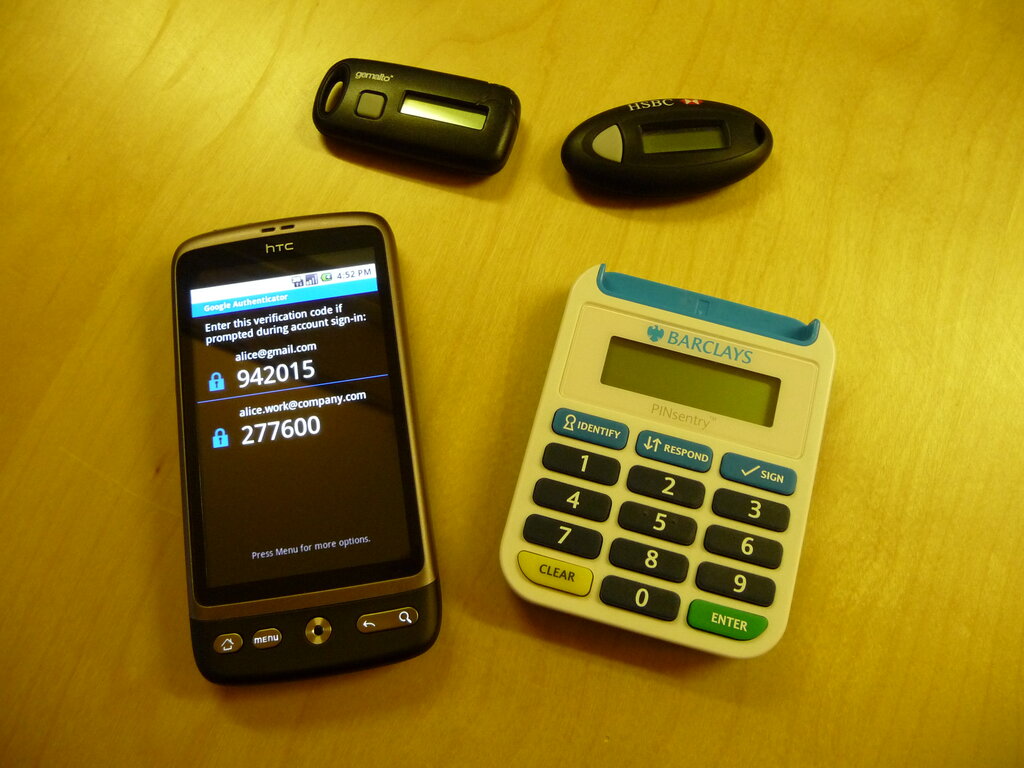
Understanding these basic threats and defenses is the foundation of good digital security. By using strong passwords and enabling 2FA, you make it significantly harder for anyone to access your private information.
Ready to check your knowledge?
What is the primary goal of a phishing attack?
You receive an urgent email that appears to be from your bank, asking you to click a link to 'verify your account immediately'. This is a classic example of...
Now that you can spot common threats and understand your primary lines of defense, you're better equipped to navigate the digital world safely.