Digital File Organization Mastery
Understanding Digital File Management
The Art of Digital Tidiness
Digital file management is how you handle your digital information. It’s the system you use to name, save, and structure your documents, photos, and other files so you can find them again. Without a system, you're left with digital clutter.
Think of a desktop cluttered with icons, or a 'Downloads' folder overflowing with cryptically named files like 'report_final_v2_final.docx'. Finding anything is a treasure hunt without a map.
This disorganization isn't just messy; it costs you time and adds stress. Searching for a misplaced file can derail your workflow and make collaboration with others difficult. When files are a jumble, it's also easier to accidentally delete the wrong version or lose important information.
Why Bother Organizing?
Putting a simple system in place changes everything. A well-organized digital space makes your work smoother and more efficient. You can retrieve files in seconds, not minutes. This clarity reduces mental friction, freeing you up to focus on more important tasks.
Digital file management will look different for each organization but they should all reach the same goal: find what you need, when you need it.
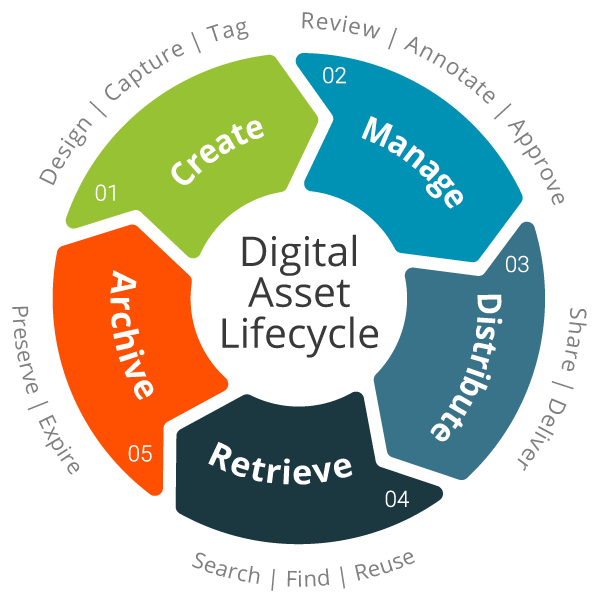
Systematic organization also safeguards your work. Knowing exactly where a file is and what version it is prevents costly mistakes. For teams, a shared, logical structure ensures everyone is on the same page and can access information consistently. Every file has a lifecycle, from its creation to when it's eventually archived or deleted. Managing this cycle is key.
Two Core Ideas
Two concepts are central to good file management: digital curation and data format management.
Digital Curation
noun
The process of managing and preserving digital assets for long-term access. It involves selecting, maintaining, and archiving digital information.
Think of yourself as the curator of your own digital museum. You actively decide what is important enough to keep, how to organize it, and how to ensure it remains accessible in the future. This isn't just about saving everything; it's about saving the right things in the right way.
Part of that process involves managing data formats. The format of a file (like .docx, .pdf, .jpg, or .mp3) determines what software can open it. Some formats are better for long-term storage than others because they are open standards and less likely to become obsolete.
| Format Type | Good for Editing | Good for Archiving |
|---|---|---|
| Documents | .docx, .odt | .pdf, .txt |
| Images | .psd, .xcf | .tiff, .png |
| Spreadsheets | .xlsx, .ods | .csv |
Choosing a stable format for files you need to keep long-term is a core part of digital curation. It ensures that you'll still be able to open and read your important documents years from now, even if the original software you used no longer exists.
Ready to test what you've learned about keeping your digital life in order?
What is the primary goal of an effective digital file management system?
The process of actively deciding which files to keep, how to organize them, and how to ensure they remain accessible in the future is called: