Digital File Mastery
Understanding File Organization
The Search for a Single File
We've all been there. You need a specific document, and you know it's somewhere on your computer. You start by checking the obvious folders: 'Documents,' 'Desktop,' maybe that one folder you creatively named 'Important Stuff.' Ten minutes later, you're deep in a digital rabbit hole, clicking through folders with names like 'Untitled Folder (3)' and wondering how you ever found anything in the first place.
A disorganized digital space creates the same mental drag as a cluttered physical desk. It's a constant, low-level source of stress that makes work harder than it needs to be. But when your files have a clear and logical home, you unlock some powerful benefits.
Organizing your digital files isn't just about being tidy — it's about creating a system that helps you find what you need quickly, collaborate effectively, and work with maximum efficiency.
A good system helps you:
- Save Time: You'll spend less time searching for files and more time actually using them. This adds up to hours of reclaimed productivity each month.
- Reduce Stress: Knowing exactly where to find what you need eliminates the panic of a last-minute search.
- Improve Collaboration: When working in a team, a shared, organized file system means everyone can find the latest version of a document without asking.
- Prevent Data Loss: A structured system makes it less likely you'll accidentally delete the wrong file or save over a critical document.
The Cost of Digital Chaos
A lack of organization doesn't just waste time; it creates real problems. How many times have you seen a file named Report-Final-v2-final-FINAL.docx? This kind of naming chaos is a classic symptom of a broken system. It leads to confusion about which version is the most current, causing people to work on outdated information.
Then there's the problem of duplicate files. Without a central, trusted location for documents, it's easy to end up with multiple copies of the same file scattered across different folders. This wastes storage space and, more importantly, makes it impossible to know which one is the definitive version.
The biggest risk is losing important information. When files are dumped haphazardly, it's easy to delete a folder thinking it's old, only to realize later it contained a crucial document you needed.
Simple Principles for Sanity
Building an effective file management system doesn't require complex software or a rigid, complicated rulebook. It's built on a few simple, foundational principles.
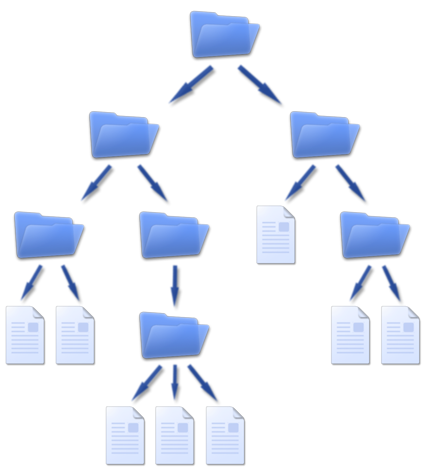
1. Create a Logical Hierarchy Think of your computer's folders like a set of nesting dolls. You start with a few broad, top-level categories and get more specific as you go deeper. For example, you might have a main folder called 'Projects,' and inside that, a separate folder for each project. Within each project folder, you might have subfolders for 'Proposals,' 'Invoices,' and 'Final Deliverables.' The goal is to create a path to any file that feels intuitive.
A well-organized folder hierarchy is the foundation of efficient file management.
2. Be Consistent Once you decide on a structure, stick to it. Consistency is the most important part of any organizational system. If you sometimes save invoices in the project folder and other times in a general 'Finances' folder, the system falls apart. Every file should have one, and only one, logical home.
3. Keep It Simple It can be tempting to create a folder for every possible category, resulting in a deep, complex hierarchy that's difficult to navigate. Resist this urge. A good system is one you'll actually use. Start with a simple, flat structure and only add more layers of folders when it becomes absolutely necessary. Fewer, broader categories are often easier to manage than dozens of very specific ones.
What is the primary problem caused by file names like Proposal-draft-v3-final-EDITED.docx?
According to the principles of file management, what is the most important element for maintaining an organizational system?
By keeping these core principles in mind, you can build a system that turns digital chaos into organized calm, making it easy to find what you need, when you need it.