Digital Art E-commerce Mastery
Understanding SVG and PNG Formats
Two Families of Images
When you look at a digital image, you're seeing one of two types: raster or vector. Understanding the difference is key to creating digital art that looks sharp and works well everywhere.
Imagine you have a huge grid of tiny squares, like a piece of graph paper. A raster image is like a mosaic, where each tiny square, or pixel, is filled with a specific color. A photograph is a perfect example. If you zoom in far enough, you'll see the individual pixels.
A vector image, on the other hand, is like a set of instructions. Instead of remembering the color of millions of pixels, the computer remembers a mathematical formula: "draw a circle here with this radius and this color." Because it’s based on math, not a fixed grid of pixels, it can be scaled to any size without losing quality.
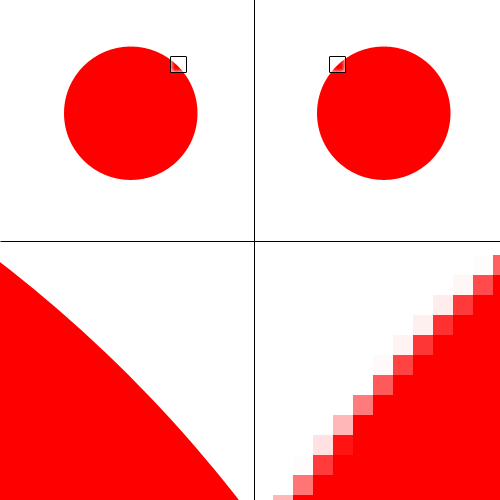
PNG and SVG are two of the most common file formats for digital art, and each belongs to one of these families.
PNG The Raster Workhorse
PNG
noun
Stands for Portable Network Graphics. A raster image format that uses lossless compression and supports transparency.
PNG is a raster format, meaning it's made of pixels. Its biggest advantages are its use of lossless compression and its support for transparency.
Lossless compression means that when the file is saved, no data is thrown away. Every pixel remains exactly as you created it, which is crucial for preserving the quality of detailed illustrations or text. Transparency allows you to have parts of your image be see-through, which is perfect for placing a logo on a website or layering elements in a design.
Use a PNG file when you need to preserve the exact details of a complex, pixel-based image, especially if it requires a transparent background.
Common uses for PNGs include:
- Detailed digital paintings or illustrations
- Website graphics like buttons or banners that have transparent parts
- Any image where crisp lines and text are important, but it's not a simple shape
SVG The Scalable Vector
SVG
noun
Stands for Scalable Vector Graphics. A vector image format based on XML that defines shapes with mathematical equations.
SVG is the most popular vector format for the web. Since SVGs are defined by math, their file sizes are often very small, and they can be scaled up or down to any size without becoming blurry or pixelated.
Unlike stretching an object in a pixel-based program like Photoshop, when you enlarge a vector shape, there is no loss in quality.
This scalability makes SVGs incredibly versatile. The same logo file can be used for a tiny website favicon or a giant billboard. Because SVGs are actually text-based files (written in a markup language called XML), they can also be animated and manipulated with code.
Common uses for SVGs include:
- Logos and brand icons
- Illustrations and diagrams
- Website and app interface elements
At a Glance
| Feature | PNG (Raster) | SVG (Vector) |
|---|---|---|
| Based On | Pixels (Grid) | Math (Paths) |
| Scalability | Loses quality when enlarged | Infinitely scalable |
| File Size | Larger, especially for high-res | Typically smaller |
| Transparency | Yes (Alpha channel) | Yes |
| Best For | Photos, complex illustrations | Logos, icons, simple graphics |
Choosing the right format depends entirely on the artwork and where it will be used. For a detailed digital painting, PNG is the clear winner. For a company logo that needs to look sharp everywhere, SVG is the way to go.