Digital Art and Product Creation
Digital Art Fundamentals
What Is Digital Art?
At its core, digital art is simply art made with digital tools. Instead of a physical canvas and paints, you use a screen and software. Digital illustration is a huge part of this world, covering everything from the concept art for video games and movies to the graphics you see on websites and in magazines. It's a medium that combines the principles of traditional art with the power of modern technology.
Digital art is actually an extension of traditional art that uses a computer as a tool.
So why go digital? The advantages are significant. One of the biggest is the power to undo mistakes. Spilled ink on a traditional drawing can be a disaster, but a wrong brushstroke on a digital canvas can be erased with a single click. There are no happy accidents unless you want them.
Digital art also introduces the concept of layers. Think of layers as transparent sheets of plastic stacked on top of each other. You can draw your background on one sheet, your characters on another, and the special effects on a third. This lets you edit one part of your image without affecting the others. It's a game-changer for complex compositions.
Distribution is another key benefit. A finished digital piece can be shared with millions of people online instantly. It can be resized without losing quality (if it's vector-based) and printed on anything from a coffee mug to a giant billboard. This flexibility opens up a world of possibilities that are much harder to achieve with traditional media.
Your Digital Toolkit
Getting started with digital art requires two main things: hardware and software. The most important piece of hardware is a drawing tablet. These devices translate the movement of your hand into lines on the screen.
There are two main types of tablets:
- Graphics Tablets: These are flat pads that you draw on while looking at your computer monitor. They take some getting used to, but are often more affordable.
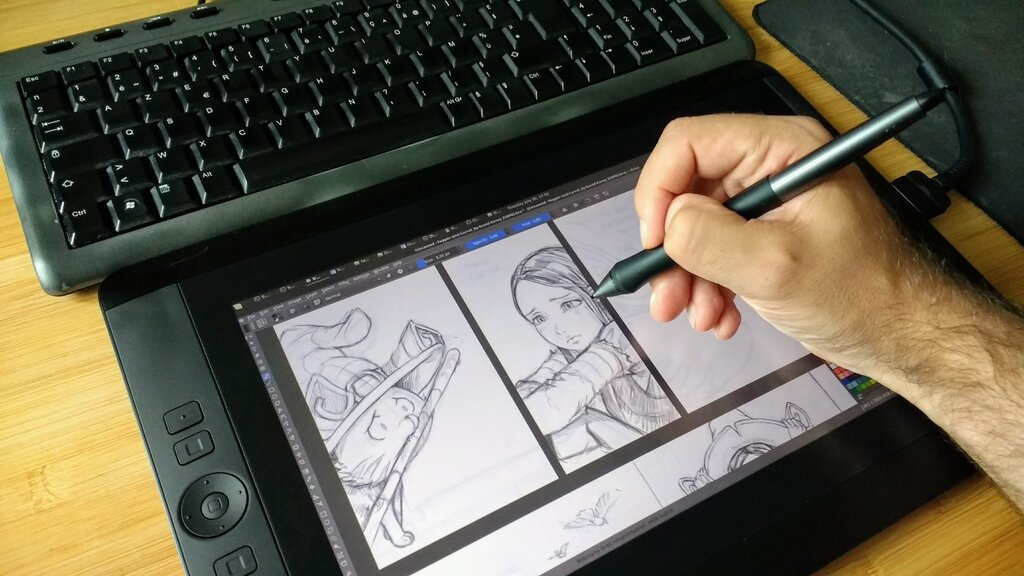
- Display Tablets: These have a built-in screen, so you can draw directly on the image. It feels more like traditional drawing and is very intuitive, but they come at a higher price.
Both types use a stylus, which is a special pen that often senses pressure. Pressing harder can create a thicker or darker line, mimicking the feel of real pens and brushes.
Next is software. This is your digital studio, filled with every tool you could imagine. There are many options, each with its own strengths. Here's a quick look at a few popular choices:
| Software | Best For | Platform | Cost Model |
|---|---|---|---|
| Adobe Photoshop | All-around powerhouse, photo editing, painting | Windows, macOS | Subscription |
| Procreate | Intuitive painting, great for beginners | iPad only | One-time purchase |
| Clip Studio Paint | Comics, manga, and illustration | Windows, macOS, iPad, etc. | One-time purchase or subscription |
| Krita | Free and open-source, great for painting | Windows, macOS, Linux | Free |
Don't get too caught up in choosing the "perfect" software. Many professionals use multiple programs. The best tool is the one that helps you bring your ideas to life.
Setting Up Your Studio
Once you have your tools, it's time to set up your workspace. A digital workspace isn't a physical desk, but the layout of your software's interface. Most art programs are highly customizable. You can move toolbars, create custom brush sets, and set up keyboard shortcuts for your most-used commands.
Take some time to arrange your digital space in a way that feels comfortable. Put your favorite tools where you can reach them easily. A clean, organized workspace lets you focus on creating, not hunting for a specific button.
Just as important is how you organize your files. A messy folder of untitled artworks can quickly become a nightmare. A good system saves you time and prevents you from losing work. A simple, clear structure is best. You might organize your projects by date, client, or type of work.
Also, get in the habit of naming your files clearly. A name like Dragon_Sketch_v3.psd is much more useful than Untitled-1.psd. It tells you the subject, the stage of the artwork, and the version. This simple habit will save you countless headaches down the road.
Ready to check your understanding? Let's see what you've learned.
In digital art, what is the primary function of using layers?
A digital artist is using a drawing tablet that has a built-in screen, allowing them to see the image directly under their stylus. What type of tablet are they using?
With these fundamentals, you have a solid foundation. You understand the what, the why, and the how of getting started in digital art. The next step is to open up your chosen software and start creating.