DevOps Engineering and Automation Mastery
Continuous Integration Workflows
From Merging to Integrating
In any software project with more than one developer, you eventually face the same challenge: combining everyone's work. Without a disciplined process, this leads to a dreaded situation known as , where developers spend days, not hours, trying to untangle conflicting changes from long-running branches.
Continuous Integration (CI) is the practice that solves this. Instead of merging massive branches occasionally, developers integrate their work into a shared repository several times a day. Each integration is then automatically verified, allowing teams to detect problems early.
Continuous Integration (CI) is a cornerstone of DevOps, emphasizing the frequent and automatic integration of code changes into a shared repository.
This frequent integration is enabled by a branching strategy. While many teams start with GitFlow, which uses long-lived branches for features, releases, and hotfixes, CI thrives on a different model: (TBD). In TBD, developers work in short-lived branches that are merged into the main branch (the "trunk") as quickly as possible, often multiple times a day.
The Automated Handshake
So how does this integration happen automatically? Through automated build triggers. When a developer pushes a commit to the repository, a webhook notifies a separate CI server. This server then pulls the latest code and begins a predefined sequence of tasks, known as a pipeline.
Two of the most popular tools for orchestrating these pipelines are Jenkins and GitHub Actions.
| Feature | Jenkins | GitHub Actions |
|---|---|---|
| Hosting | Self-hosted (on your own servers) | Cloud-managed (by GitHub) |
| Configuration | Jenkinsfile (Groovy syntax) | YAML files within the repository |
| Flexibility | Extremely high; vast plugin ecosystem | High, but within GitHub's ecosystem |
| Maintenance | Requires server management and updates | Managed by GitHub; less overhead |
is the classic, open-source workhorse. It offers immense flexibility and control because you run it on your own infrastructure. This is great for complex or highly specific security needs, but it also means you are responsible for maintaining the server.
is a newer, cloud-native approach. The workflow configuration lives directly inside your repository as a YAML file. It’s simpler to get started with and requires no server maintenance, making it a great choice for teams that want to focus on code, not infrastructure.
Quality Gates
An automated build is only useful if it tells you something important about the code's health. This is where quality gates come in. These are automated checks in the CI pipeline that must pass before the code can be considered stable or merged.
The two most fundamental quality gates are:
-
Unit Test Integration: The CI server runs the project's entire suite of automated unit tests. If even a single test fails, the build is marked as "broken." This provides immediate feedback that a recent change has introduced a regression.
-
Linting: A linter is a tool that analyzes source code to flag stylistic errors, programming mistakes, and suspicious constructs. Running a linter in the pipeline enforces a consistent code style across the team and catches common errors before they ever reach a human reviewer.
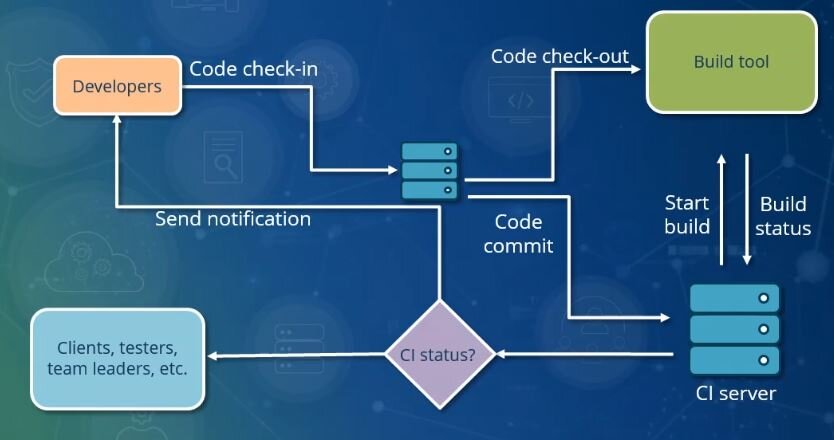
If the code passes through these gates successfully, the pipeline proceeds. If it fails at any step, the pipeline stops, and the team is notified immediately. This fast feedback loop is the core benefit of CI.
Managing the Output
When a CI pipeline succeeds, it usually produces one or more files. This output is called a build artifact. An artifact could be a compiled executable, a compressed package (.zip, .jar), or a Docker container image.
The goal of a successful CI run is to produce a clean, verifiable artifact that is ready for the next stage, whether that's more testing or deployment.
Proper artifact management is crucial. The CI server stores these artifacts in a repository, tagging them with the version number or commit ID that produced them. This ensures that you have a traceable, reproducible package that can be deployed to any environment, guaranteeing that what was tested is exactly what gets released.
Now that you understand how code is automatically integrated and verified, let's review the key terms.
Ready to test your knowledge?
What is the primary problem that Continuous Integration (CI) is designed to solve?
Which branching strategy aligns best with the principles of Continuous Integration?
With a reliable CI process in place, the next logical step is to automate how these verified artifacts get delivered to users. This moves us from Continuous Integration to Continuous Delivery and Deployment.