Device Management Essentials
Introduction to Device Management
What is Device Management?
When you start a new job, you might get a company laptop, a phone, or a tablet. Your first thought is probably about the work you'll do on them. But the company's IT department is thinking about something else: how to keep that device, and the company's data, safe and functional. This is the core of device management.
Device management is the process an organization uses to track, secure, and control the hardware used for work. It’s a key part of any modern IT strategy, ensuring that every device connected to the company network meets specific standards for security and performance.
A centralized approach to managing these devices provides reliable inventory, security, usage, and costs across company infrastructure.
Think of it like being a librarian for technology. A librarian doesn't just hand out books. They keep an inventory of every book, track who has what, ensure books are returned in good condition, and decide which new books to acquire. Similarly, an IT team uses device management to oversee the entire lifecycle of a device, from its initial setup to the day it's retired.
IT Infrastructure
noun
The combined set of hardware, software, networks, facilities, etc., in order to develop, test, deliver, monitor, control, or support IT services.
The Device Landscape
Not too long ago, device management mostly meant dealing with desktop computers sitting in an office. Today, the landscape is much more complex. The rise of remote work and new technologies has expanded the types of devices that connect to corporate networks.
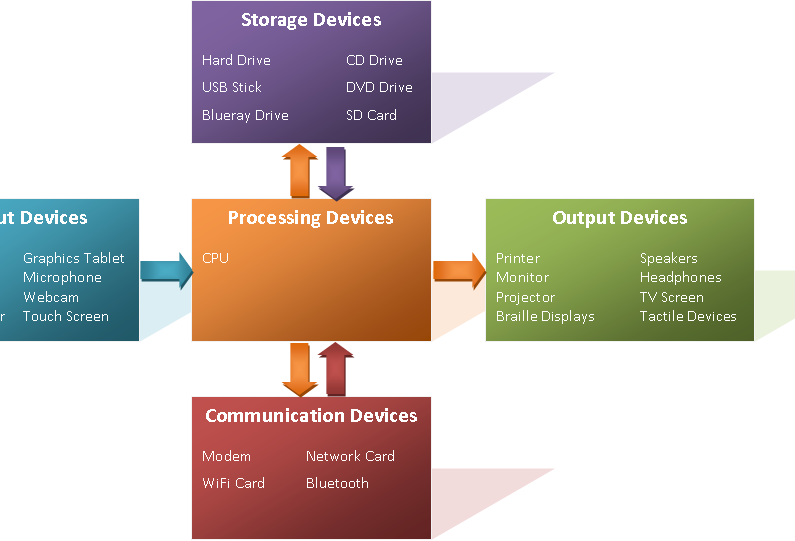
Commonly managed devices include:
- Laptops and Desktops: The traditional workhorses of the corporate world.
- Smartphones and Tablets: Essential for employees who are mobile or work from the field.
- IoT (Internet of Things) Devices: This is a broad category that includes everything from smart sensors in a factory to security cameras and printers. Any "smart" device that connects to the network needs to be managed.
Each type of device comes with its own set of rules and potential vulnerabilities, making the IT team's job more challenging than ever.
Common Hurdles
Managing a diverse fleet of devices isn't easy. Organizations face several key challenges that a good device management strategy helps solve.
Security Threats: A lost or stolen phone can be a gateway into the company's network. An unpatched laptop can be vulnerable to malware. Every device is a potential entry point for a cyberattack.
Device Diversity: Employees may use devices with different operating systems (like Windows, macOS, Android, and iOS). This variety, often called a heterogeneous environment, requires policies that work across all platforms. The rise of "Bring Your Own Device" (BYOD) policies, where employees use their personal devices for work, adds another layer of complexity.

Policy Consistency: How do you ensure every device has the same baseline security settings? Without a central management system, it's nearly impossible. Inconsistent policies can lead to security gaps and compliance issues, especially in regulated industries like healthcare or finance.
Now, let's test your understanding of these core concepts.
What is the core function of device management in an organization?
An IT environment with a mix of devices running different operating systems like Windows, macOS, and Android is referred to as:
Effectively managing devices is foundational to building a secure and efficient IT environment. It allows organizations to confidently embrace new technologies and flexible work styles while protecting their critical data.