Depth First Search Algorithm Explained
Graph Basics
What is a Graph?
Think of a social network. You have people (profiles) and connections between them (friendships). In computer science, we model these kinds of relationships using a structure called a graph. It's a simple but powerful way to represent how things are connected.
A graph is just a collection of nodes and the lines that link them. That’s it. We have special names for these parts, though.
Vertex
noun
A node in a graph. It represents an individual item, like a person in a social network or a city on a map.
Edge
noun
A line that connects two vertices. It represents the relationship or connection between them, like a road between two cities.
Let's look at a simple graph. This one has four vertices, labeled A, B, C, and D, and a few edges connecting them.
A path is a sequence of edges that lets you travel from one vertex to another. For example, a path from A to C could go through B (A → B → C). Another path from A to C goes through D (A → D → C). A cycle is a path that starts and ends at the same vertex, like A → B → C → D → A.
Types of Graphs
Not all connections are the same. Some relationships are two-way, while others are one-way. This difference gives us two basic types of graphs.
Undirected Graphs: Edges have no direction. If A is connected to B, then B is connected to A. Think of a friendship on Facebook—it’s mutual.
Directed Graphs: Edges have a direction, shown with arrows. A connection from A to B doesn't mean there's one from B to A. Think of following someone on social media—they don't necessarily follow you back.
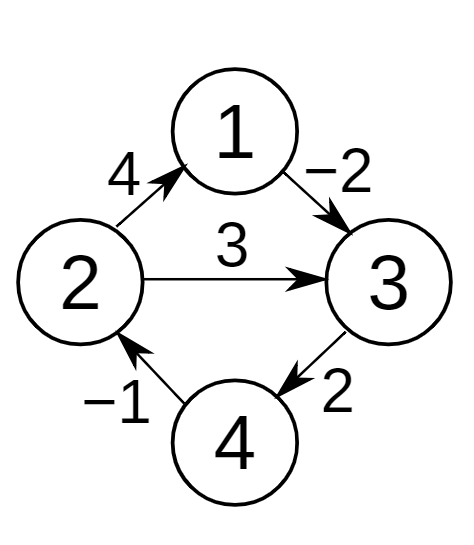
Edges can also have values assigned to them. This is useful for representing things like distance, cost, or time. This leads to another pair of graph types.
Unweighted Graphs: Edges simply show a connection exists. The path length is just the number of edges.
Weighted Graphs: Each edge has a numerical weight. This weight could represent the distance between cities, the cost of a flight, or the time it takes to send data between computers.
How Computers Store Graphs
To work with graphs in a program, we need a way to store them in memory. There are two common methods: the adjacency matrix and the adjacency list.
Let's use a simple undirected graph as our example. It has four vertices, which we'll number 0, 1, 2, and 3 for simplicity.
An adjacency matrix is a grid of numbers. If we have vertices, we create an grid. The entry at row and column is 1 if there's an edge between vertex and vertex , and 0 otherwise.
| 0 | 1 | 2 | 3 | |
|---|---|---|---|---|
| 0 | 0 | 1 | 1 | 0 |
| 1 | 1 | 0 | 1 | 0 |
| 2 | 1 | 1 | 0 | 1 |
| 3 | 0 | 0 | 1 | 0 |
An adjacency list is a more space-efficient method for graphs without a lot of edges. For each vertex, we simply store a list of the other vertices it's connected to.
0: [1, 2]
1: [0, 2]
2: [0, 1, 3]
3: [2]
Both methods represent the exact same graph. The best one to use depends on the specific problem you're trying to solve. Adjacency matrices are fast for checking if an edge exists between two specific vertices, while adjacency lists are often better for finding all neighbors of a vertex.
Now you have the basic building blocks of graphs. Understanding these core concepts is the first step toward exploring the powerful algorithms that operate on them.