Demystifying the Python GIL
Introduction to Python Concurrency
Concurrency vs. Parallelism
Imagine a chef in a kitchen. They start boiling water for pasta, and while it heats up, they begin chopping vegetables for the sauce. They are handling multiple tasks by switching between them. This is concurrency. It's the art of managing several tasks at once, making progress on each of them over time.
Now, imagine two chefs in the same kitchen. One boils pasta while the other makes the sauce. Both tasks are happening at the exact same time, each with its own dedicated worker. This is parallelism. It's about executing multiple tasks simultaneously.
A single processor can achieve concurrency by quickly switching between tasks, a technique called context switching. To achieve true parallelism, you need multiple processors or cores.
The Building Blocks
In computing, concurrency and parallelism are achieved using two main constructs: processes and threads.
Process
noun
An instance of a computer program that is being executed. Each process has its own separate memory space.
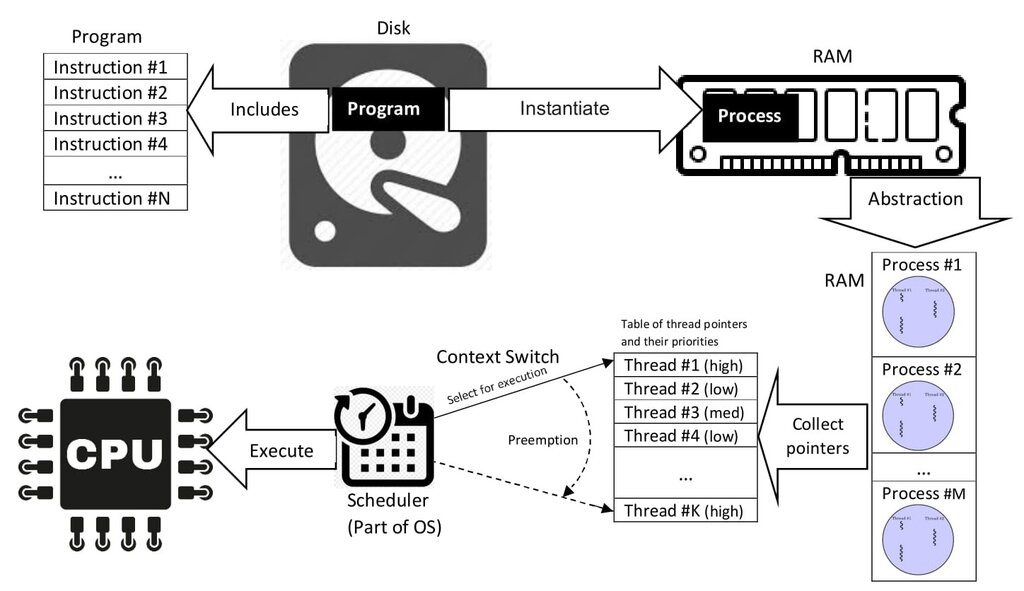
Thread
noun
The smallest sequence of programmed instructions that can be managed independently by a scheduler. Multiple threads can exist within a single process and share its memory space.
Think of a process as a restaurant. It has its own kitchen, ingredients, and space (memory). Threads are the individual chefs working inside that restaurant. They all share the same kitchen and ingredients but can work on different dishes (tasks) independently.
| Feature | Process | Thread |
|---|---|---|
| Memory | Independent memory | Shared memory |
| Creation | Slower, more resource-intensive | Faster, less resource-intensive |
| Communication | Complex (requires special mechanisms) | Simple (via shared memory) |
| Isolation | High (one crash doesn't affect others) | Low (one crash can affect the whole process) |
Python's Concurrency Tools
Python provides built-in modules to work with both threads and processes, making it easy to add concurrency to your programs.
The
threadingmodule is used to create and manage threads.
import threading
import time

def worker():
    print("Worker thread starting")
    time.sleep(2)
    print("Worker thread finishing")

# Create and start a thread
thread = threading.Thread(target=worker)
thread.start()

print("Main thread continues...")
thread.join() # Wait for the worker thread to finish
print("All done.")
This code creates a separate thread that runs the worker function. The main part of the program can continue its own work while the new thread is running.
The
multiprocessingmodule is used to create and manage processes.
import multiprocessing
import time

def worker():
    print(f"Worker process starting")
    time.sleep(2)
    print(f"Worker process finishing")

if __name__ == "__main__":
    # Create and start a process
    process = multiprocessing.Process(target=worker)
    process.start()

    print("Main process continues...")
    process.join() # Wait for the worker to finish
    print("All done.")
This looks very similar to the threading example, but it's fundamentally different. Instead of a lightweight thread, it spins up an entirely new process with its own memory. The if __name__ == "__main__": guard is important to prevent issues when new processes are created.
Now that you understand the basic building blocks, you're ready to explore how Python handles them. A key concept we'll discuss next is the Global Interpreter Lock, or GIL, which has a major impact on how Python threads perform.