Decoding Digital Files
File Systems
The Digital Filing Cabinet
Think about a physical office. It has filing cabinets, folders inside those cabinets, and documents inside those folders. To find anything, you need to know this system. A computer's storage drive, like a hard drive or SSD, would be a chaotic mess without a similar system.
That's where a file system comes in. It's a set of rules and data structures that an operating system (like Windows, macOS, or Linux) uses to control how data is stored and retrieved. It organizes the countless bits of data on a drive into files you can name, folders you can browse, and a hierarchy you can navigate. Without it, your computer wouldn't know where your photo ends and a document begins.
Essentially, a file system is the master organizer for all the data on a storage device, managing where it is, who can access it, and how it's all arranged.
The Building Blocks
Every file system, regardless of its specific type, is built from a few fundamental components.
Directory
noun
A container used to organize files and other directories. You probably know them as folders.
Directories create a tree-like structure, allowing for a logical and hierarchical arrangement of information. For example, you might have a "Photos" directory, and inside that, you could have directories for "2023" and "2024".
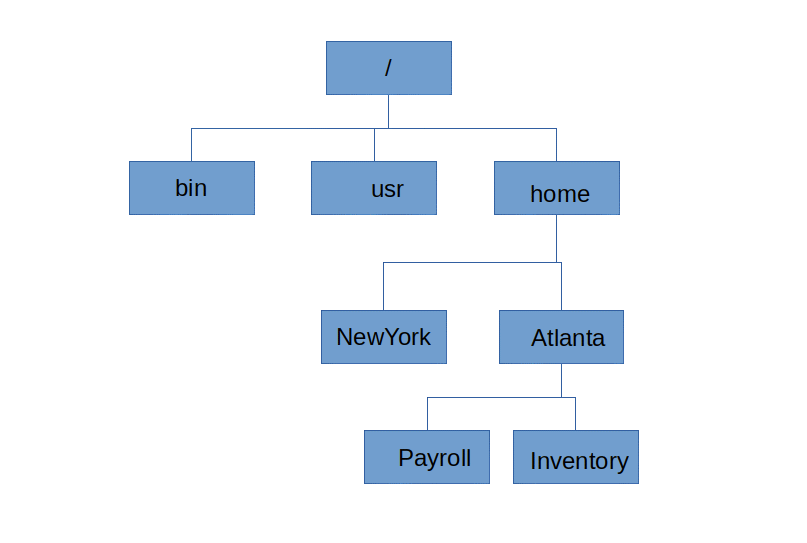
Inside these directories are the files themselves—the documents, songs, applications, and pictures. But the file system needs more than just the file's data. It also needs information about the file. This is called metadata.
Metadata is data about data. For a file, this includes its name, size, creation date, modification date, and, crucially, a pointer to its physical location on the storage drive.
When you save a file, the file system finds available space on the disk, writes the data, and then creates a metadata record in the directory that says, "The file named 'MyReport.docx' is located at this specific spot."
Common File Systems
Different operating systems often prefer different file systems, each with unique strengths and weaknesses. Think of them as different organizational philosophies.
FAT32 (File Allocation Table 32) is an older but highly compatible system. It's simple and understood by nearly every device, from Windows PCs and Macs to digital cameras and smart TVs. This makes it perfect for USB flash drives that you might plug into various devices. However, it's not very modern; it can't handle single files larger than 4 GB and lacks robust security features.
NTFS (New Technology File System) is the standard for modern Windows systems. It overcomes FAT32's limitations, supporting massive files and disk sizes. It also offers much better security through file permissions, which control who can read, write, or execute a file. NTFS includes a feature called journaling, which keeps a log of changes, making it much more resilient against data corruption if the system crashes.
ext4 (Fourth Extended Filesystem) is the default file system for most Linux distributions. Like NTFS, it is a modern, journaling file system that supports large files and volumes. It's known for its stability, reliability, and excellent performance, especially in environments where many small files are accessed frequently.
| Feature | FAT32 | NTFS | ext4 |
|---|---|---|---|
| Primary OS | Universal | Windows | Linux |
| Max File Size | 4 GB | 256 TB | 16 TB |
| Security | None | File Permissions | File Permissions |
| Journaling | No | Yes | Yes |
Storage and Retrieval
So how does this all work when you open a file?
When you double-click an icon, you're telling the operating system, "Get me the file with this name." The OS hands this request to the file system. The file system navigates its directory structure to find the entry for that file. It then reads the file's metadata to learn its exact address on the physical disk.
Finally, the file system instructs the storage hardware to read the data from that address and send it to the computer's memory (RAM), where your application can use it. The process happens in reverse when you save a file: the file system finds free space, writes the data, and updates the metadata with the new location.
This elegant system of organization is fundamental to how computers work, turning a vast, unstructured expanse of digital storage into an orderly and accessible library of information.