Database Population and Querying
Introduction to Databases
What Is a Database?
Think of a database as a highly organized digital filing cabinet. Its job is to store information in a way that makes it easy to find, update, and manage. You interact with databases every day, whether you're checking your bank account, browsing an online store, or scrolling through social media. They are the engines that power most modern applications.
At its core, a database is simply an organized collection of data. But unlike a simple spreadsheet, a database is designed for speed, security, and reliability, especially when dealing with large amounts of information. It ensures that data is kept consistent and safe, preventing issues like two people booking the same airline seat at the same time.
Databases are at the heart of many applications, making database management skills essential.
Organizing the Data
The most common type of database is a relational database. It organizes data into tables, which look a lot like spreadsheets. Each table stores information about a specific type of thing, like customers, products, or orders.
These tables are made up of a few key components:
Table
noun
A collection of related data organized into rows and columns. For example, you might have a table for Customers and another for Products.
Record
noun
A single entry in a table, also known as a row. It represents one complete item. For instance, one customer in your Customers table is a single record.
Field
noun
A single piece of information within a record, also known as a column. It represents a specific attribute of the record, such as FirstName, Email, or Price.
Here’s what a simple Customers table might look like:
| CustomerID | FirstName | LastName | |
|---|---|---|---|
| 1 | Maria | Garcia | m.garcia@email.com |
| 2 | Chen | Wei | chen.wei@email.com |
| 3 | Sam | Jones | sam.j@email.com |
In this table, the entire grid is the table. Each numbered line is a record, and each header like FirstName or Email is a field.
Connecting the Dots
The "relational" in relational database comes from its ability to connect, or relate, different tables to each other. This is what makes them so powerful. You don't have to cram all your information into one giant table. Instead, you can create separate tables for Customers and Orders and then link them.
This linking is done using keys.
Primary Key
noun
A field that uniquely identifies each record in a table. No two records can have the same primary key. In our Customers table, CustomerID is the primary key.
Foreign Key
noun
A field in one table that is the primary key of another table. It's used to create a relationship between the two tables. For example, you would include CustomerID in the Orders table to know which customer placed which order.
By using keys, we can easily look up all orders placed by Sam Jones (CustomerID 3) without having to store his name and email with every single order he makes. This keeps the data clean and efficient.
Two Main Flavors
While there are many types of databases, they generally fall into two main categories: relational and non-relational.
Relational databases (SQL) are the structured, table-based systems we've been discussing. They use a language called SQL (Structured Query Language) to manage data. They are excellent for applications where data integrity and consistency are critical, like in banking or e-commerce systems.
Non-relational databases (NoSQL) are more flexible. They don't use the rigid table structure. Instead, they might store data as documents (like a JSON file), key-value pairs, or in a graph. They are often used for big data applications, social media feeds, and systems where the data structure needs to change and evolve quickly.
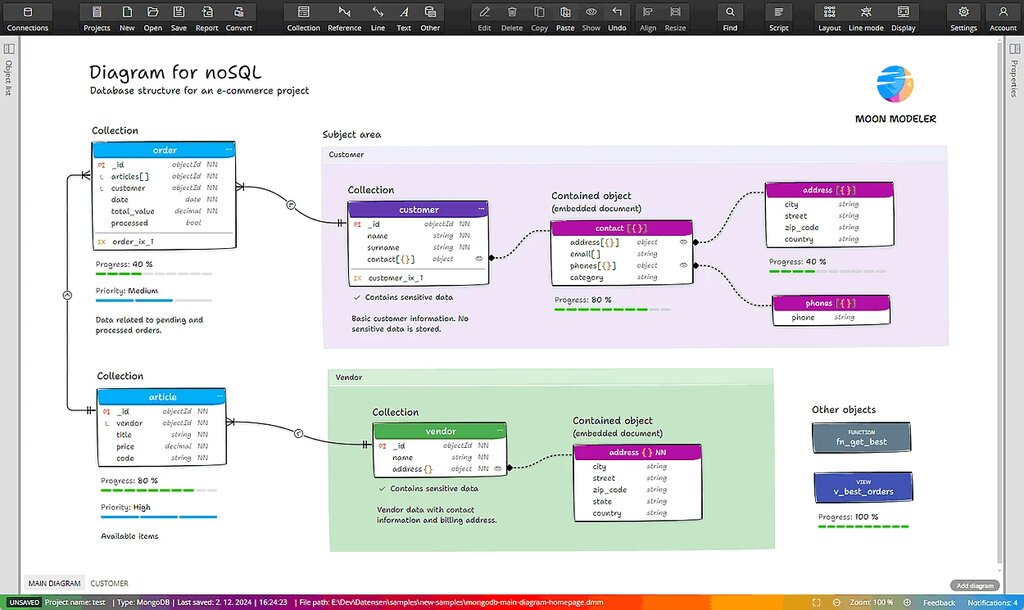
Choosing the right type depends entirely on the job. For structured, predictable data, relational is often the best choice. For massive, evolving, or less structured data, non-relational might be a better fit.
For the rest of this course, we'll focus on relational databases, as they are a fundamental building block for a huge number of applications.
Ready to test your knowledge? Let's see what you've learned.
What is the primary purpose of a database?
In a relational database table that stores customer information, what does a single row typically represent?
Understanding these basic concepts is the first step toward working with data effectively.