Database Fundamentals for Healthcare Imaging Professionals
Database Fundamentals
Organizing Information
A database is essentially a digital filing cabinet. It’s an organized collection of information, or data, stored electronically. Its main job is to make it easy to store, manage, and retrieve that data efficiently. Without databases, finding a single piece of information would be like searching for a specific book in a library with no catalog and no sections.
Imagine a hospital. It needs to keep track of thousands of patients, their appointments, and their medical images. A database allows the hospital staff to quickly pull up a patient's entire history, schedule a new appointment, or find a specific X-ray from years ago. This system ensures data is not only stored but also kept accurate and secure.
Database systems are the backbone of modern computing, enabling efficient storage, retrieval, and manipulation of data.
The Building Blocks
Databases structure information using a few key components. The most fundamental is the table.
Think of a table as a spreadsheet. It holds a collection of related data, like a list of all patients or all appointments.
Each table is made up of columns and rows.
- Columns define the categories of information. For a
Patientstable, columns might includePatientID,FirstName,LastName, andDateOfBirth. - Rows represent individual records. Each row in the
Patientstable would contain the information for one specific person.
| PatientID | FirstName | LastName | DateOfBirth |
|---|---|---|---|
| 101 | Sarah | Jones | 1985-05-22 |
| 102 | David | Lee | 1991-11-10 |
| 103 | Maria | Garcia | 1978-02-14 |
In this example, the entire grid is the table. The headers are the columns, and each numbered line of patient data is a row.
Describing Your Data
Every column in a table has a data type, which tells the database what kind of information is allowed in that column. This is a crucial rule that helps maintain data accuracy. You wouldn't want to store someone's name in a column meant for dates.
Common data types include:
| Data Type | Description | Example |
|---|---|---|
INTEGER | Whole numbers | 101 |
VARCHAR or TEXT | Text of varying length | Sarah |
DATE | A calendar date | 1985-05-22 |
DECIMAL | Numbers with decimal points | 120.5 |
BOOLEAN | True or false values | true |
Assigning the correct data type ensures that calculations work properly, dates are sorted correctly, and the overall integrity of the data is protected.
Connecting the Dots
Most modern databases are relational databases. This means you can create relationships, or links, between different tables. This is incredibly powerful because it prevents you from having to repeat information.
Let's go back to our hospital example. Instead of cramming appointment details into the Patients table, we can create a separate Appointments table. We can then link the two tables using a common column, like PatientID.
This way, if a patient changes their last name, you only need to update it in one place: the Patients table. The change is automatically reflected for all their appointments. This relational model makes the database more efficient, organized, and less prone to errors.
The Database Manager
Finally, how do we interact with a database? We use a Database Management System (DBMS). A DBMS is the software that acts as an intermediary between the user and the database.
You can think of a DBMS as the librarian. You don't go searching through all the shelves yourself. Instead, you ask the librarian (the DBMS) to find, add, or update a book (data) for you. The DBMS handles all the complex operations of creating, reading, updating, and deleting data. It also manages security, ensuring only authorized users can access information, and handles tasks like backups and performance optimization.
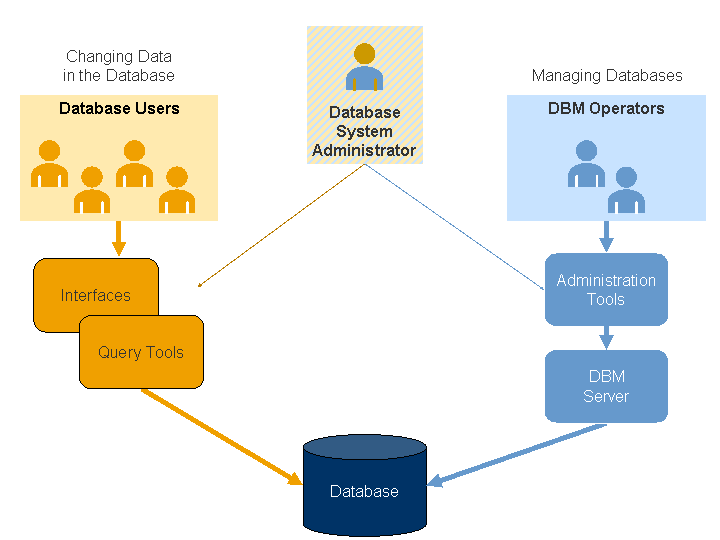
Understanding these fundamentals—what a database is, its components, and the software that runs it—is the first step to working with data effectively.
What is the primary purpose of a database?
In a database table for hospital patients, what does a single row represent?
These core concepts are the foundation upon which all complex data systems are built.