Database Engineering Essentials
Introduction to Databases
What Is a Database?
Think of a massive library. It contains thousands of books, all organized by genre, author, and title. A librarian can quickly find any book you need, check it out for you, and put it back in the right spot when you're done. A database is like that library, but for digital information. It’s an organized collection of data, designed to be easily accessed, managed, and updated.
At its core, a database's job is to store and retrieve data efficiently and reliably. It brings order to information chaos.
Without databases, your favorite social media app couldn't remember your login, online stores wouldn't know what they have in stock, and your bank wouldn't have a record of your transactions. They are the invisible backbone of the modern digital world.
From Filing Cabinets to the Cloud
The earliest computer systems stored data in simple files, much like paper documents in a filing cabinet. Each application had its own set of files. If the sales department and the accounting department both needed customer addresses, they each kept a separate list. This led to problems: if a customer moved, you'd have to hope someone updated the address in both places. If they didn't, the data would become inconsistent. This duplication and risk of error was a major headache.
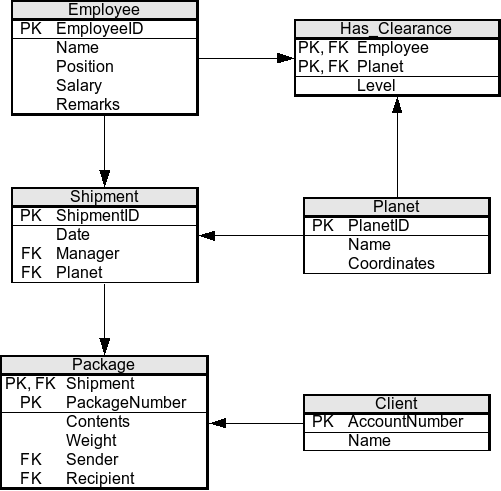
The solution was the relational database, which became dominant in the 1980s. It organizes data into tables with rows and columns, similar to a spreadsheet. Each table represents a type of entity (like 'Customers' or 'Products'), and relationships can be defined between them. For example, you could link an 'Orders' table to the 'Customers' table, so you always have one, single source of truth for a customer's address. To communicate with these databases, a language called SQL (Structured Query Language) was created.
As the internet grew, so did the amount and variety of data. Think of the billions of posts, photos, and messages generated on social media. Storing all this in rigid tables became challenging. This led to the rise of NoSQL (which stands for "Not only SQL") databases. They offer more flexibility. Instead of just tables, they might store data in documents, as key-value pairs, or in graphs, making them great for handling large volumes of unstructured data quickly.
| Feature | Relational (SQL) | NoSQL |
|---|---|---|
| Structure | Strict, predefined tables | Flexible (documents, key-value, etc.) |
| Scalability | Scales vertically (more power on one server) | Scales horizontally (more servers) |
| Best For | Structured data, transactions (e.g., banking) | Large, unstructured data (e.g., social media) |
The Role of a DBMS
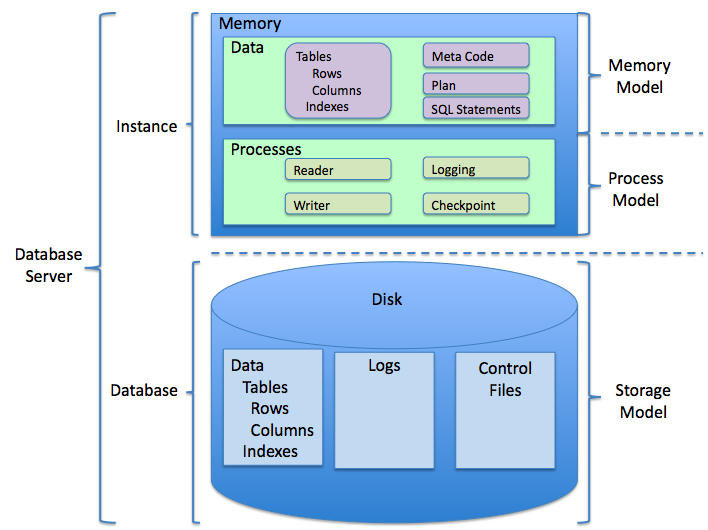
So, what manages all this? A Database Management System (DBMS). It's the software that acts as the intermediary between the user and the database. You don't interact with the raw data files on the hard drive; you talk to the DBMS, and it handles the complex work of storing, retrieving, and securing the data.
In its most fundamental form, a Database Management System (DBMS) is a piece of software that gives users the ability to efficiently store, retrieve, and manipulate data contained within a structured format.
Think of the DBMS as the librarian again. It enforces the library's rules (data integrity), helps multiple people borrow books at once without chaos (concurrency), and keeps unauthorized people out of the restricted section (security). Popular examples of DBMS software include MySQL, PostgreSQL (for relational), and MongoDB and Redis (for NoSQL).
Databases in the Wild
Databases are everywhere, working silently behind the scenes.
- E-commerce: When you shop online, a database tracks every product, its price, its inventory level, and your shopping cart. It processes your order and saves your shipping information.
- Social Media: Every user profile, post, photo, comment, and friend connection is stored in a massive database. When you scroll your feed, the application is rapidly querying the database to pull the latest updates from your network.
- Banking: Your account balance, transaction history, and personal information are all managed in a highly secure database. The system ensures that if you withdraw $100, your balance is updated instantly and accurately.
- Healthcare: Hospitals use databases to manage electronic health records, patient appointments, billing information, and lab results. This allows for quick access to critical patient information.
- Gaming: Online multiplayer games use databases to store player profiles, character progress, in-game items, and leaderboard rankings.
Let's review some of the key terms we've covered.
Ready to test your knowledge?
What is the primary function of a database?
What was a major problem with early systems where each application stored its own data in separate files?
Understanding these fundamentals provides a solid foundation for anyone working with data. Whether you're building an application, analyzing business trends, or just curious about how technology works, it all starts with the database.