Database Design Fundamentals
Introduction to Databases
What Is a Database?
At its core, a database is just an organized collection of information. Think of an old-fashioned library card catalog or a filing cabinet. Both are systems for storing and retrieving information. A digital database does the same thing, but on a much larger and more powerful scale. It allows us to store, update, manage, and access huge amounts of data quickly and efficiently.
The main purpose of a database is to make data accessible and useful. It brings structure to information so that it can be easily found and worked with.
Without databases, finding a specific customer's order history in a system with millions of transactions would be like searching for a single grain of sand on a beach. Databases use specific structures and languages to make these kinds of tasks almost instantaneous.
Databases vs. Spreadsheets
You might be thinking, "Can't I just use a spreadsheet?" For small, simple tasks, a spreadsheet works fine. But as data grows in size and complexity, spreadsheets start to break down. They're not built to handle large volumes of data or complex relationships between different pieces of information.
Imagine a company that uses a spreadsheet to track customer orders. What happens when a customer changes their address? You'd have to find and update every single order they've ever made. This is not only tedious but also prone to errors. A database solves this problem by storing the customer's information in one place and linking it to their orders. Change it once, and it's updated everywhere.
| Feature | Spreadsheet (e.g., Excel) | Database |
|---|---|---|
| Best For | Small datasets, calculations, one-off lists | Large, complex, related datasets |
| Data Integrity | Low (easy to make errors) | High (rules ensure consistency) |
| Multiple Users | Poor (risk of overwriting data) | Excellent (manages simultaneous access) |
| Scalability | Limited | Handles massive amounts of data |
| Relationships | Difficult to manage | Designed to handle relationships |
Types of Databases
Not all databases are the same. They come in different flavors, each designed for specific needs. The two most common categories are relational databases and NoSQL databases.
A relational database organizes data into tables, which are similar to spreadsheets. Each table has rows and columns. The power of this model comes from creating relationships between these tables.
For example, you could have one table for Customers and another for Orders. Instead of repeating a customer's details for every order they place, you simply link the order to the customer using a unique ID. This is the foundation of most traditional database systems and they use a language called SQL (Structured Query Language) to manage the data.
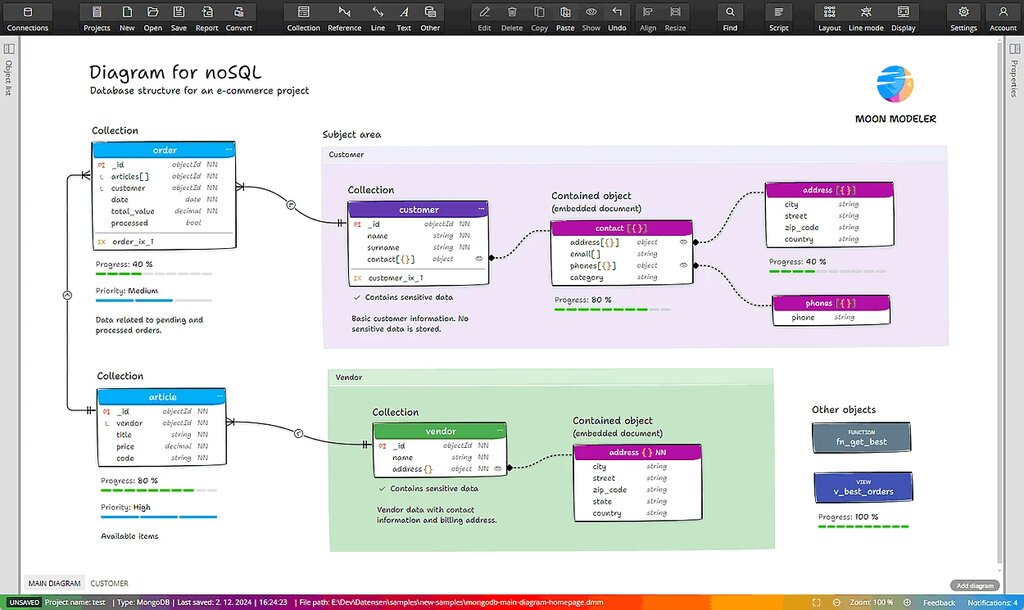
NoSQL databases are a newer category. The name stands for "Not Only SQL." They are more flexible and don't always use the rigid table structure of relational databases. Instead, they might store data in documents (like a JSON file), as key-value pairs, or in other formats. This makes them great for handling unstructured data, like social media posts or sensor data, and for applications that need to scale out to handle massive traffic.
Understanding these fundamental concepts is the first step. Knowing what a database is, how it differs from a simple spreadsheet, and the basic types available will help you appreciate why good design is so important for building reliable and efficient applications.
What is the primary purpose of a database?
A small business tracks its customer orders in a spreadsheet. As the business grows, they find that updating a customer's address requires them to manually find and change every order that customer has ever placed. This is a problem of ____.