Database Design and Construction
Introduction to Databases
What is a Database?
Think of a database as a highly organized digital filing cabinet. Its main job is to store, manage, and retrieve information quickly and efficiently. Instead of random piles of paper, a database uses a logical structure to keep everything in its right place.
Whether it's your contacts list, the inventory of an online store, or the vast amount of content on a social media site, a database is working behind the scenes. It makes sure data is not only stored safely but can also be accessed, updated, or removed by users and applications.
The core purpose of a database is to provide a structured way to handle information, making it reliable and easy to work with.
Ways to Organize Data
Not all data is the same, so databases come in different flavors. The two main categories are relational and non-relational, and the difference lies in how they structure information.
Relational Databases
Relational databases are like a collection of spreadsheets that are linked together. They organize data into tables with rows and columns. Each row represents a specific record, like a customer or a product, and each column represents an attribute of that record, like a name or price.
The real power comes from the relationships between tables. For example, one table might hold customer information and another might hold order information. By linking them on a CustomerID, you can easily find all the orders placed by a specific customer.
| CustomerID | Name | |
|---|---|---|
| 1 | Alice | alice@email.com |
| 2 | Bob | bob@email.com |
| OrderID | CustomerID | Product |
|---|---|---|
| 101 | 2 | Coffee Mug |
| 102 | 1 | T-Shirt |
This structured approach makes relational databases very reliable for handling consistent data, such as in financial systems or e-commerce platforms. SQL (Structured Query Language) is the standard language used to interact with them.
Non-Relational Databases
Non-relational databases, often called NoSQL databases, are more flexible. They don't rely on the rigid table-and-column structure. Instead, they can store data in various ways, such as:
- Document databases: Data is stored in JSON-like documents, which are great for things like user profiles or content management.
- Key-value stores: Data is stored as a simple pair of a key (like a word) and its value (like a definition). This is very fast for simple lookups.
- Graph databases: Data is stored as nodes and edges, perfect for representing networks like social connections or supply chains.
This flexibility makes them a good choice for handling large amounts of varied or rapidly changing data, common in big data applications and real-time web apps.
{
  "userId": "alice123",
  "username": "Alice",
  "email": "alice@email.com",
  "interests": ["hiking", "photography"],
  "lastLogin": "2023-10-27T10:00:00Z"
}
The Database Manager
You don't interact with a database directly. You use a special piece of software called a Database Management System, or DBMS.
DBMS
noun
A software package designed to define, manipulate, retrieve, and manage data in a database.
Think of the DBMS as a helpful librarian for your data. It handles all the complex tasks involved in keeping the database running smoothly. When an application needs to read or write data, it sends a request to the DBMS, which then performs the action.
Popular examples of relational DBMSs include MySQL, PostgreSQL, and SQL Server. Common NoSQL DBMSs are MongoDB, Redis, and Cassandra.
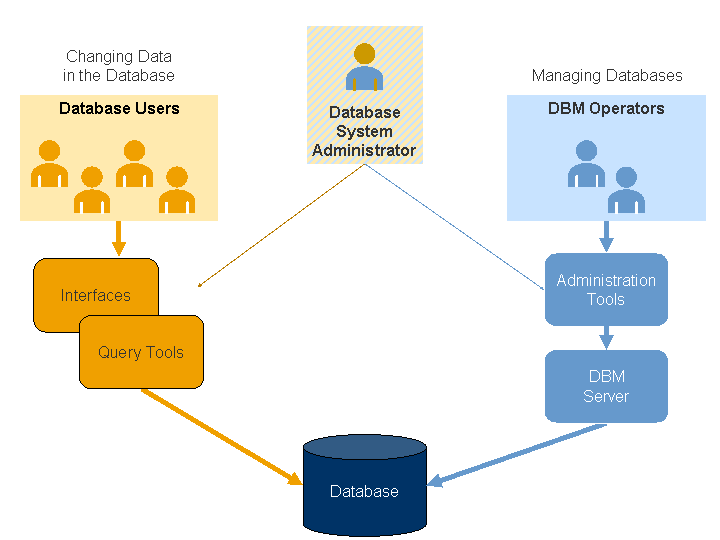
The DBMS is responsible for crucial tasks like ensuring data security, creating backups, and controlling who can access what information. It provides a consistent way to work with the data, freeing up developers to focus on building the application itself.
What is the primary role of a database?
What is the fundamental difference between relational (SQL) and non-relational (NoSQL) databases?
Understanding these core concepts is the first step. With a solid grasp of what databases are and how they're managed, you're ready to explore how they're designed.