Database Administration with SQL
Introduction to Databases
What Is a Database?
At its core, a database is just an organized collection of data. Think of it like a digital filing cabinet. Instead of stuffing random papers into a drawer, you use folders and labels to keep everything tidy and easy to find. A database does the same thing for digital information, whether it's for a small business tracking its customers or a massive social media site managing billions of posts.
The main purpose of a database is to store, retrieve, and manage data efficiently. By structuring the information, we can quickly ask questions and get answers, like "How many customers live in New York?" or "What were our sales last month?" Without a database, finding this information would be like searching for a single sentence in a library with no catalog and all the books piled on the floor.
The Building Blocks
The most common type of database, a relational database, organizes data into tables. You can think of a table just like a spreadsheet.
| CustomerID | FirstName | LastName | City |
|---|---|---|---|
| 1 | Maria | Anders | Berlin |
| 2 | Ana | Trujillo | México D.F. |
| 3 | Antonio | Moreno | México D.F. |
| 4 | Thomas | Hardy | London |
This structure is built from three key components:
Table
noun
A collection of related data organized in a grid of rows and columns. In our example, the entire grid of customer information is one table.
Each table holds information about one type of thing, like customers, products, or orders.
Record
noun
A single entry in a table, representing one complete set of information. It's also known as a row.
A record contains all the information about one specific item, such as one customer or one product.
Field
noun
A single piece of data in a record. It's also known as a column.
So, in our example, the 'Customers' table contains multiple records, and each record is made up of several fields like 'FirstName' and 'City'.
How We Manage It All
You don't interact with the database files directly. Instead, you use a special piece of software called a Database Management System, or DBMS.
A DBMS is the intermediary between you and the database. It's the software that understands your requests and knows how to add, edit, or retrieve the data you need.
Popular examples of DBMSs include MySQL, PostgreSQL, and Microsoft SQL Server. They handle all the complex, behind-the-scenes work, providing security, ensuring data integrity, and managing simultaneous access by multiple users.
Types of Databases
While relational databases are extremely common, they aren't the only option. The two main categories you'll hear about are Relational and NoSQL.
Relational Databases (like MySQL or PostgreSQL) use the structured table format we've discussed. They are reliable and great for data that has clear, predictable relationships, like linking a customer to their orders.
NoSQL Databases (like MongoDB or Cassandra) are more flexible. The name is a bit misleading; it means "Not Only SQL." They don't always use tables, rows, and columns. Instead, they might store data in documents, as key-value pairs, or in a graph structure. This makes them good for handling large amounts of varied or unstructured data, like social media posts or sensor data from IoT devices.
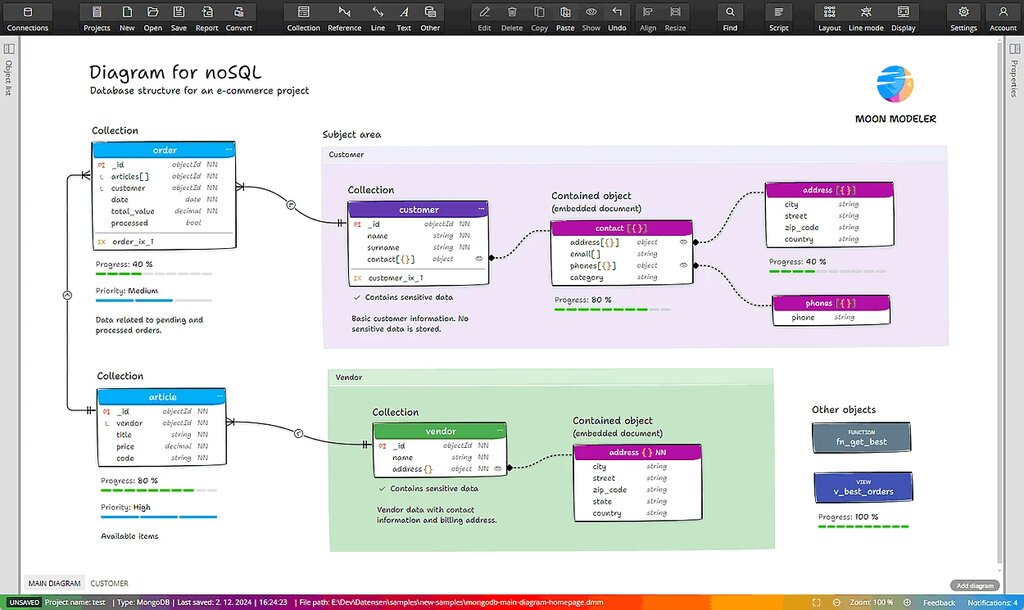
Choosing the right type of database depends entirely on what you need to do. For most traditional applications, a relational database is a solid choice. For massive-scale or highly flexible applications, NoSQL often has the edge.
Let's check your understanding of these core concepts.
What is the primary purpose of a database?
In a relational database, a 'record' is best described as:
Understanding these fundamentals gives you a solid foundation. You now know what a database is, how it's structured, and the software used to manage it.