Data Types Explained
Introduction to Data Types
Data's Three Forms
Data isn't one-size-fits-all. Think of it like organizing your closet. Some things, like socks, have a designated drawer. Others, like a collection of assorted buttons, might just get tossed in a jar. Data works the same way, falling into three main categories: structured, unstructured, and semi-structured. Understanding the difference is the first step in making sense of the information all around us.
Structured Data
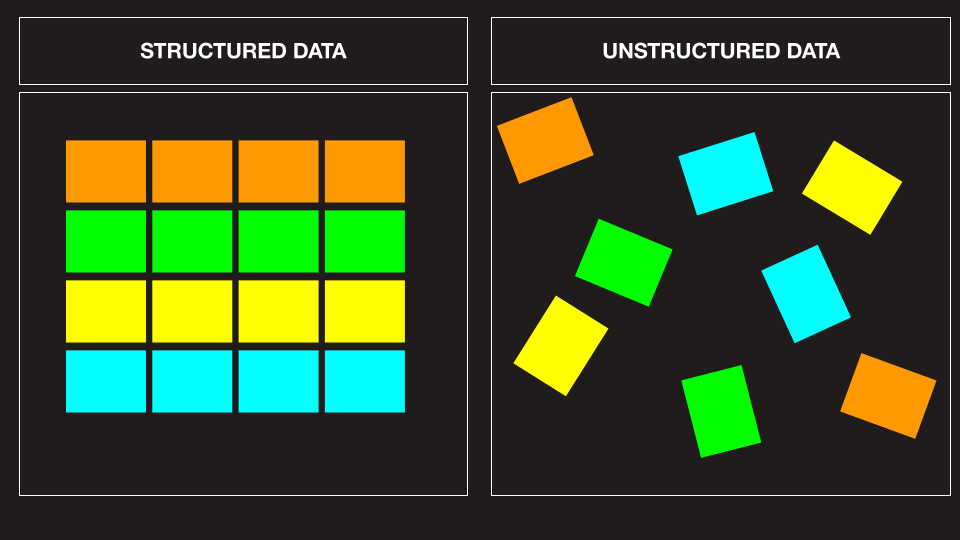
Structured data is the neat freak of the data world. It's highly organized and formatted in a way that makes it easily searchable. This data lives in a fixed field within a record or file. Think of a spreadsheet, like a list of contacts on your phone. Each piece of information—name, phone number, email—has its own specific column. The format is predictable and consistent for every entry.
Because of its rigid organization, structured data is the easiest to manage and analyze. It's the language of databases and spreadsheets.
Common examples include financial data like sales transactions, employee records in a company database, or inventory lists. If you can put it neatly into a table with rows and columns, it's probably structured data.
Unstructured Data
Unstructured data is the opposite. It's information that either doesn't have a pre-defined data model or is not organized in a pre-defined manner. It's messy and comes in all shapes and sizes. This type of data is qualitative, not quantitative, meaning it's descriptive and conceptual rather than numerical.
Think about the content of an email. It has a sender and a recipient, but the body of the message is free-form text. Other examples include photos, videos, social media posts, and audio files. There's a ton of valuable information here, but it’s harder to process and analyze because it doesn't fit into neat boxes.
A huge portion of the world's data—some estimates say over 80%—is unstructured. It's rich with insight but requires more advanced tools to understand.
Semi-structured Data
Semi-structured data is the middle ground. It's not as rigid as structured data, but it's not completely free-form either. It has some organizational properties, like tags or other markers, to separate semantic elements and create hierarchies of records and fields. However, the fields don't have to be the same for every record.
A good example is an email itself. While the content is unstructured text, the email as a whole has some structure. It has fields for 'From', 'To', 'Subject', and 'Date'. Another common example is a JSON or XML file, often used by websites to store and transport data. They use tags to define the structure, but that structure can be flexible.
| Feature | Structured Data | Semi-structured Data | Unstructured Data |
|---|---|---|---|
| Format | Pre-defined, rigid schema | Flexible schema with tags | No pre-defined schema |
| Example | Excel spreadsheet | JSON file, email | Photo, video, text document |
| Searchability | Easy to search | Moderately easy to search | Difficult to search |
| Analysis | Straightforward | Complex | Very complex |
Knowing these categories helps you understand how information is stored and what it takes to analyze it. Now, let's test your understanding.
Which of the following best describes structured data?
A company's database of employee records, with fields for name, employee ID, department, and salary, is an example of what type of data?
Recognizing these data types is a fundamental skill. Whether you're looking at a customer database, a social media feed, or a scientific report, you're interacting with one of these three forms of data.