Data Science
Pipeline Architecture
From Exploratory Notebooks to Production Pipelines
While experimentation in notebooks is where great ideas start, relying on them for production often leads to brittle and unpredictable results. This chapter will guide you through transforming your ad-hoc processes into robust, automated workflows that prioritise data quality and reliability. By the end, you will be able to implement effective validation layers, manage data drift, and ensure your pipelines are dependable enough for any high-stakes environment.
The Fragility of the Sandbox
For most of us, the journey starts in a notebook. It is a brilliant space for exploration—a digital scratchpad where you can instantly see the results of a code cell. This workflow allows for the rapid trial and error necessary when you are first trying to make sense of a new dataset. You can plot a distribution, drop a column, and train a quick model all within minutes. It feels productive because the distance between an idea and an output is nearly zero.
However, this flexibility is a double-edged sword. As your project grows, the very features that made the notebook helpful start to work against you. You might run cells out of order, creating a where your variables depend on code you deleted ten minutes ago. When you try to share that notebook with a colleague, they often encounter the dreaded "it worked on my machine" syndrome. The manual, step-by-step nature of a notebook makes it incredibly difficult to reproduce the exact same results twice, especially as data volumes scale.
In a notebook, you are focused on getting the right output once. In production, you are building a system that produces the right output always.
Enter the Assembly Line
To move beyond the sandbox, you have to stop thinking about your work as a single script and start viewing it as a pipeline. Think of the difference between a master chef preparing a single signature dish and a high-end food production facility. The chef can adjust seasoning on the fly based on taste; the facility must rely on a deliberate, repeatable assembly line where every measurement is automated and every failure point is monitored.
A pipeline replaces manual intervention with a sequence of discrete, automated steps. This shift in mindset introduces two critical engineering disciplines: observability and reproducibility. If a data source changes format at 3:00 AM, a pipeline doesn't just crash silently or produce garbage data—it alerts you exactly where the break happened.
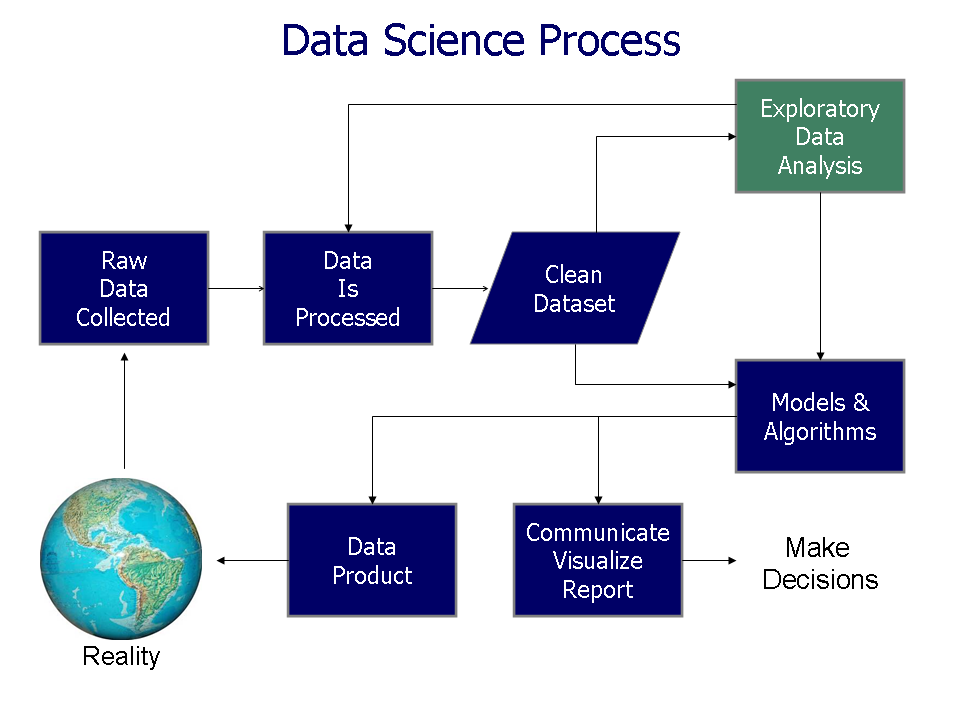
Transitioning to a pipeline also forces you to handle the messy reality of data quality. In a notebook, you might just ignore a few null values. In a pipeline, you define a validation layer—a set of rules that act as a quality gate. If the incoming data doesn't meet your standards, the pipeline stops the line before that bad data can pollute your downstream models or dashboards.
| Feature | Notebook Workflow | Pipeline Workflow |
|---|---|---|
| Execution | Manual / Out-of-order | Automated / Sequential |
| State | Hidden / Volatile | Isolated / Stateless |
| Validation | Visual spot-checks | Automated quality gates |
| Scaling | Difficult / Manual | Scalable / Orchestrated |
| Primary Goal | Exploration | Reliability |
Building these automated systems is not just about making things 'faster'; it is about making them 'trustworthy'. As we move forward, we will look at how to build the specific validation layers that turn these assembly lines into self-correcting systems.
 How do I build my first validation layer?
Anatomy of a Validation Gate
Think of a validation layer as the at a high-end club. The bouncer’s job isn't to mix the drinks or choose the music; their sole purpose is to ensure that only the right people—those who meet specific criteria—get inside the building. In your data pipeline, the 'club' is your expensive processing logic or your production database. If you let everyone in without checking, someone is eventually going to cause a mess that ruins the night for everyone.
A robust validation layer is more than just a simple check for missing values. It is a multi-tiered filter that scrutinises data through three distinct lenses: its structure, its range, and its context.
Every validation layer should be built on these three core components:
- Schema Checks (The ID Check): Does the data look right? This ensures that if you expect a number, you don't get a string. It checks column names, data types, and the overall shape of the dataset.
- Content Checks (The Dress Code): Are the values within a sane range? If a 'price' column contains negative numbers or a 'user_age' is 500, the structure is correct (they are numbers), but the content is nonsense.
- Business Logic Checks (The Guest List): Is this data relevant to our specific world? For example, if a customer is placing an order for a subscription, does that customer already exist in your 'Users' table? This requires checking the data against the current state of your business.
Once your 'bouncer' finds an issue, you need a strategy for what happens next. The two most common approaches are Fail-Fast and Logging.
In a fail-fast strategy, the bouncer shuts down the entire entrance if they see a single problem. This is critical for data like financial transactions where a single corrupt record could cause catastrophic downstream errors. The trade-off is that one bad row can stop your entire company's data flow. Alternatively, a logging strategy simply pulls the 'troublemakers' aside into an error table while letting the 'good data' continue. This keeps the pipeline moving but requires a separate process to go back and clean up the mess later.
def validate_sales_data(df):
    # 1. Schema Check: Ensure required columns exist
    required_columns = ['user_id', 'price']
    if not all(col in df.columns for col in required_columns):
        raise ValueError("Missing essential columns!")

    # 2. Content Check: Price must be positive
    if (df['price'] <= 0).any():
        # Fail-fast approach
        raise ValueError("Found negative or zero prices!")

    # 3. Business Logic: user_id cannot be null
    if df['user_id'].isnull().any():
        return False # Indicator for failure

    return True
Validation isn't just about stopping 'bad' data; it's about defining what 'good' looks like so your downstream systems can work with total confidence.
As you start building your own gates, think about the data 'nightmares' you have faced. Is it usually a column that changed name without warning, or values that suddenly doubled for no reason? Identifying these recurring issues is the first step toward automating your quality control. In the next section, we will explore how to turn these manual checks into a suite of automated tests that watch your pipeline while you sleep.