Data Center Value Chain Analysis
Infrastructure Design
Building the Foundation
A data center is more than just a warehouse for computers. It's a precisely engineered environment where every detail, from the layout of the server racks to the flow of air, is carefully planned. The physical design, or infrastructure, is the bedrock that supports everything else. A smart design ensures the data center runs efficiently, stays reliable, and can grow with future demands.
The technical infrastructure is at the heart of building a data centre.
Getting this foundation right involves a careful balance of three key elements: maximizing space, managing heat, and delivering consistent power. Let's look at how each piece contributes to a high-performing data center.
Making Every Square Foot Count
Real estate is expensive, and data centers are packed with costly equipment. Wasting space is wasting money. The goal of space utilization is to fit as much computing power as possible into the facility while maintaining safe and efficient operating conditions.
A foundational strategy for this is the hot aisle/cold aisle layout. Server racks are arranged in rows, with the fronts of the servers in one row facing the fronts of the servers in the next. The aisle where the server fronts face each other is the “cold aisle,” where cool air is pumped in to be drawn into the equipment. The hot exhaust air is then blown out the back into the “hot aisle,” where it is collected and returned to the cooling systems.
This simple separation prevents hot and cold air from mixing, which makes cooling systems much more efficient. It allows for higher server density in each rack without creating dangerous hotspots.
Modern data centers also embrace modular designs. Instead of building one massive, monolithic facility, they use prefabricated, standardized modules for power, cooling, and server racks. This approach is like building with LEGO bricks; it's faster to deploy, easier to scale, and allows for upgrades without disrupting the entire facility.
Modular construction accelerates the development process, as components manufactured off-site can be assembled on-site with remarkable speed.
Keeping It Cool
Computers generate a lot of heat. A single server rack can produce as much heat as a kitchen oven. Multiply that by thousands of racks, and you have a serious thermal challenge. Cooling is one of the biggest operational expenses for a data center, often accounting for 30-40% of its total electricity consumption.
Cooling is a top priority in data center operations, and airflow management is vital to keeping equipment cool and functioning properly.
The traditional method involves using large Computer Room Air Conditioner (CRAC) units that function like massive air conditioners, pumping cold air into the facility, typically under a raised floor.
However, as computing density increases, air cooling reaches its limits. This has pushed the industry toward more innovative and efficient solutions, particularly liquid cooling. Water and other fluids are far more effective at transferring heat than air.
| Cooling Method | Description | Efficiency |
|---|---|---|
| Air Cooling | Uses CRAC units to circulate cold air. | Standard |
| Liquid Cooling | Circulates liquid directly to components or immerses servers. | High |
| Free Cooling | Uses cool outside air to reduce mechanical cooling needs. | Very High (location dependent) |
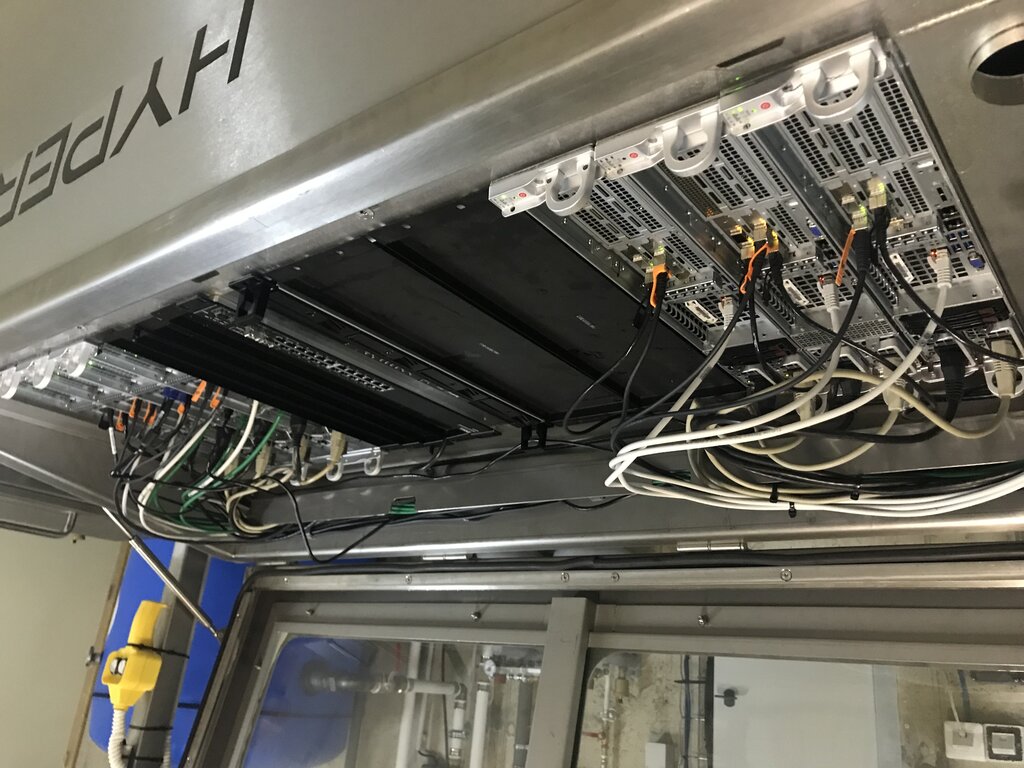
One of the most extreme forms is immersion cooling, where entire servers are submerged in a non-conductive, dielectric fluid. The fluid absorbs heat directly from the components and is then circulated away to be cooled. While it might look strange, this method is incredibly efficient and can dramatically reduce a data center's energy use.
Powering the System
A data center's thirst for power is immense, and that power must be clean and uninterrupted. A momentary outage can cost a company millions of dollars in lost revenue and data. Therefore, power system design is all about reliability and redundancy.
The core concept is N+1 redundancy. 'N' represents the amount of a component (like a power supply or generator) needed to run the facility. The '+1' means there is at least one independent backup. If one unit fails, another is ready to take over instantly, with no downtime. For the most critical facilities, you might see 2N or even 2N+1 redundancy, meaning the entire infrastructure is duplicated.
Key Components:
- Uninterruptible Power Supply (UPS): Large batteries that provide instant power if the main utility fails, giving backup generators time to start up.
- Backup Generators: Typically diesel-powered, these can run the data center for days during an extended outage.
- Power Distribution Units (PDUs): Manage and distribute power to the server racks.
Optimization also plays a huge role. This involves more than just buying efficient hardware. It means using intelligent software to manage power distribution, shifting workloads to less-active servers, and even powering down components when they're not needed. Every watt saved adds up across a massive facility.
Design for resilience by following industry standards like those from the Uptime Institute, aiming for at least N+1 redundancy on critical systems such as power, cooling, and networking.
Now, let's test your understanding of these core infrastructure concepts.
What is the primary purpose of a hot aisle/cold aisle layout in a data center?
In the context of power system design, what does 'N+1 redundancy' signify?
Effective infrastructure design is a constant balancing act between performance, cost, and reliability. By optimizing space, cooling, and power, data centers can form a stable and efficient foundation for our digital world.