Data Analysis Fundamentals Part 2
Data Cleaning
The Janitor of Data
Raw data is messy. It's like a cluttered room after a big party. Before you can find anything useful, you have to tidy up. This cleanup process is called data cleaning, and it’s one of the most important steps in any analysis. Without it, your conclusions could be based on typos, missing information, or other errors. Good analysis depends on good data.
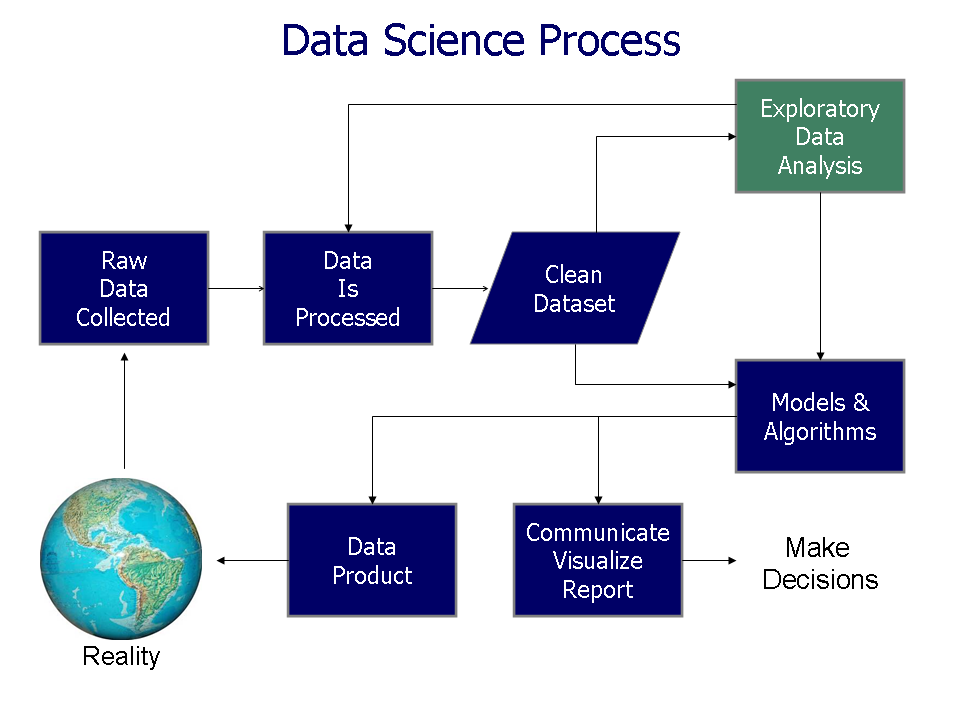
Data cleaning is often considered tedious but is an essential part of the data science process.
The goal is simple: make the dataset accurate, consistent, and complete. Think of it as preparing ingredients for a meal. You wash the vegetables, trim the fat, and measure everything carefully. Only then can you start cooking.
Finding and Fixing Gaps
The most common problem you'll encounter is missing data. A user might skip a question on a form, a sensor might fail to record a reading, or a technical glitch could wipe out an entry. Whatever the reason, you're left with a blank space where a value should be.
| UserID | Name | Age | City |
|---|---|---|---|
| 101 | Alice | 28 | New York |
| 102 | Bob | Los Angeles | |
| 103 | Charlie | 35 | |
| 104 | Diana | 42 | San Francisco |
In the table above, Bob's age and Charlie's city are missing. What do we do?
-
Delete it. The simplest option is to remove any row with missing data. If you have millions of records and only a few are incomplete, this is a quick fix. But be careful. If you delete too much, you might throw out valuable information or introduce bias into your analysis.
-
Fill it in (Imputation). A more common approach is to fill the gap with a reasonable substitute. For numerical data like age, you could use the average (mean) or middle value (median) of the entire column. For categorical data like a city, you could use the most common value (mode).
-
Leave it. Sometimes, the fact that data is missing is itself useful information. In these cases, you might leave it as is or create a separate category for "Unknown."
Spotting Errors and Standardizing
Beyond missing values, data can be just plain wrong. You might find typos, impossible entries, or inconsistent formatting. An age of 999 is probably an error. A customer from "Californa" is a typo. These need to be fixed.
Another huge issue is a lack of standardization. One person might enter "USA," another "United States," and a third "U.S.A." To a computer, these are three different places. The goal of standardization is to make sure the same piece of information is always recorded in the same way.
This is where data validation comes in. Validation involves setting rules for your data. For example, you can set a rule that an 'Age' column must contain a number between 0 and 120, or that a 'Country' column must be a value from a predefined list. These rules help catch errors as they happen and enforce consistency across your dataset.
Cleaning with Common Tools
You don't need fancy software to start cleaning data. Tools you may already know, like Excel and SQL, are powerful enough for many common tasks.
Using Excel for Data Cleaning Excel has several built-in features that are great for cleaning. The "Remove Duplicates" tool finds and deletes identical rows. The "Find and Replace" feature is perfect for correcting typos or standardizing terms (e.g., replacing all instances of "St." with "Street"). You can also use functions like
TRIM()to remove extra spaces from text andPROPER()to fix capitalization.
For example, to find and remove all duplicate rows based on the 'UserID' column, you would select your data, go to the Data tab, and click "Remove Duplicates."
Using SQL for Data Cleaning SQL (Structured Query Language) is excellent for cleaning data directly within a database. You can write queries to find and update incorrect or inconsistent data with precision.
For example, to find all the different ways a country is recorded, you could use a GROUP BY query:
SELECT country, COUNT(*)
FROM Customers
GROUP BY country;
This would show you a list of all country entries and how many times each appears. Once you spot inconsistencies, you can fix them with an UPDATE statement.
UPDATE Customers
SET country = 'USA'
WHERE country IN ('United States', 'U.S.A.');
This query standardizes all variations to 'USA'. You can also use SQL to find NULL values or entries that don't match a specific format, making it a versatile tool for ensuring data quality.
What is the primary goal of data cleaning?
You are cleaning a 'Country' column in a database. You suspect there are multiple variations like 'USA', 'United States', and 'U.S.A.'. Which SQL query would be best to identify all the unique variations and their frequencies?
Cleaning data sets the stage for everything that follows. A clean, reliable dataset is the foundation upon which all meaningful analysis is built.