CUDA Kernel Optimization for Blackwell GPUs
CUDA Basics
The CUDA Programming Model
CUDA, which stands for Compute Unified Device Architecture, is NVIDIA's platform for parallel computing. It lets developers use the massive parallel processing power of a graphics processing unit (GPU) for general-purpose tasks, not just graphics. This is often called GPGPU (General-Purpose computing on GPUs).
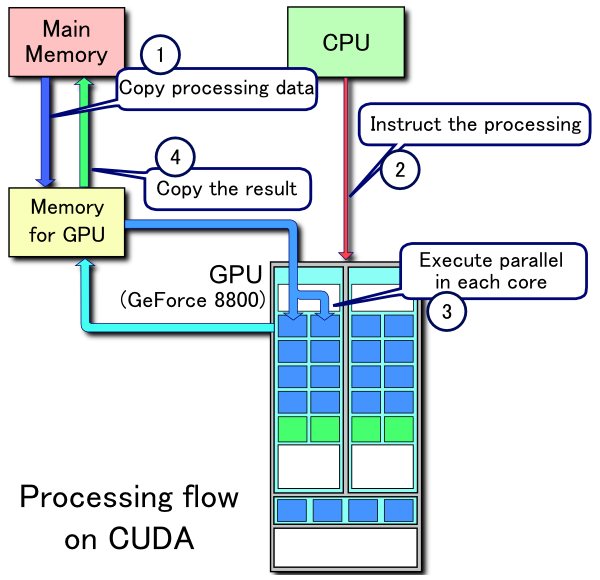
The core idea is a partnership between the CPU and the GPU. In the CUDA model, the CPU is called the host, and the GPU is called the device. The host is great at sequential tasks and managing the overall program flow. The device, with its thousands of cores, excels at running the same operation on many different pieces of data simultaneously.
The host (CPU) manages the overall application, while the device (GPU) executes the computationally intensive, parallel parts.
A typical CUDA program involves the host preparing data, sending it over to the device for high-speed processing, and then retrieving the results. CUDA extends familiar programming languages like C++ with special keywords and API calls to manage this entire process. You write code that runs on the host and separate functions, called kernels, that run on the device.
Threads, Blocks, and Grids
To manage the thousands of cores on a GPU, CUDA organizes computations into a three-level hierarchy. Understanding this structure is key to writing effective CUDA programs.
- Threads: A thread is the smallest individual unit of execution. A single thread executes one instance of your kernel function.
- Blocks: Threads are grouped into blocks. Threads within the same block can cooperate by sharing data through a special, fast on-chip memory and can synchronize their execution.
- Grids: Blocks are then organized into a grid. A single kernel launch creates one grid, which can contain many blocks.
This hierarchy might sound abstract, but it's what makes CUDA scalable. You can write a kernel that is launched on a grid of a certain size, and CUDA will map the blocks to the physical processors on whatever GPU is available, whether it's a laptop GPU with a few hundred cores or a high-end server GPU with tens of thousands.
Writing a Simple Kernel
A CUDA kernel is a function that runs on the GPU. You define it in your code using the __global__ specifier. This tells the compiler that this function can be called from the host but will be executed on the device.
When a kernel runs, thousands of threads execute the same code. To make sure each thread works on a different piece of data, CUDA provides built-in variables. The most common are:
threadIdx: The ID of a thread within its block.blockIdx: The ID of a block within the grid.blockDim: The dimensions of a block (number of threads per block).
Programmers use these variables to calculate a unique global index for each thread. This index typically corresponds to an element in an array.
Here is a simple kernel that adds two vectors, A and B, and stores the result in vector C. Each thread calculates one element of C.
// CUDA Kernel Function to add two vectors
__global__ void addVectors(float* A, float* B, float* C, int N) {
    // Calculate the global index of the thread
    int index = blockIdx.x * blockDim.x + threadIdx.x;

    // Check array bounds to avoid writing out of memory
    if (index < N) {
        C[index] = A[index] + B[index];
    }
}
To launch this kernel from the host, you use a special syntax <<<...>>> that specifies the grid and block dimensions. For example, addVectors<<<numBlocks, threadsPerBlock>>>(d_A, d_B, d_C, N); would launch the kernel.
Managing Memory
The host and device have their own separate memory spaces. The CPU works with standard RAM, while the GPU has its own high-speed VRAM. Because kernels running on the device cannot directly access host memory, you must explicitly manage data transfers between them.
The standard workflow looks like this:
- Allocate memory on the GPU device.
- Copy input data from host RAM to device VRAM.
- Launch the kernel on the device to process the data.
- Copy the results from device VRAM back to host RAM.
- Free the allocated memory on the device.
CUDA provides a C-style API for these operations. The main functions you'll use are cudaMalloc to allocate device memory, cudaMemcpy to transfer data, and cudaFree to deallocate.
// N is the number of elements in our vectors
int N = 1024;
size_t size = N * sizeof(float);

// Pointers for device memory
float *d_A, *d_B, *d_C;

// 1. Allocate memory on the GPU
cudaMalloc(&d_A, size);
cudaMalloc(&d_B, size);
cudaMalloc(&d_C, size);

// h_A, h_B are pointers to data on the host (CPU)
// 2. Copy data from host to device
cudaMemcpy(d_A, h_A, size, cudaMemcpyHostToDevice);
cudaMemcpy(d_B, h_B, size, cudaMemcpyHostToDevice);

// 3. Launch kernel (not shown in detail here)
// addVectors<<<...>>>(d_A, d_B, d_C, N);

// 4. Copy results from device to host
// h_C is a pointer to memory on the host for the result
cudaMemcpy(h_C, d_C, size, cudaMemcpyDeviceToHost);

// 5. Free device memory
cudaFree(d_A);
cudaFree(d_B);
cudaFree(d_C);
Efficiently managing these memory transfers is one of the most important aspects of getting good performance from a CUDA application. Moving data between the host and device is relatively slow, so a common goal is to minimize these transfers by doing as much work as possible on the GPU.
In the CUDA programming model, what is the relationship between the 'host' and the 'device'?
Which of the following correctly describes the CUDA execution hierarchy, from the smallest unit of execution to the largest?
These are the foundational concepts of CUDA programming. By understanding the host-device model, the thread hierarchy, kernel execution, and memory management, you have the building blocks to start accelerating your applications with the power of GPUs.