Core Networking Architecture Refresher
LAN and WAN Topology
Scope, Speed, and Switches
A computer network's most basic characteristic is its size. A Local Area Network, or LAN, connects devices in a small, defined area like a single office, a school, or your home. Think of it as the internal phone system within one building. Conversations are quick and direct because everyone is close by.

Because the distances are so short, LANs are incredibly fast. Data transfer speeds, often called bandwidth or throughput, are very high. Modern LANs commonly run at speeds of 1 Gigabit per second (Gbps) or even faster. The delay, or latency, is also very low because data packets only have to travel a few meters through an Ethernet cable or across a room via Wi-Fi.
Communication inside a LAN is managed by a device called a switch. A switch acts like a mail sorter for a single office building. It knows the unique hardware address, called a , of every device connected to it. When one computer sends data to another on the same LAN, the switch receives the data, reads the destination MAC address, and forwards it directly to the correct port. This process, known as Layer 2 switching, is fast and efficient for local traffic.
LANs are defined by high bandwidth, low latency, and a small geographic area. They are typically managed by a single organization and use switches for communication.
Connecting the Networks
A Wide Area Network, or WAN, does something different. It connects multiple LANs together over vast distances, like across cities, states, or even countries. A WAN is like the global telephone network that connects all the individual office phone systems. The internet is the largest WAN in the world.
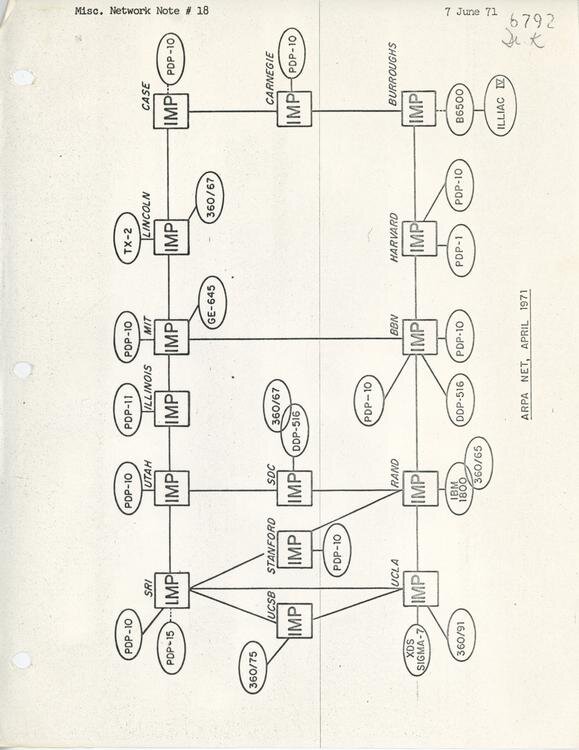
This massive scale comes with trade-offs. Because data has to travel hundreds or thousands of kilometers through fiber optic cables, satellite links, or other long-distance connections, WANs have much higher latency than LANs. Bandwidth is also typically lower and more expensive. You can't just run a simple Ethernet cable between New York and Los Angeles.
WANs rely on a more sophisticated type of device: a router. A router is like an international mail sorting center. It doesn't care about the specific desk in an office building (the MAC address). Instead, it reads the mailing address, known as an , on a data packet. This address contains information about the destination network. The router's job is to look at this address and choose the most efficient path to forward the packet toward its final destination LAN. This is called Layer 3 routing.
Backbones and Backhaul
So how does a router send data across a country? It uses a complex web of high-capacity connections that form the infrastructure of the WAN. The part of the network that connects a local network (like a cell tower or a neighborhood's internet hub) to the main network is called the backhaul . Think of it as the on-ramp to the highway.
Once on the highway, the data travels along the network backbone. This is a series of extremely high-speed fiber optic lines that crisscross continents and run under oceans, connecting major cities and data centers. These backbone networks are the core arteries of the internet, operated by large telecommunication companies. Your data packet might be routed through several of these backbone networks to get from your home LAN to a server's LAN on the other side of the world.
| Feature | Local Area Network (LAN) | Wide Area Network (WAN) |
|---|---|---|
| Scope | Small (single building, campus) | Large (cities, countries, global) |
| Speed | Very High (1 Gbps - 100 Gbps) | Lower (variable, often slower) |
| Latency | Very Low | High |
| Hardware | Switches (Layer 2) | Routers (Layer 3) |
| Ownership | Usually private | Often public or leased lines |
Understanding these distinctions is key. The choice between LAN and WAN technologies isn't about which is better, but which is suited for the task. LANs provide fast, local connectivity, while WANs provide the essential long-distance links that tie them all together.