Content Management Systems Explained
Introduction to CMS
Beyond the Text File
In the early days of the internet, creating a website was a manual, painstaking process. Every page was a static file, usually written in HTML. If you wanted to change a sentence, update a photo, or fix a typo, you had to open that specific file, edit the code, and upload it back to the server. This worked for small personal sites, but it quickly became unmanageable for larger websites with hundreds or thousands of pages and multiple contributors.
Imagine a library where to update a single word in a book, you had to rewrite the entire book by hand. That's what managing a large, static website was like.
This challenge led to the development of a powerful new tool: the Content Management System, or CMS.
CMS
noun
A software application that allows users to create, manage, and modify digital content on a website without needing specialized technical knowledge.
A CMS separates the content of a website (the text, images, videos) from its design and structure (the layout, colors, fonts). This separation is a game-changer. It means content creators can focus on what they do best, writing and creating, without worrying about breaking the website's code. Marketers, writers, and editors can log into a user-friendly interface, type into a text box similar to a word processor, and hit “publish.” The CMS handles the rest, automatically formatting the content and placing it in the correct template on the live website.
If the website will be managed by non-technical users (e.g., marketers or content creators), a CMS offers an easy-to-use interface for updating content without requiring coding knowledge.
From Documents to Web Pages
The idea of managing content isn't new. The roots of CMS lie in systems designed to handle large volumes of documents for big corporations. These early systems were complex and expensive, built to organize internal reports, technical manuals, and legal documents. As the web grew, this technology was adapted to manage website content.
This led to two broad categories of content management systems that still exist today: Enterprise Content Management (ECM) and Web Content Management (WCM).
| Feature | Enterprise Content Management (ECM) | Web Content Management (WCM) |
|---|---|---|
| Primary Focus | Managing internal business documents and processes. | Creating, publishing, and managing content for websites. |
| Typical Content | Contracts, invoices, employee records, reports. | Blog posts, articles, product pages, videos, marketing copy. |
| Main Goal | Improve business efficiency, ensure compliance, and streamline internal workflows. | Engage external audiences like customers and visitors. |
| Example | A system managing a hospital's patient records. | The software running a news website or an online store. |
While they have different focuses, the line between them can blur. Many modern platforms combine features from both. For our purposes, we'll mostly be discussing Web Content Management Systems, as they're the engine behind most of the websites you visit every day.
The CMS Workflow
So how does a CMS actually work? It streamlines the entire lifecycle of a piece of digital content, from creation to publication and beyond. This process is often called a content workflow.
A typical workflow inside a CMS might look like this:
- Creation: A writer drafts an article in the CMS editor.
- Review: The writer saves the draft and assigns it to an editor. The editor receives a notification, reviews the article, and leaves comments or makes changes directly in the system.
- Approval: Once the editor is happy with it, they approve the content for publication.
- Publishing: The content can be published immediately or scheduled to go live at a specific date and time. The CMS automatically places it on the website using the correct template.
- Archiving: After a certain period, old content can be automatically archived or removed.
This structured process ensures quality and consistency. It allows entire teams to collaborate efficiently without stepping on each other's toes or needing to send files back and forth over email.
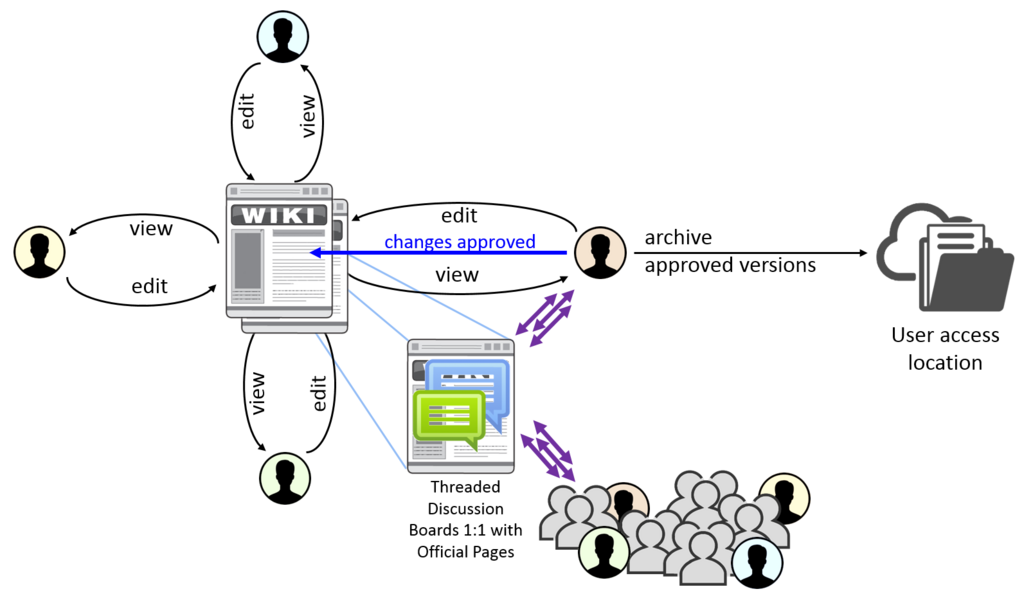
By managing these workflows, a CMS becomes the central hub for an organization's digital presence. It provides the foundation for creating and sharing information, turning a chaotic process into an organized and scalable operation.
Ready to check your understanding of these core concepts?
Let's see what you've learned.
What was the primary problem that led to the development of Content Management Systems (CMS)?
The core principle that makes a CMS so powerful is its ability to separate a website's ______ from its ______.
Now that you have a solid grasp of what a CMS is and why it's important, we can start looking at specific examples and how they are used in the real world.