Computer Vision for Inventory Automation
Introduction to Computer Vision
What is Computer Vision?
Computer vision is the field of artificial intelligence that trains computers to interpret and understand the visual world. Using digital images from cameras and videos, machines can identify and classify objects, and then react to what they “see.”
Think about how you recognize a friend in a crowd. Your brain processes visual information—their face, hair color, the jacket they're wearing—almost instantly. Computer vision aims to give computers that same ability. Instead of a brain, it uses algorithms to analyze pixels in an image and find patterns.
For inventory management, this means a camera can scan a warehouse shelf and tell you not just that there are items, but exactly what those items are and how many you have.
This technology automates tasks that humans usually do, like counting boxes, checking for out-of-stock products, or identifying misplaced items. It’s faster, less prone to error, and can run 24/7 without getting tired.

How Computers Process Images
A computer doesn't see a photograph the way we do. It sees a grid of tiny dots called pixels, where each pixel has a numeric value representing its color and brightness. The first step in computer vision is image processing, which involves manipulating these numbers to prepare the image for analysis.
This could mean adjusting the contrast to make objects stand out, sharpening the image to clarify details, or converting it to black and white to simplify the information. The goal is to enhance the image so the important parts are easier for the algorithm to find.
Once the image is prepped, the system moves on to feature extraction. It looks for distinguishing characteristics—or features—that can help it identify objects.
What counts as a feature? It could be anything distinctive:
- Edges and Corners: The sharp lines that define the shape of a box.
- Color and Texture: The unique red and white pattern on a soup can label.
- Shapes: The circular top of a bottle or the rectangular shape of a book.
The system learns to associate these specific features with specific items. A collection of straight lines at right angles might mean "box," while a specific curve and color might mean "banana."
Finding and Naming Objects
After extracting features, the real work begins. This is where two key techniques come into play: object detection and object recognition.
detection
noun
The process of identifying the location of objects within an image.
Object detection is about finding an object's position. The system essentially draws a bounding box around each item it finds in an image. It answers the question, "Where is something of interest?" For example, a camera in a warehouse might place boxes around every pallet on the floor.
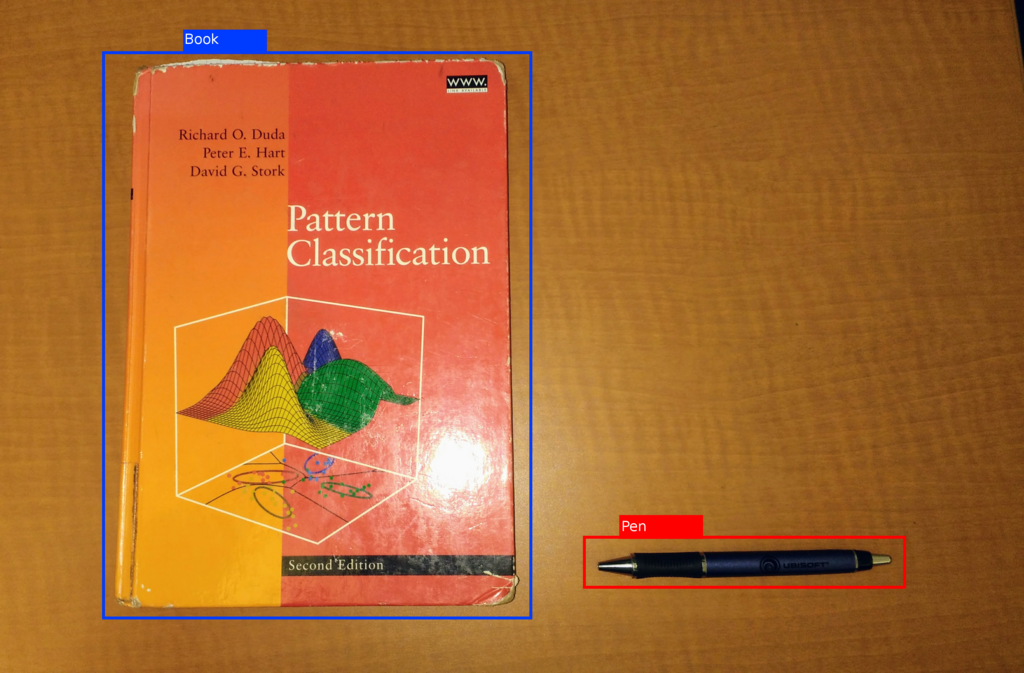
Object recognition (or classification) is the next step. Once an object is detected, the system tries to identify what it is. It analyzes the features within the bounding box and compares them to a database of known items. This answers the question, "What is this object?"
So, after drawing a box around a pallet, the system would analyze its contents and conclude, "This is a pallet of breakfast cereal boxes." By combining detection and recognition, a computer vision system can scan a store aisle, count every bottle of soda, and flag that you're running low on diet cola.
Ready to check your understanding? Let's see what you've learned about the basics of computer vision.
What is the primary goal of computer vision?
When a computer vision system processes a digital image, what is it fundamentally analyzing?
These core concepts—processing images into data, extracting key features, and then detecting and recognizing objects—are the foundation of how computer vision transforms inventory management.