Computer Systems and Architecture
System Architecture Fundamentals
The Computer's Inner Blueprint
At its heart, a computer isn't just a collection of parts; it's a system designed for information to flow. The dominant design for this flow, used in everything from your smartphone to massive supercomputers, is the . Its core principle is simple but revolutionary: both the instructions the computer follows and the data it works on are stored in the same memory.
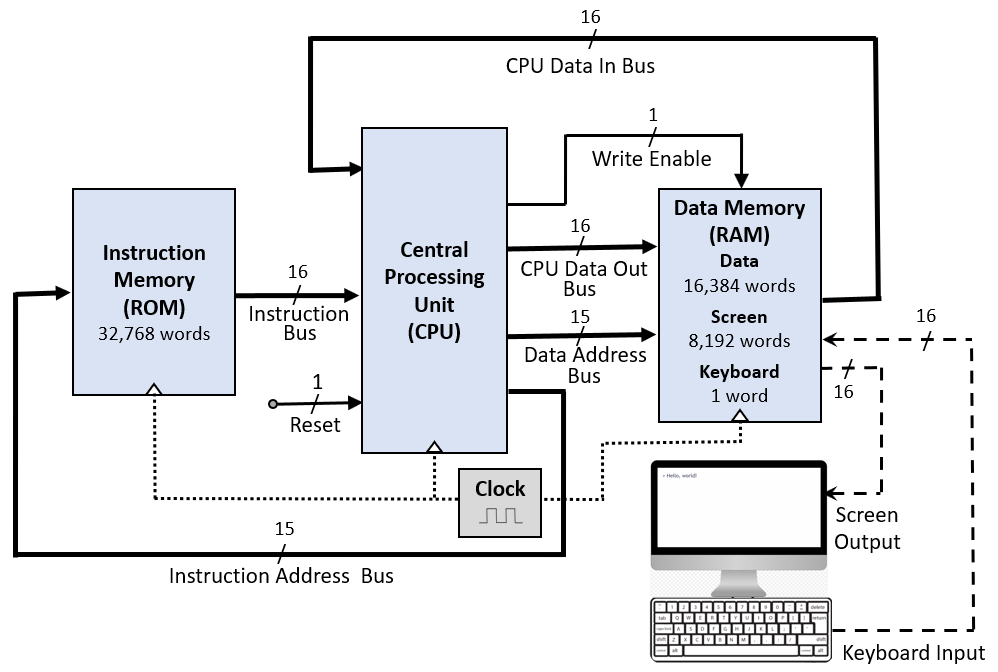
This shared memory approach means the Central Processing Unit (CPU) can treat instructions just like data. It can read, write, and modify program instructions on the fly, enabling the incredible versatility of modern software. To understand how the CPU actually processes this information, we need to look at its fundamental rhythm.
The CPU's Rhythm
The CPU is the engine of the computer, constantly running a simple, three-step process known as the Fetch-Decode-Execute cycle. This happens billions of times per second.
- Fetch: The CPU retrieves the next instruction from memory. 2. Decode: The CPU's control unit interprets what the instruction means. 3. Execute: The instruction is carried out by the appropriate part of the CPU, like the Arithmetic Logic Unit (ALU) for a math operation.
The speed of this cycle is often measured in gigahertz (GHz), which represents billions of cycles per second. A 3.2 GHz processor, for instance, performs 3.2 billion cycles every second. But raw speed isn't the whole story. The amount of work done in each cycle is just as important. This is where (IPC) comes in. A more efficient CPU with a higher IPC can accomplish more work at the same clock speed as a less efficient one.
The Data Superhighway
For the CPU to perform its work, data must travel quickly between it, memory, and other components. This happens on the motherboard, which acts as the central nervous system of the computer. Data travels along pathways called buses. The speed of these buses determines how fast information can move.
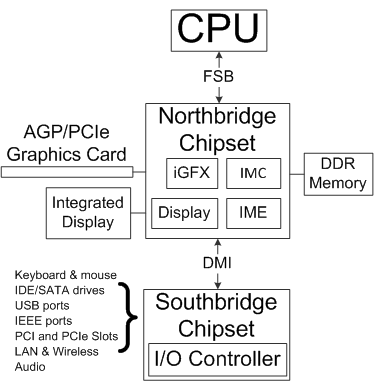
Historically, this traffic was managed by a chipset duo: the Northbridge and Southbridge. The Northbridge acted as the high-speed link, connecting the CPU directly to the fastest components like RAM and the graphics card. The Southbridge handled the slower peripherals, such as hard drives, USB ports, and network connections. While modern CPUs have integrated many of the Northbridge's functions directly onto the processor die, the principle of tiered data pathways remains.
Because accessing main memory (RAM) is relatively slow compared to the CPU's processing speed, engineers created a faster, smaller memory system right next to the CPU called cache. This memory hierarchy is crucial for performance.
CPU cache is organized in levels. L1 cache is the smallest and fastest, located directly on the processor core. L2 is slightly larger and slower, and L3 is larger still, often shared across multiple cores. When the CPU needs data, it checks L1 first. If it's not there (a 'cache miss'), it checks L2, then L3, and finally, as a last resort, the much slower main RAM.
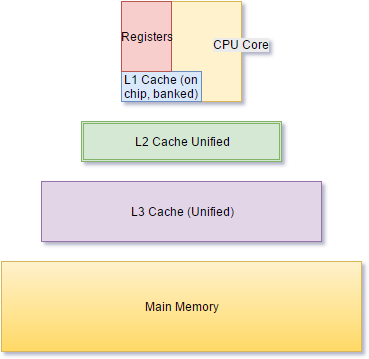
A high 'cache hit' rate, where the CPU finds the data it needs in the cache, is vital for keeping the processor fed and running at full tilt. This intricate dance between the CPU, its cache, and the motherboard's buses defines the performance and responsiveness of your computer.
What is the revolutionary principle of the Von Neumann architecture?
Which of the following correctly lists the three steps of the CPU's fundamental processing cycle?