Computer Organization Principles
Introduction to Computer Systems
The Basic Blueprint
At its core, a computer is a system of parts working together. Think of it like a workshop. You have a workbench for active projects, a set of tools to do the work, a filing cabinet for storing plans, and a way to bring materials in and send finished products out.
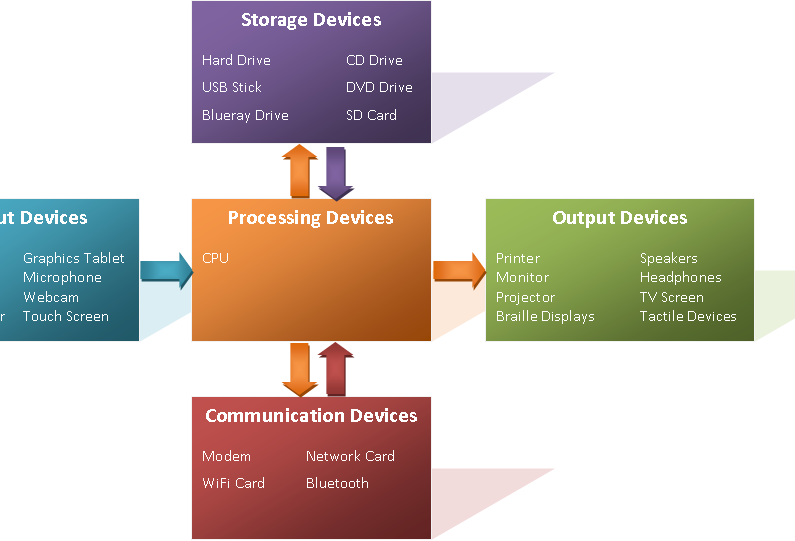
Every computer, from your phone to a massive server, follows this same basic model. It takes in information (input), processes it, and produces a result (output). This flow is managed by a few key components.

Let's break down what each of these parts does.
The Brain of the Operation
The Central Processing Unit, or CPU, is the computer's engine. It executes commands and runs the programs you use. Whenever you click, type, or start an app, the CPU is what carries out those instructions.
CPU (Central Processing Unit)
noun
The primary component of a computer that executes instructions. It's often called the 'brain' of the computer.
The CPU has two main parts that work together:
- Arithmetic/Logic Unit (ALU): This is the calculator of the CPU. It handles all the math (addition, subtraction) and logic (like comparing if one number is greater than another).
- Control Unit (CU): This is the traffic cop. It directs the flow of data inside the CPU, telling the ALU and other components what to do and when.
Memory and Storage
Computers need a place to hold the data they're working with and a place to save it for later. These are two different jobs, handled by memory and storage.
Memory, or Random Access Memory (RAM), is the computer's short-term workspace. It’s like the top of your desk. When you open a file or run an application, it’s loaded into RAM for the CPU to access quickly. RAM is volatile, which means its contents are erased when the computer turns off.
RAM (Random Access Memory)
noun
A type of computer memory that can be read from and written to. It is used for temporary storage of data that the CPU is actively using.
Storage is the computer's long-term filing cabinet. This is where your files, applications, and the operating system are kept permanently. Unlike RAM, storage is non-volatile, so your data stays safe even without power. Examples include hard disk drives (HDDs) and solid-state drives (SSDs).
Getting Information In and Out
A computer wouldn't be very useful if you couldn't interact with it. That's where input and output devices come in. They are the bridge between you and the machine.
Input devices send data to the computer. A keyboard sends text, a mouse sends clicks and movements, and a microphone sends sound.
Output devices receive data from the computer. A monitor displays images, speakers play audio, and a printer creates physical documents.
Hardware vs. Software
All the physical components we've discussed—the CPU, RAM, monitor, and keyboard—are called hardware. They are the tangible parts of a computer system that you can see and touch.
Hardware
noun
The physical components of a computer system.
But hardware can't do anything on its own. It needs instructions. Those instructions are software. Software is a set of programs, procedures, and data that tells the hardware what to do. Your web browser, your operating system, and the games you play are all software.
Software
noun
The programs and other operating information used by a computer.
A simple analogy is a piano. The piano itself is the hardware. The sheet music, which tells you what keys to press, is the software. You need both to make music.
Now, let's test your understanding of these core components.
What is the primary role of the Central Processing Unit (CPU)?
Using the analogy of a workshop, Random Access Memory (RAM) is best described as the...
Understanding these basic parts is the first step to seeing how a computer really works. Everything from here builds on this foundation of hardware and software working together.