Computer Networking Fundamentals
Introduction to Computer Networks
What Is a Network?
At its core, a computer network is simple: it's a group of two or more connected devices that can share information. Think of it like a conversation. You can talk to one person, or you can be in a room full of people talking. A network allows devices like computers, phones, and printers to have that conversation.
The main purpose of a network is to enable communication and the sharing of resources. This could mean sharing a file, a printer, or an internet connection.

This setup saves time and money. Instead of buying a printer for every computer in an office, a single printer can be connected to the network for everyone to use. Instead of transferring a file with a USB drive, you can send it instantly over the network. This ability to connect and share is what makes networks so powerful.
Networks Come in All Sizes
Networks aren't one-size-fits-all. They are categorized based on the geographical area they cover. The scale can range from the space on your desk to the entire planet.
Personal Area Network (PAN) This is the smallest type of network, designed for one person. When you connect your wireless headphones to your phone, or your smartwatch to your laptop, you've created a PAN. It's all about connecting your personal devices over a short distance, usually just a few feet.
Local Area Network (LAN) A LAN connects devices within a limited area, like a home, school, or a single office building. Your home Wi-Fi network is a perfect example of a LAN. It connects your computer, phone, and smart TV so they can all access the internet and sometimes each other.
Metropolitan Area Network (MAN) Bigger than a LAN, a MAN spans a larger area like a city or a large university campus. It often connects multiple LANs together. For example, a university might use a MAN to connect the networks of its various campus buildings scattered across town.
Wide Area Network (WAN) A WAN covers a broad area, such as across states, countries, or even continents. It connects LANs and MANs together. The most famous example of a WAN is the internet, which is a massive, global network of networks.
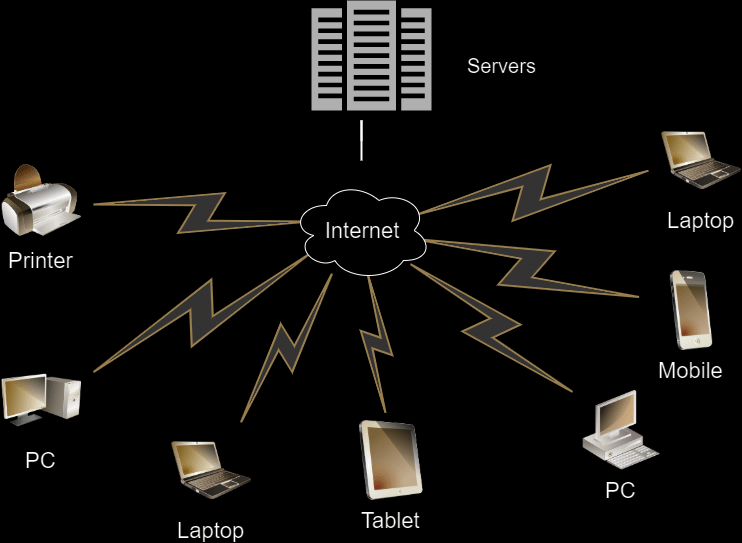
The Building Blocks of a Network
Every network, regardless of its size, is built from the same basic components. Let's look at the three key ingredients.
Node
noun
Any device on a network. This includes computers, printers, servers, smartphones, and even smart home devices like thermostats or light bulbs.
Next, you need a way for the nodes to talk to each other. This is handled by transmission media.
Transmission Media This is the physical or wireless path that connects nodes. It can be a physical cable, like the Ethernet cables that plug into your laptop, or it can be wireless, using radio waves like Wi-Fi and Bluetooth.
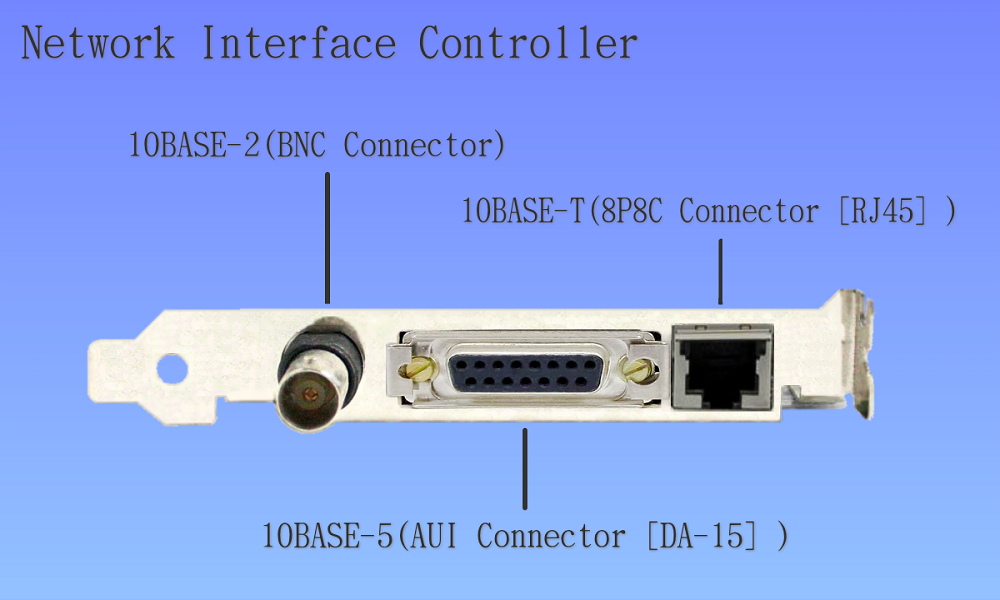
Finally, each device needs the right hardware to connect to the transmission media. This is the job of the network interface.
Network Interfaces Often called a Network Interface Card (NIC), this is a piece of hardware that allows a node to connect to the network. Every device on a network has one. For a wired connection, it's the Ethernet port. For a wireless connection, it's the Wi-Fi or Bluetooth antenna built into your device.
These three components—nodes, media, and interfaces—form the foundation of every computer network, from the simple one in your home to the complex global internet.
Ready to check your understanding? Let's see what you've learned about the basics of computer networks.
What is the most fundamental definition of a computer network?
Which of the following is a primary benefit of using a computer network in an office?
Understanding these basic building blocks is the first step. With this foundation, you can begin to explore how these networks are structured and how data travels between them.