Computer Networking Fundamentals
Introduction to Computer Networks
Connecting the Dots
At its heart, a computer network is simple: it's a group of two or more devices linked together. The purpose is just as simple: to share things and to communicate. Think about your home. You might have a printer connected to your laptop. A network lets your phone and tablet use that same printer without needing a direct cable. That's resource sharing.
Communication is the other major benefit. Email, video calls, and instant messaging all depend on networks to send information from one device to another, whether it's across the room or across the globe.
A network connects devices so they can share resources and communicate with each other.

Networks Big and Small
Networks come in different sizes, each suited for a specific environment. The most common types you'll encounter are LANs, WANs, and WLANs.
A Local Area Network (LAN) is a network confined to a small area, like a single office, a school, or your home. The devices are physically close, allowing for fast and reliable connections. If you have a router at home connecting your computer, TV, and gaming console, you've created a LAN.
A Wide Area Network (WAN) connects multiple LANs over a large geographical distance. The internet is the ultimate example of a WAN. It connects billions of devices and smaller networks from all over the world. Companies with offices in different cities also use WANs to link their internal LANs together.
A Wireless Local Area Network (WLAN) is simply a LAN that uses wireless technology, like Wi-Fi, to connect devices instead of cables. This offers more flexibility, allowing devices like laptops and smartphones to move around freely within the coverage area.
The Hardware That Makes It Work
Several key pieces of hardware are required to build a network.
Routers are like the traffic cops of the internet. They direct data packets between different networks. Your home router, for example, connects your private LAN to the public internet (a WAN), ensuring that data gets to and from the right place.
Switches are used within a single network, like a LAN. They act as a central point that connects all your devices. When one device wants to send data to another on the same network, the switch creates a direct link between them, ensuring the message goes only to the intended recipient. Think of it as a mail sorter for a single office building.
Finally, every device that connects to a network needs a Network Interface Card (NIC). This is the hardware that allows your computer, phone, or printer to actually speak the language of the network.
Network Interface Card
noun
A hardware component that connects a computer to a computer network.
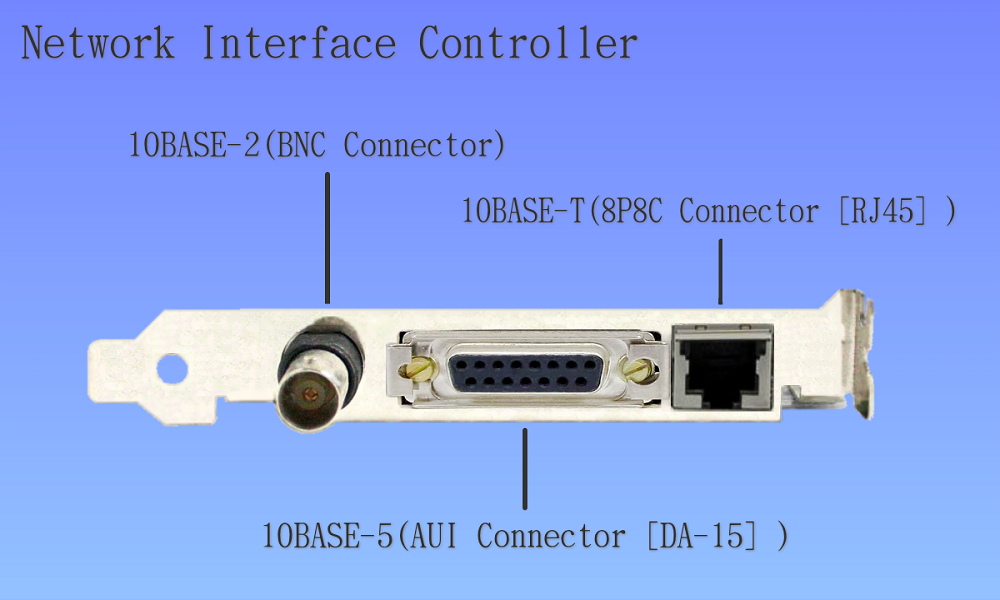
The Physical Connections
Data needs a path to travel along. This path is called the transmission medium, and it can be either wired or wireless.
Wired technologies use physical cables to transmit data. The most common is the Ethernet cable, which you've likely used to plug a computer directly into a router. For longer distances and higher speeds, fiber optic cables are used. These cables transmit data as pulses of light, making them incredibly fast and reliable.
Wireless technologies transmit data through the air using radio waves. Wi-Fi is the most familiar example, used for creating WLANs in homes, coffee shops, and offices. Bluetooth is another wireless technology, but it's designed for short-range communication between devices, like connecting headphones to a phone or a mouse to a computer.
Ready to check your understanding? Let's see what you've learned about the basics of computer networks.
What is the primary purpose of a computer network?
Which piece of hardware is responsible for directing data traffic between different networks, such as your home network and the internet?
Understanding these fundamental building blocks is the first step to seeing how our digital world is connected.