Computer Network Types Explained
Network Fundamentals
What Is a Computer Network?
A computer network is simply a group of two or more computers connected to share resources and information. Think of it like a conversation. If you and a friend are talking, you've formed a simple network. You're sharing ideas (data) over a connection (the air your voices travel through).
Computer networks do the same thing on a much larger scale. Their main purpose is to let devices share things. This could be a connection to the internet, a file on a server, or a piece of hardware like a printer. By connecting devices, we can collaborate and access information far more efficiently than if each machine stood alone.
The Building Blocks
Every network, from the small one in your home to the global internet, is built from the same basic parts. Let's break them down.
Node
noun
Any device on a network that can send, receive, or forward information. This includes computers, printers, servers, and even your smartphone.
Nodes need a way to connect to each other. These connections are called links. A link is the physical or wireless medium that carries data between nodes. The most common examples are Ethernet cables and Wi-Fi signals.
For networks with more than two nodes, we need special devices to manage the traffic. Two of the most important are switches and routers.
A switch is like a mailroom clerk for a single office building. It connects multiple nodes on the same local network and directs data packets only to the specific node they're intended for. This prevents unnecessary traffic and keeps communication efficient within that one network.
A router is like an airport traffic controller. Its job is to connect different networks together and direct traffic between them. When you send an email, your home router sends the data packet out to the internet, where other routers pass it along until it reaches its destination network.
Switches create a network. Routers connect networks.
Layout vs. Logic
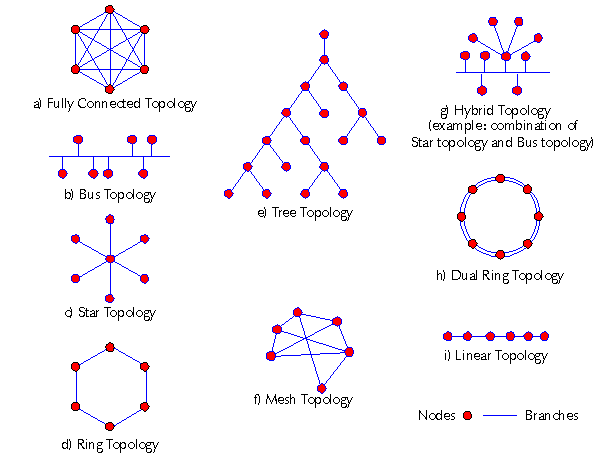
The way a network is arranged is called its topology. It's important to understand that there are two ways to look at this arrangement: physically and logically.
Physical topology is the actual, tangible layout of the network. It’s how the cables are run and where the devices are placed. If you were to draw a map of the devices and the wires connecting them, you'd be mapping the physical topology.
Logical topology, on the other hand, describes how data actually travels through the network, regardless of the physical layout. Sometimes the path data takes is exactly the same as the physical connections, but often it's not. For example, devices might be physically wired in a star shape around a central switch, but the data might flow in a loop from one device to the next.
Finally, for all these different devices to understand each other, they need a common set of rules. These rules are called protocols. A protocol is a standard that defines how data is formatted and transmitted across a network. It ensures that a computer made by one company can successfully communicate with a server made by another.
Think of protocols as a shared language. If everyone agrees to speak the same language and follow the same grammatical rules, communication is smooth and reliable.