Computer Hardware Architecture and System Integration
Modern Motherboard Architecture
The Motherboard's Nervous System
Think of a motherboard not as a simple circuit board, but as the central nervous system of your PC. It doesn't just connect components; it dictates the speed and efficiency of their communication. The heart of this system is the chipset.
The chipset is the traffic controller for data, managing the flow between the CPU, memory, storage, and other peripherals. Its design determines the capabilities and limitations of the entire system.
Historically, this role was split between two chips: a Northbridge and a Southbridge. The Northbridge was the high-speed controller, connecting the CPU directly to memory and the primary graphics card slot. The Southbridge handled slower I/O, like USB ports and SATA drives.
Modern systems have evolved. Most of the Northbridge's functions, like the memory controller, have been integrated directly into the CPU for faster access. What's left is a single, more capable chip called the Platform Controller Hub, or PCH, which is what we now refer to as the chipset.
This integration makes the direct connection between the CPU and its most critical partners, like RAM and the main graphics card, incredibly fast. Everything else communicates with the CPU via the PCH.
The PCIe Lane Economy
Data travels on your motherboard through pathways called PCIe lanes. Think of them like lanes on a motorway. More lanes mean more data can travel at once, resulting in higher bandwidth. A device's connection is described by the number of lanes it uses, like x1, x4, x8, or x16.
Crucially, a motherboard has a finite number of these lanes, and they originate from two different places: the CPU and the chipset (PCH). This creates a 'lane economy' you must manage.
CPU Lanes: These are the express routes. They offer the highest bandwidth and lowest latency because they connect directly to the processor. Modern consumer CPUs typically offer 20 to 28 dedicated PCIe lanes. These are reserved for the most demanding components, primarily your main graphics card (which uses 16 lanes) and your fastest NVMe storage drive (which uses 4 lanes).
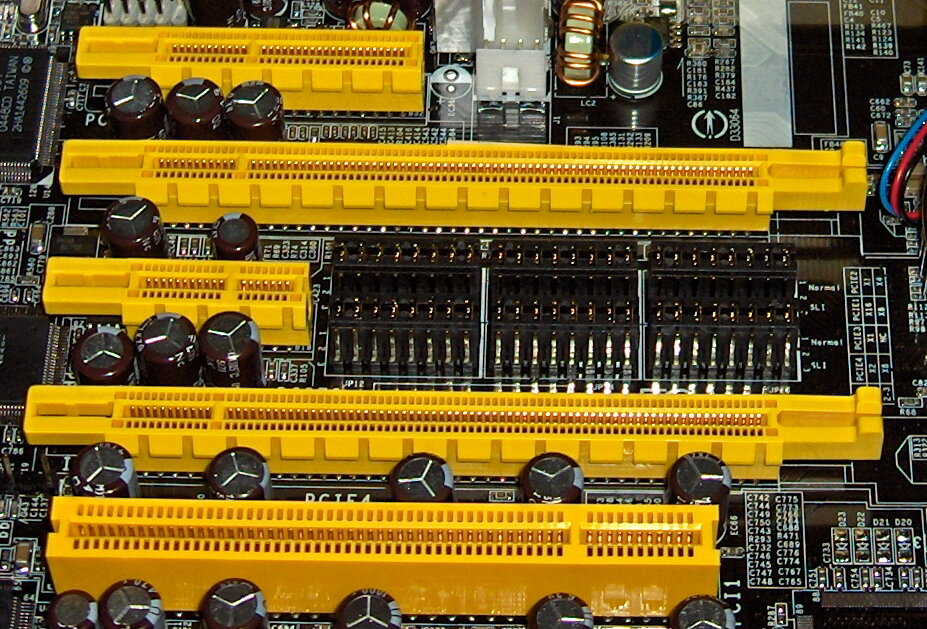
Chipset Lanes: The PCH provides an additional pool of PCIe lanes. These are general-purpose lanes for everything else: additional NVMe drives, USB controllers, network cards, and smaller PCIe slots. Data from these devices must first travel to the chipset, which then communicates with the CPU through a dedicated link (usually the equivalent of a PCIe x4 or x8 connection called DMI on Intel or UPI on AMD). This link is a potential bottleneck. While fast, it's shared by every single device connected to the chipset. If you have multiple fast NVMe drives and other peripherals all connected to the chipset and all active at once, they are competing for that limited bandwidth to the CPU.
Generations, Speeds, and Slots
Not all lanes are created equal. Each new generation of PCIe roughly doubles the bandwidth per lane of the previous one. This means a PCIe 5.0 x8 slot has the same theoretical bandwidth as a PCIe 4.0 x16 slot.
| PCIe Generation | Bandwidth per Lane | Bandwidth of x16 Slot |
|---|---|---|
| PCIe 3.0 | ~1 GB/s | ~16 GB/s |
| PCIe 4.0 | ~2 GB/s | ~32 GB/s |
| PCIe 5.0 | ~4 GB/s | ~64 GB/s |
This leads to an important distinction: a slot's physical size versus its electrical connection. You might see a full-length x16 slot on a motherboard, but the specifications reveal it's only wired for x8 or even x4 speeds. This is common for secondary or tertiary graphics card slots. The physical form factor allows the card to fit, but its performance will be limited by the number of electrical lanes actually connected to it.
Always check the motherboard manual. It will detail exactly how the PCIe lanes are distributed. You might find that populating a second M.2 NVMe slot causes your primary x16 graphics card slot to drop to x8 speeds. This is called bifurcation, where the 16 lanes are split into two x8 connections to serve two devices.
These trade-offs are at the core of motherboard selection. A high-end chipset offers more of its own PCIe lanes and a faster link to the CPU, allowing you to run more high-speed devices without compromise. A budget board might force you to choose between running a second NVMe drive or giving your graphics card its full bandwidth.
Understanding this architecture is key. Your motherboard choice doesn't just enable components to work; it defines the performance ceiling for the entire system.
What is the modern, single-chip equivalent of the traditional Northbridge and Southbridge architecture on today's motherboards?
A motherboard has a physical PCIe slot that is the full x16 length, but the manufacturer's specifications state its electrical connection is 'x16 (x4 mode)'. What does this mean?