Computational Logic and Program Architecture
Advanced Control Flow
Beyond If-Else
You're already familiar with if-else statements. They are the bedrock of decision-making in code, letting you execute different blocks of logic based on a condition. But when you face a dozen different conditions, a long chain of if-else if-else statements can become clunky and hard to read. Let's explore more advanced and elegant ways to control the flow of your program.
Handling Multiple Paths with Switch
When you need to check a single variable against a list of possible values, a switch statement is often cleaner than a series of if-else if blocks. It clearly states the variable being checked and then lists each possible case and the code to run for it.
Imagine you're building a system with different user roles. A switch statement makes the logic clear and easy to follow.
// userRole can be 'admin', 'editor', or 'viewer'
switch (userRole) {
  case 'admin':
    console.log('Access to all systems.');
    break; // Exits the switch statement
  case 'editor':
    console.log('Can create and edit content.');
    break;
  case 'viewer':
    console.log('Read-only access.');
    break;
  default:
    console.log('Unknown role. Access denied.');
}
The break keyword is crucial. It tells the program to exit the switch block once a match is found. If you omit it, the code will continue executing the code in the next case, a behavior known as This can be useful in rare situations, but it's more often a source of bugs for new programmers.
Concise Conditionals
For simple if-else assignments, the ternary operator provides a compact, one-line alternative. It takes three operands: a condition, a value to return if the condition is true, and a value to return if it's false.
The syntax is
condition ? value_if_true : value_if_false.
It’s perfect for assigning a value to a variable based on a simple check.
// Using if-else
let accessMessage;
if (userIsLoggedIn) {
  accessMessage = 'Welcome back!';
} else {
  accessMessage = 'Please log in.';
}

// Using the ternary operator
const accessMessageTernary = userIsLoggedIn ? 'Welcome back!' : 'Please log in.';
Use ternary operators sparingly. They are excellent for simple, readable assignments. But nesting them can quickly make your code confusing and difficult to debug. When logic gets complex, a traditional if-else statement is usually the better choice for clarity.
Smarter Logic Evaluation
Programming languages are efficient. When evaluating logical expressions, they use a technique called short-circuit evaluation. This means they stop checking conditions as soon as they know the final outcome.
- With the AND operator (
&&), if the first condition isfalse, the overall expression must befalse. The second condition is never even checked. - With the OR operator (
||), if the first condition istrue, the overall expression must betrue. The second condition is skipped.
This isn't just about speed. It's a powerful tool for preventing errors. For example, you can check if an object exists before trying to access its properties.
// Without short-circuiting, this would crash if 'user' is null or undefined.
if (user && user.hasPermission('delete')) {
  // This code only runs if 'user' exists AND has the permission.
  deleteItem();
}
It’s also important to remember operator precedence. Just like in math where multiplication happens before addition, logical && is evaluated before ||. If you mix them, use parentheses () to group your conditions and make your intent explicit. Clear code is always better than clever code.
These techniques help you write cleaner, more efficient branching logic, which reduces the overall of your code.
Cleaning Up Nested Logic
Deeply nested if statements can lead to what's sometimes called the "arrowhead anti-pattern," where your code indents further and further to the right. This makes it difficult to read and follow the logic.
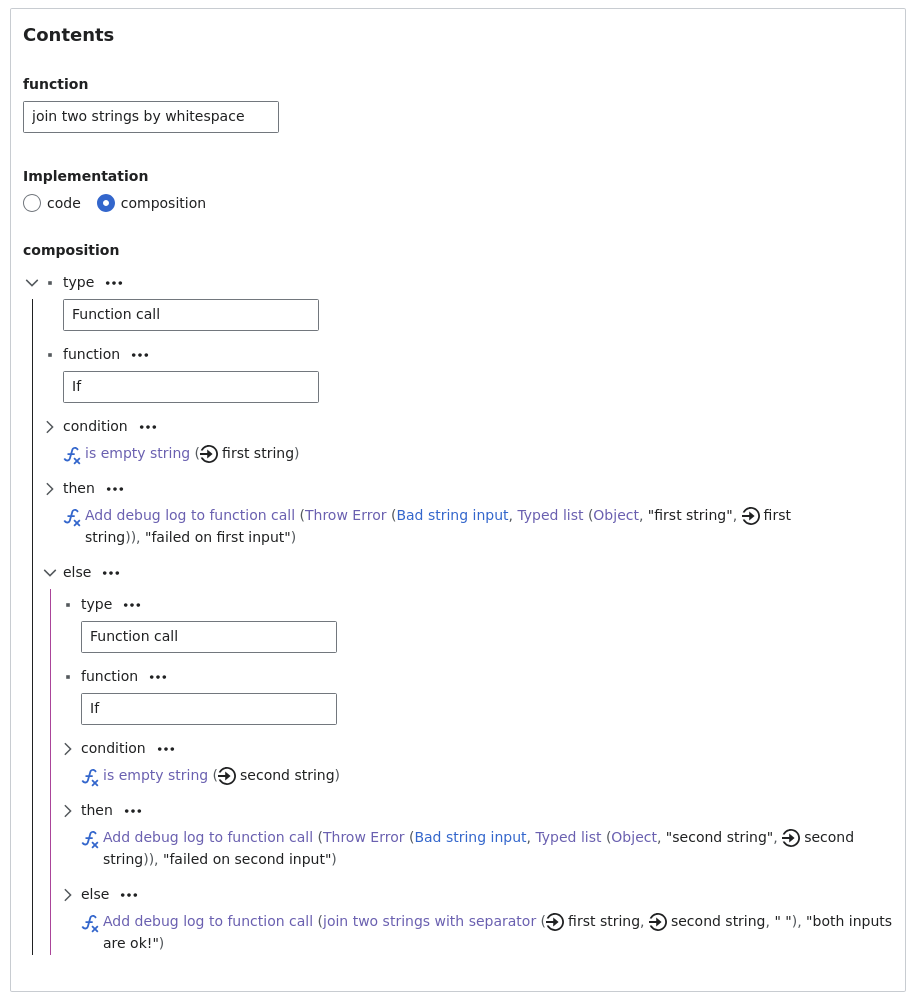
A great way to fix this is by using A guard clause is a conditional check at the beginning of a function that exits early if a condition isn't met. This pattern allows you to handle edge cases and invalid inputs upfront, leaving the main body of the function clean, flat, and focused on the "happy path."
Look at the difference. The first example uses nested logic, while the second uses guard clauses to flatten the code and improve readability.
// Before: Nested logic (the "arrowhead")
function processPayment(user, cart) {
  if (user) {
    if (user.isVerified) {
      if (cart.items.length > 0) {
        // ... main logic for processing payment ...
        return { success: true };
      }
    }
  }
  return { success: false, error: 'Invalid state' };
}

// After: Using Guard Clauses
function processPaymentRefactored(user, cart) {
  if (!user || !user.isVerified) {
    return { success: false, error: 'User not valid.' };
  }
  if (cart.items.length === 0) {
    return { success: false, error: 'Cart is empty.' };
  }

  // ... main logic for processing payment ...
  return { success: true };
}
By handling the error conditions first and exiting early, the main, successful logic of the function is left un-indented and easy to understand.
What happens if you omit the break keyword in a switch case?
When evaluating the logical expression A && B, if A is false, the expression for B is never checked. This is an example of:
Mastering these advanced control flow patterns will help you write code that is not only functional but also clean, efficient, and maintainable.