CompTIA Network+ Professional Certification
OSI Deep Dive
Data's Journey Through the Network
When you send an email or load a webpage, the data doesn't just zap from your computer to a server in one piece. Instead, it undergoes a process called encapsulation, where it's broken down and wrapped in several layers of information. Think of it like preparing a package for international shipping. You don't just put an item in a box; you add a shipping label, customs forms, and protective packaging. Each layer serves a specific purpose.
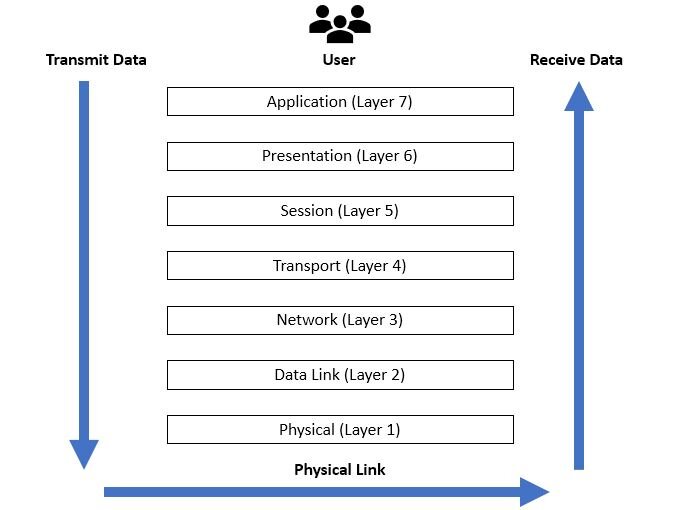
This process follows the OSI model. As your data travels down the stack from the Application Layer, each layer adds its own header (and sometimes a trailer) containing vital information. This header is specific to the function of that layer. For example, the Transport Layer adds a header with port numbers to ensure the data reaches the correct application (like your web browser instead of your email client). The Network Layer adds an IP address header for routing across the internet.
The data, along with its new header, becomes the payload for the next layer down. This continues until the data reaches the Physical Layer, where it's converted into bits—electrical signals, light pulses, or radio waves—and sent across the network medium. When the data arrives at its destination, the process happens in reverse. This is called de-encapsulation. Each layer strips off its corresponding header, reads the information, and passes the remaining payload up to the next layer until the original data is reassembled and delivered to the receiving application. This layering is what allows different network hardware and software from various vendors to work together seamlessly.
Protocol Data Units
As data is passed down the OSI model during encapsulation, its name changes at each layer. This generic term for data at any layer is Protocol Data Unit (PDU). However, we use more specific names at each of the bottom four layers to describe its form and function.
| Layer | PDU Name | Description |
|---|---|---|
| 4: Transport | Segment (TCP) / Datagram (UDP) | Data is broken into chunks. TCP adds sequencing and reliability information. |
| 3: Network | Packet | A Segment/Datagram is encapsulated with IP addresses for routing across networks. |
| 2: Data Link | Frame | A Packet is encapsulated with MAC addresses for delivery on the local network segment. |
| 1: Physical | Bits | The Frame is converted into a binary stream of 1s and 0s for transmission. |
Understanding these PDU transitions is key. When a network engineer says, "I'm seeing packet loss," they are specifically referring to a problem at Layer 3. If they mention a "frame-forwarding issue," the problem lies at Layer 2. This precise language, rooted in the OSI model, makes troubleshooting much more efficient.
Smarter Hardware and Troubleshooting
Modern networking devices aren't confined to a single OSI layer. While a basic switch operates at Layer 2, forwarding frames based on MAC addresses, a Layer 3 switch can do more. It understands IP addresses (Layer 3) and can route packets between different subnets or VLANs without needing a separate router. This combines the speed of hardware-based switching with the intelligence of routing, making networks more efficient.
Other devices operate across even more layers. A (NGFW) can inspect traffic all the way up to the Application Layer (Layer 7). Unlike traditional firewalls that only block ports or IP addresses, an NGFW can understand what application is generating the traffic (e.g., Dropbox vs. general web traffic) and enforce policies based on the user or the content itself. Similarly, load balancers distribute traffic to servers based on information from the Transport Layer (like server response time) and even the Application Layer (like the content of a cookie).
This layered model provides a powerful framework for troubleshooting. When a network issue occurs, engineers use systematic approaches to isolate the problem:
-
Bottom-Up: You start at the Physical Layer and work your way up. Is the cable plugged in? Are the link lights on? Is the switch port configured correctly? This method is effective when the problem is suspected to be physical or hardware-related.
-
Top-Down: You begin at the Application Layer. Can the user access the application? Can you resolve the server's name via DNS? This approach is useful when the problem appears to be software or a specific service.
-
Divide and Conquer: This is often the fastest method. You start in the middle, usually at the Network Layer. Can you ping the destination IP address? If yes, the problem is likely in the upper layers (4-7). If no, the problem is in the lower layers (1-3). This allows you to eliminate half of the potential problem areas with a single test.
Memorizing OSI layers isn’t just about passing exams—it’s about developing a mental framework for troubleshooting network issues.
By understanding how data is packaged, how devices interpret it, and how to methodically test each layer, you can move from simply knowing what the layers are to using them as a professional diagnostic tool.