CompTIA Network+ Essentials
Networking Fundamentals
The Network Blueprint
Imagine building a complex machine. You wouldn't just throw all the parts together. You'd follow a blueprint, assembling it layer by layer. Computer networks are built the same way, using a conceptual framework called the Open Systems Interconnection (OSI) model.
The OSI model breaks down the complex process of network communication into seven distinct layers. Each layer has a specific job, and they all work together to get data from point A to point B. This separation makes it easier to design, build, and troubleshoot networks.
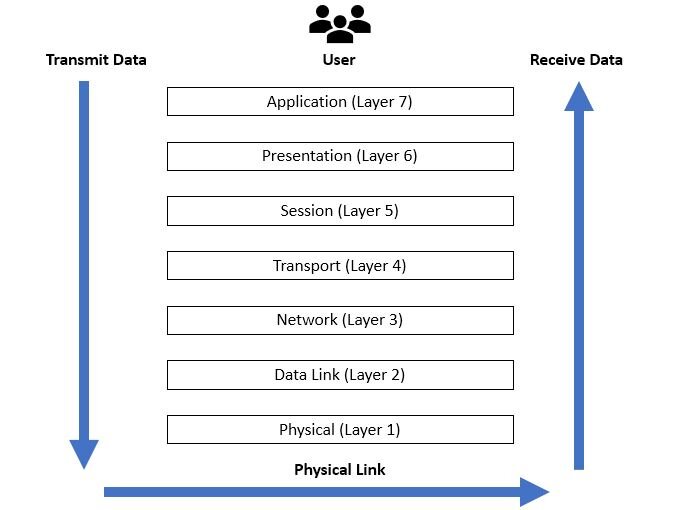
Here’s a quick tour of the seven layers, from top to bottom:
- Layer 7: Application - This is the layer you interact with. It provides network services directly to user applications like web browsers and email clients.
- Layer 6: Presentation - The translator. It ensures data is in a usable format and is where data encryption and compression happen.
- Layer 5: Session - The conversation manager. It establishes, manages, and terminates connections between applications.
- Layer 4: Transport - This layer handles end-to-end communication and data integrity. It chops data into smaller chunks called segments.
- Layer 3: Network - The traffic director. It determines the best physical path for the data to take, using logical addresses like IP addresses.
- Layer 2: Data Link - This layer provides node-to-node data transfer and handles error detection from the physical layer. It uses physical addresses (MAC addresses).
- Layer 1: Physical - The hardware layer. It's the physical stuff: cables, connectors, and radio signals that transmit raw bits of data.
The Language of Networks
For devices on a network to understand each other, they need to speak the same language. These languages are called protocols. While the OSI model is a great guide, the most commonly used protocol suite is TCP/IP, which is a more practical, four-layer model.
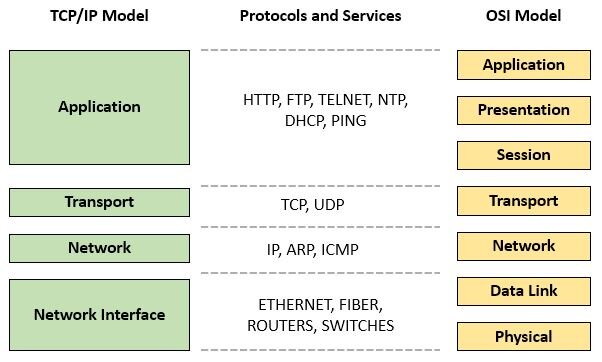
At the Transport layer, two protocols do most of the work: TCP and UDP.
Transmission Control Protocol (TCP) is like a registered letter. It's reliable and connection-oriented. Before sending any data, TCP establishes a connection, ensures all data arrives in the correct order, and checks for errors. It's used for things where accuracy is critical, like web browsing and email.
User Datagram Protocol (UDP) is more like a postcard. It's fast, simple, and connectionless. You just send the data and hope for the best. There's no guarantee of delivery or order. This makes it perfect for time-sensitive applications like video streaming or online gaming, where speed is more important than perfect reliability.
The Network's Hardware
Protocols are the rules, but physical devices do the actual work of moving data around. Different devices operate at different layers of the OSI model.
A switch connects devices on the same network. A router connects different networks together.
A switch is a smart device that operates at the Data Link layer (Layer 2). It forwards data packets to specific devices on a local network using their unique physical MAC addresses. This creates direct lines of communication between devices, reducing unnecessary traffic.
A router operates at the Network layer (Layer 3). Its job is to connect different networks and forward data between them based on their logical IP addresses. Your home router, for example, connects your local network (all your devices) to the internet (a global network).

A firewall is a security guard for your network. It sits between your internal network and an external one (like the internet), monitoring and filtering traffic based on a set of security rules. It can be a dedicated hardware device or a piece of software, but its goal is the same: block malicious traffic before it can do harm.
Addresses and Neighborhoods
Every device on a network needs a unique address, just like every house on a street. In networking, this is the IP address. It allows data to be sent to and from the correct device. The most common format you'll see is IPv4, which looks something like 192.168.1.101.
Sometimes, a single large network can become slow and congested. To fix this, we can divide it into smaller, more manageable networks called subnets. This process is called subnetting.
Subnetting is like dividing a large city into smaller zip codes. It makes mail delivery (data routing) much more efficient.
By creating subnets, you reduce unnecessary network traffic and improve performance. It also adds a layer of security, as you can contain a problem within a single subnet instead of letting it affect the entire network.
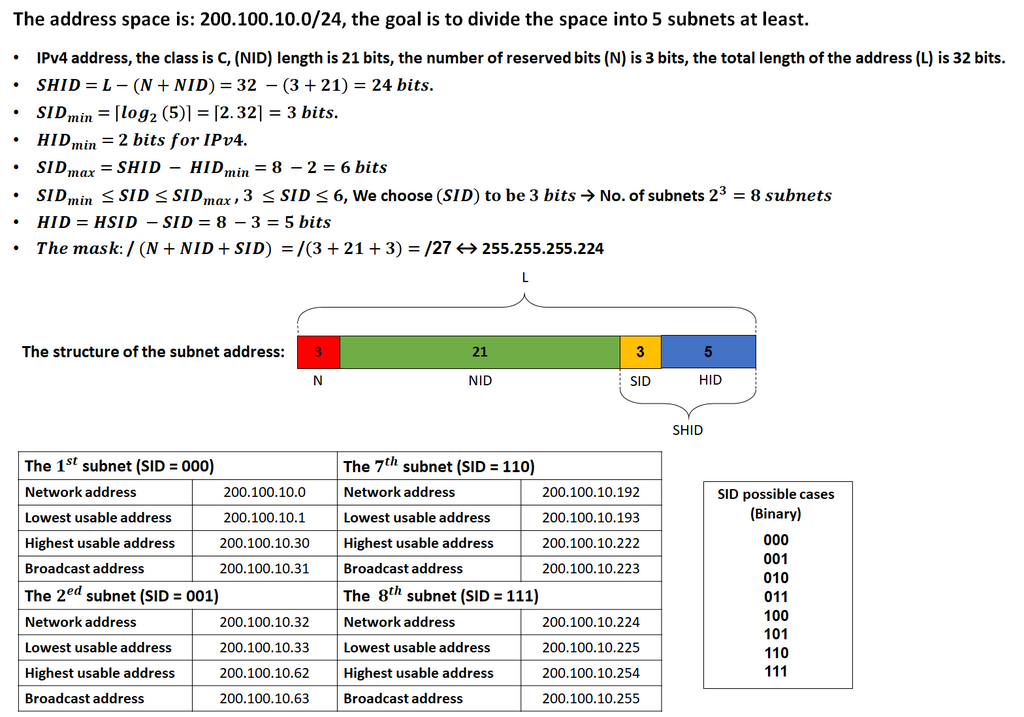
That covers the essential building blocks. Next, we'll put these pieces together to see how they form different network layouts.