CompTIA Network+
Networking Basics
What is a Network?
At its core, a computer network is just a group of two or more computers linked together. The whole point is to share things. This could be a file, an internet connection, or a piece of hardware like a printer.
Think of it like a conversation. If you're alone, you can't share ideas. But if you're in a room with other people, you can talk, pass notes, and work together. A network lets computers do the same thing. Instead of notes, they pass data. This simple idea powers everything from sharing a document in an office to streaming a movie from a server thousands of miles away.
The main purpose of a network is to enable communication and the sharing of resources between connected devices.
Networks Big and Small
Networks come in different sizes, depending on the area they cover. The three main types are LAN, WAN, and MAN.
A Local Area Network (LAN) is the most common type you'll encounter. It connects devices in a small, limited area, like your home, a single office building, or a school. Your home Wi-Fi is a perfect example of a LAN. It connects your phone, laptop, and smart TV so they can all share one internet connection.
A Wide Area Network (WAN) connects devices over a much larger geographical area, such as across cities, countries, or even continents. A WAN is essentially a network of networks; it links multiple LANs together. The internet is the biggest WAN of them all.
In between these two is the Metropolitan Area Network (MAN). As the name suggests, a MAN covers a geographic area larger than a LAN but smaller than a WAN, like a city or a large university campus. It might be used to connect the different office buildings of a company scattered across a city.
| Network Type | Scope | Example |
|---|---|---|
| LAN (Local Area Network) | Single building or room | Home Wi-Fi, office network |
| MAN (Metropolitan Area Network) | A city or large campus | A network connecting all city government buildings |
| WAN (Wide Area Network) | Large geographical area | The Internet |
The Network's Building Blocks
To build a network, you need some specialized hardware. Each piece has a specific job to do.
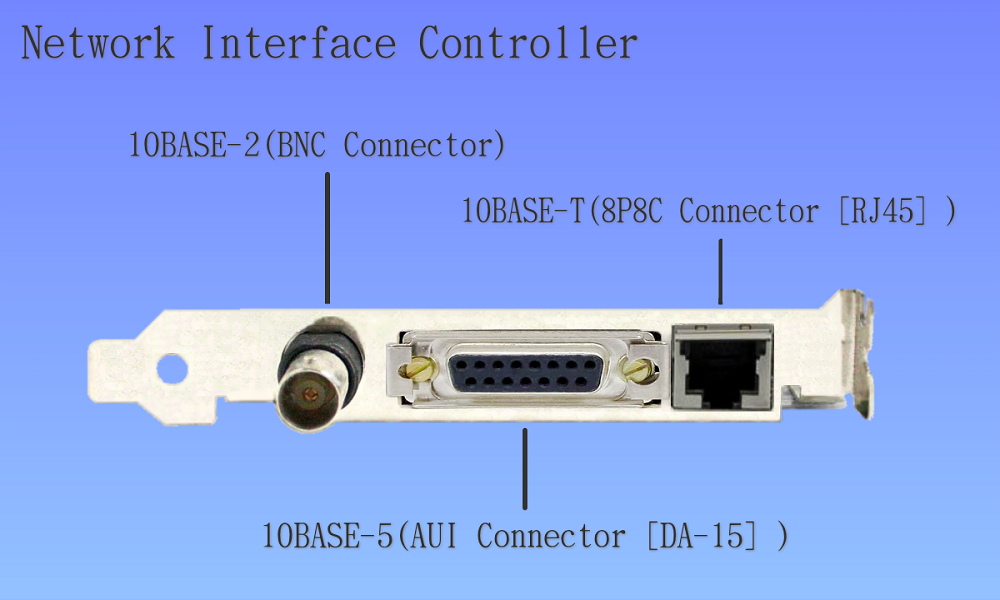
The journey starts with a Network Interface Card (NIC). This is a piece of hardware, usually built right into a computer's motherboard, that allows it to connect to a network. It's like a passport for your device; without it, you can't get on the network highway. It provides the physical connection, which could be an Ethernet port or a wireless antenna.
Once a device can connect, it needs a central point to plug into. In the past, this was often a hub. A hub is a simple device that takes any data it receives on one port and broadcasts it out to every other port. Imagine someone shouting in a crowded room—everyone hears it, whether the message was for them or not. This creates a lot of unnecessary traffic and is not very efficient.
Hubs have largely been replaced by switches. A switch is a smarter device. It knows which device is connected to each of its ports. When it receives a data packet, it reads the destination address and sends it only to the intended port. This is like a postal worker delivering a letter directly to the correct mailbox instead of shouting the contents to the whole street. Switches make the network faster and more secure.
Finally, there's the router. A router's job is to connect different networks together. Your home router, for instance, connects your private LAN to the public WAN of the internet. It acts as a traffic director, examining data packets and figuring out the best path for them to take to reach their final destination. It's what lets you send an email to a friend on the other side of the world.
Network Layouts
The physical or logical arrangement of a network—how all the devices are connected—is called its topology. Think of it as the network's floor plan. Different topologies have different strengths and weaknesses.
While there are several types, we'll look at four common ones: Bus, Ring, Star, and Mesh.
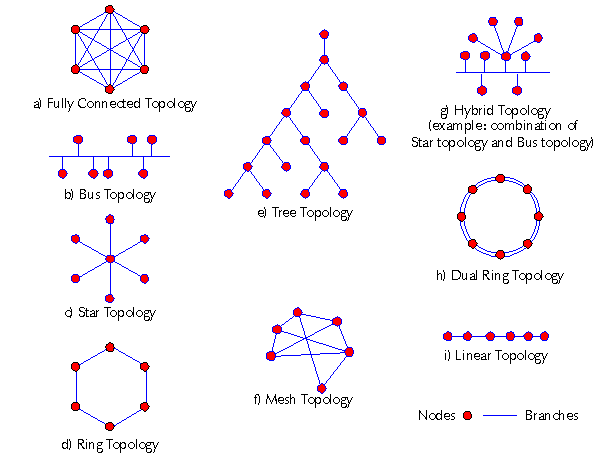
The Bus topology is an older design where all devices are connected to a single central cable, called the bus. It's simple and cheap to set up, but if that main cable fails, the entire network goes down.
In a Ring topology, devices are connected in a circle, with data traveling from one device to the next. This is more reliable than a bus, but adding or removing a device can disrupt the whole network.
Today, the Star topology is the most widely used layout for LANs. All devices connect to a central device, like a switch. It's reliable because if one computer's cable breaks, it doesn't affect the others. It's also easy to add new devices.
A Mesh topology is the most resilient. In a full mesh, every device is connected to every other device. This creates multiple paths for data to travel, so a single point of failure is very unlikely to bring the network down. This setup is complex and expensive, so it's often used for critical networks, like the backbones of the internet.
What is the primary function of a router in a computer network?
A company has several office buildings spread throughout a city. To connect them all into a single, cohesive network, they would most likely use a __________.