CompTIA Linux+ Essentials
Linux Basics
The Core of Linux
At the heart of every Linux system is the kernel. Think of it as the engine of a car. You don't see it when you're driving, but it's what makes everything else work. It's the core program that has complete control over the computer's hardware, acting as the bridge between your applications and the physical components like the CPU, memory, and storage devices.
At its core, Linux is a kernel—the core of an operating system that manages hardware resources (CPU, memory, storage) and enables communication between software and hardware.
kernel
noun
The central component of an operating system that manages the system's resources and the communication between hardware and software.
The kernel juggles several critical tasks:
- Process Management: It decides which programs get to use the CPU and for how long.
- Memory Management: It keeps track of what memory is in use and by which process, ensuring programs don't interfere with each other.
- Device Drivers: It acts as an interpreter between hardware (like your mouse or graphics card) and software, so they can understand each other.
- System Calls: It provides a way for applications to request services from the kernel, like reading a file or opening a network connection.
Without the kernel, your applications would have no way to access the hardware. It's the foundational layer that makes everything else possible.
From Power On to Prompt
When you turn on a Linux computer, it goes through a series of steps before you can log in. This is called the boot process. While it happens in seconds, it's a well-orchestrated sequence.
-
BIOS/UEFI: The first piece of software that runs is stored on a chip on the motherboard. It performs a Power-On Self-Test (POST) to check that your hardware is working correctly. Then, it finds and hands over control to the bootloader.
-
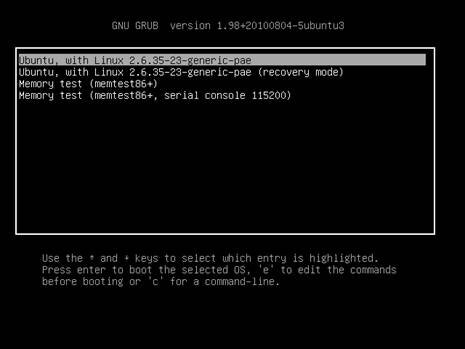
Bootloader: The bootloader's job is to load the Linux kernel into memory. The most common bootloader for Linux is GRUB (GRand Unified Bootloader). It often presents a menu allowing you to choose which operating system to boot if you have more than one installed.
-
Kernel Initialization: Once loaded, the kernel takes over. It initializes your hardware, like your disks and network card, by loading the necessary driver modules. It then mounts the root filesystem, which contains all the files for the operating system, making it available for use.
-
Init Process: The kernel starts the very first user-space process, called
init(orsystemdon most modern systems). This process is the ancestor of all other processes. It reads its configuration files and starts the essential system services needed to bring the computer to a fully functional state, finally presenting you with a login prompt.
Finding Your Way Around
Unlike some operating systems that store everything in one or two main folders, Linux organizes files in a standard, logical structure. This is defined by the Filesystem Hierarchy Standard (FHS). It ensures that no matter what Linux distribution you're using, you can reliably find files in the same places.
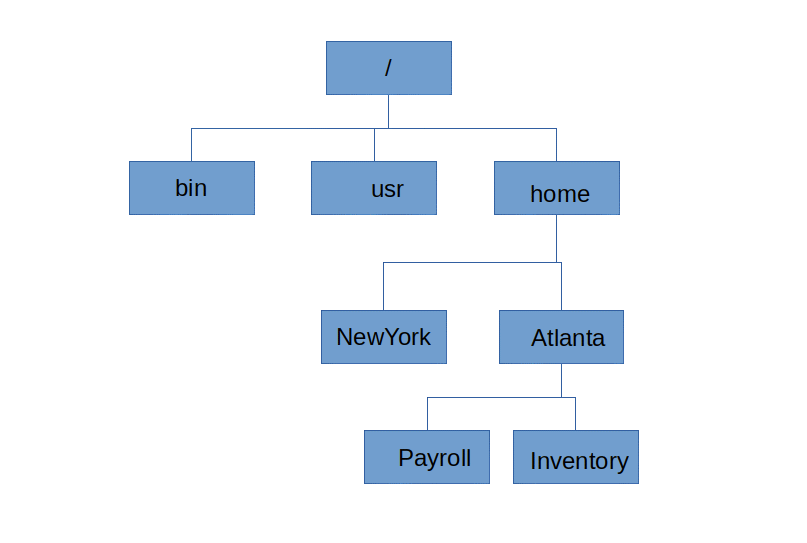
The entire filesystem starts from a single directory called the root, represented by a forward slash (/). Everything on your system is located under this directory. Here are some of the most important directories you'll encounter:
| Directory | Purpose |
|---|---|
/ | The root directory; the top of the filesystem hierarchy. |
/bin | Essential user command binaries (programs). |
/boot | Static files of the boot loader (kernel, initramfs). |
/dev | Device files, which represent hardware. |
/etc | Host-specific system configuration files. |
/home | User home directories. |
/lib | Essential shared libraries and kernel modules. |
/opt | Optional application software packages. |
/sbin | Essential system binaries (for system administration). |
/tmp | Temporary files. |
/usr | Secondary hierarchy for user data (programs, libraries). |
/var | Variable data files like logs, caches, and spools. |
Understanding this structure is fundamental to working with Linux. When a program is installed or a log file is created, the FHS dictates where it should go. This consistency makes managing the system much easier.
For example, if you're looking for the configuration file for a web server, you'd check
/etc. If you want to find a command likelsorcp, it will be in/bin.
Let's check your understanding of these core concepts.
What is the primary role of the Linux kernel?
Which of the following represents the correct order of the Linux boot process?
Grasping the roles of the kernel, the boot process, and the filesystem layout provides a solid foundation for mastering Linux.