CMS vs Design Tools
Introduction to CMS
What Is a CMS?
Imagine building a website from scratch. Every time you want to add a blog post or change a picture, you'd have to dive into the code. It’s like being a car owner who needs to be a mechanic just to add gas or change the radio station. It’s possible, but not very practical for most people.
A Content Management System, or CMS, solves this problem. It’s software that helps you create, manage, and publish digital content without needing to write code. It separates the content of a website—the text, images, and videos—from its underlying design and structure.
Think of it as a helpful layer between you and the complex code, giving you simple tools, like forms and buttons, to control your website's content.
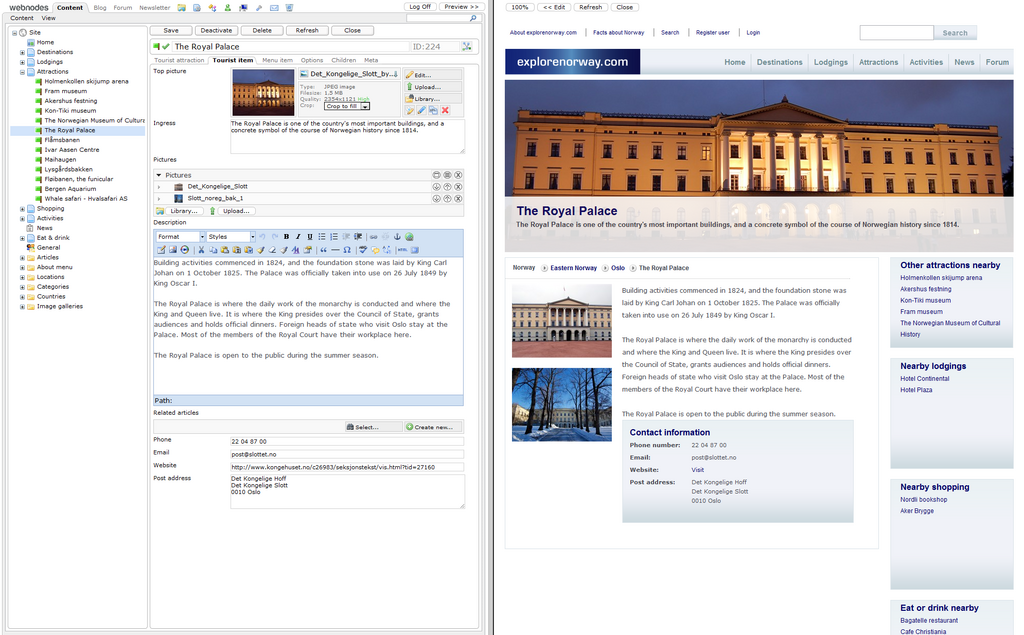
This separation is key. It allows writers, editors, and marketers to focus on what they do best: creating great content. Meanwhile, developers can focus on the site’s functionality and design without getting tangled up in daily content updates.
Core Features
While different CMS platforms have their own unique bells and whistles, most share a set of core functionalities. These are the essential tools that make managing a website straightforward.
| Feature | Description |
|---|---|
| Content Creation | Provides a user-friendly editor, often a "What You See Is What You Get" (WYSIWYG) interface, that feels like a word processor. |
| Content Editing | Allows users to easily update existing text, swap out images, or fix typos without touching any code. |
| Publishing Tools | Gives you control over when content goes live. You can save drafts, schedule posts for the future, or unpublish content. |
| User Management | Lets you assign different roles and permissions. An administrator might have full control, while a writer can only create and edit their own posts. |
| Media Library | A central place to upload, store, and organize all your media files, such as images, videos, and documents. |
| Version Control | Automatically saves previous versions of your content, so you can easily revert to an older draft if you make a mistake. |
The Upside of Using a CMS
Using a CMS offers some powerful advantages, especially for teams or individuals who want to maintain an active, dynamic website.
The most significant benefit is empowerment. A CMS democratizes website management. Team members without technical skills can make updates quickly and independently. A marketing team can launch a new landing page, or a writer can publish a timely article, without needing to wait for a developer. This speeds up workflows and makes the website a much more flexible tool.
Use a Content Management System (CMS): Utilize your CMS (e.g., WordPress, Drupal) effectively to manage and update content easily.
Another major plus is scalability. A good CMS can grow with you. Whether you have ten pages or ten thousand, the system provides a structured way to organize it all. Many platforms also support extensions or plugins, allowing you to add new features like e-commerce stores, forums, or advanced analytics as your needs evolve.
Potential Downsides
Of course, no tool is perfect. A CMS brings a few trade-offs that are important to consider.
Customization can sometimes be limited. Most CMS platforms rely on templates or themes to control the site's look and feel. While this makes it easy to get a professional-looking site up and running, achieving a truly unique or complex design can be challenging. Breaking out of the template's constraints might require specialized development skills, defeating some of the purpose of using a CMS in the first place.
Security is another critical consideration. Because popular CMS platforms power millions of websites, they are a common target for hackers. The core software and any third-party plugins or themes must be kept up-to-date to patch security vulnerabilities. Neglecting this maintenance can leave your site exposed to attacks.
Ready to check your understanding?
What is the primary function of a Content Management System (CMS)?
The key principle that allows a CMS to be so effective is the separation of ______.
A CMS is a powerful tool for managing a modern website, offering a balance of ease-of-use and robust features. By understanding its core functions, benefits, and limitations, you can make an informed decision about whether it's the right choice for your project.