CMS Languages Explained
Introduction to CMS
Managing Websites Without Code
In the early days of the web, creating or updating a website was a job for coders. Every page was a static file written in HTML. If you wanted to change a sentence or swap an image, you had to edit the code directly. This was slow, expensive, and required technical skill.
This created a bottleneck. Business owners, writers, and artists had content to share, but they had to rely on developers for every minor update. The solution was a tool that separated the content of a website from its underlying code. This tool is called a Content Management System, or CMS.
Content Management System
noun
A software application that allows users to create, manage, and modify content on a website without needing specialized technical knowledge.
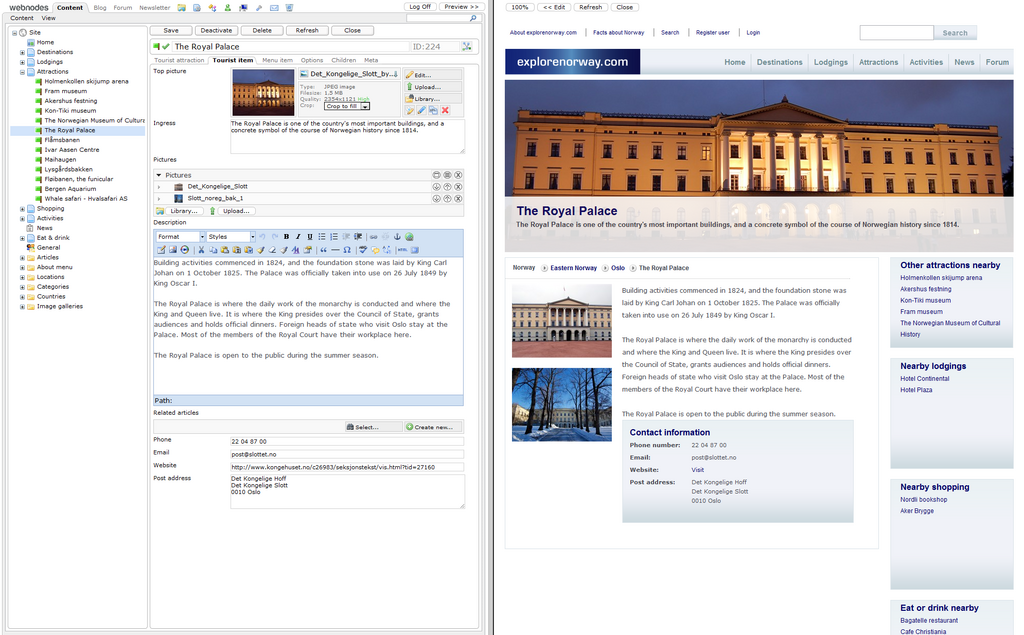
Think of a CMS as the administrative dashboard for your website. It provides an interface, often resembling a simple word processor, that lets you write articles, upload photos, and manage pages. The CMS handles the hard part, taking your content and displaying it within your site's design.
If the website will be managed by non-technical users (e.g., marketers or content creators), a CMS offers an easy-to-use interface for updating content without requiring coding knowledge.
Core Features
While different CMS platforms have unique strengths, most share a set of core features. These tools are what make them so powerful.
- Content Editor: This is the heart of a CMS. It's a user-friendly interface for creating and formatting text, embedding images, and adding links. It shields you from seeing any code.
- User Management: A CMS lets you create different user accounts with specific permissions. An editor might be able to write and publish articles, while a contributor can only write drafts. This is essential for teams.
- Themes & Templates: These control the visual design of your website. You can change your site's entire look and feel by switching themes, without ever touching your actual content.
- Plugins & Extensions: These are add-ons that extend your site's functionality. Need an online store, a contact form, or better security? There's likely a plugin for it.
Popular Platforms
The CMS landscape began to form in the late 1990s and early 2000s, leading to the powerful open-source platforms that dominate the web today. "Open-source" means the software is developed collaboratively and is free for anyone to use, modify, and distribute. Three names stand out.
| Platform | Best For | Key Characteristic |
|---|---|---|
| WordPress | Beginners, Bloggers, Small Businesses | Unmatched ease of use and a massive library of themes and plugins. |
| Joomla | Social Networks, E-commerce | A balance of user-friendliness and power, with more built-in features than WordPress. |
| Drupal | Governments, Large Enterprises | Extremely powerful, flexible, and secure, but has the steepest learning curve. |
WordPress started as a simple blogging platform in 2003 and has since grown to power a huge portion of the internet. Its success comes from its simplicity and vast ecosystem. Joomla and Drupal are known for handling more complex site structures and custom content types right out of the box.
Choosing a CMS often depends on the project's complexity. For a personal blog, WordPress is a clear choice. For a large university website with thousands of pages and user roles, Drupal might be a better fit.
Now that you know what a CMS is, you're ready to explore how they are built. Let's test your knowledge first.
What was the primary problem that led to the development of Content Management Systems (CMS)?
Which CMS feature is primarily responsible for controlling the website's visual design, such as colors, fonts, and layout?