Cloud Incident Response Fundamentals
Introduction to Cloud Computing
What Is Cloud Computing?
At its core, cloud computing means accessing computing services—like servers, storage, and software—over the internet instead of from a hard drive or server in your own building. Think of it like streaming a movie. You don't own the film, but you can watch it anytime you want through a service like Netflix. The movie itself lives on a massive, powerful server somewhere else.
Cloud computing is the delivery of computing services—including servers, storage, databases, networking, software, analytics, and intelligence—over the Internet to offer faster innovation, flexible resources, and economies of scale.
This model is defined by a few key characteristics:
- On-Demand Self-Service: You can get computing resources like server time or storage automatically, without needing to talk to anyone.
- Broad Network Access: You can access these services from anywhere with an internet connection, using a phone, laptop, or tablet.
- Resource Pooling: The provider's resources are shared among many customers. You don't know or care exactly where your data is stored; you just know it's safe and accessible.
- Rapid Elasticity: You can quickly scale your resources up or down based on your needs. If your website suddenly gets a surge in traffic, you can add more server capacity in minutes.
- Measured Service: You only pay for what you use. Cloud systems automatically control and optimize resource use, and you get a bill for your specific consumption, much like a utility bill for electricity or water.
The Service Models
Cloud computing isn't a one-size-fits-all solution. It comes in three main service models, each offering a different level of control and management. A popular way to understand them is the "pizza as a service" analogy.
Infrastructure as a Service (IaaS) This is the most basic level. The cloud provider gives you access to fundamental computing resources like servers, storage, and networking. You're responsible for managing the operating system, applications, and data. It's like being handed the keys to a professional kitchen: you get the ovens, counters, and raw ingredients, but you have to make the pizza yourself.
Platform as a Service (PaaS) Here, the provider manages the underlying infrastructure and the operating systems and development tools. You just focus on building and running your applications. This is like ordering a take-and-bake pizza. The dough, sauce, and cheese are already prepared; you just pop it in your oven at home.
Software as a Service (SaaS) This is the most common model. The provider delivers a complete software application over the internet. You just log in and use it. Think of Gmail, Dropbox, or Salesforce. This is like going to a restaurant and ordering a pizza. You just sit down and eat; the restaurant handles everything from cooking to cleanup.
Where Does the Cloud Live?
Just as there are different service models, there are different ways to deploy cloud resources. These are known as deployment models.
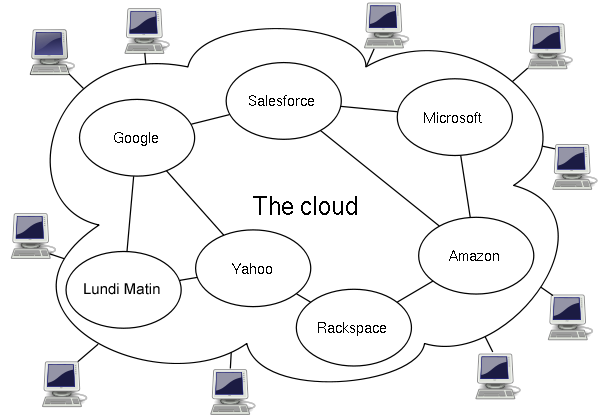
Public Cloud This is the most common deployment model. The cloud infrastructure is owned and operated by a third-party provider (like Amazon Web Services, Google Cloud, or Microsoft Azure) and made available to the general public over the internet. All hardware, software, and other supporting infrastructure is owned and managed by the cloud provider. You share these resources with other organizations, a concept known as a multi-tenant environment.
Private Cloud In this model, the cloud infrastructure is operated exclusively for a single organization. It can be managed by the organization itself or a third party and may exist on-premise or off-premise. A private cloud offers more control and security but comes at a higher cost and requires more maintenance.
Hybrid Cloud As the name suggests, a hybrid cloud combines public and private clouds. It allows data and applications to be shared between them. This model gives organizations greater flexibility and more deployment options. For example, a company might use its private cloud for sensitive data while using the public cloud for less critical workloads or to handle spikes in demand.
Benefits and Challenges
Why do so many organizations move to the cloud? The benefits are significant.
| Benefit | Description |
|---|---|
| Cost Savings | Eliminates the need to buy and maintain your own hardware, reducing capital expenses. |
| Scalability | Easily increase or decrease resources based on business demand. |
| Performance | Major cloud providers have a global network of secure data centers, offering better performance and lower latency. |
| Speed & Agility | Resources are available in minutes, allowing teams to innovate and develop faster. |
| Reliability | Cloud providers offer data backup, disaster recovery, and data replication, making business continuity easier and less expensive. |
However, cloud computing also presents challenges. Handing over your data and infrastructure to a third party can create new complexities. Concerns often revolve around security, managing costs, and having the right expertise to manage a cloud environment effectively. Governance and compliance can also be tricky, as regulations may vary depending on where data is physically stored.
Understanding these foundational concepts—what the cloud is, how it's delivered, and where it lives—is the first step in navigating both its immense potential and its unique challenges.
Ready to test your knowledge? Take a shot at these questions.
A small startup wants to launch a new mobile application. They don't have a large IT team and want to focus solely on writing code for their app, without worrying about managing the underlying operating systems or servers. Which cloud service model would be the best fit for their needs?
Which of the following is NOT one of the five essential characteristics of cloud computing?
With these fundamentals in place, you're ready to explore how to operate securely within these powerful and dynamic environments.