Cloud Computing Fundamentals
Introduction to Cloud Computing
What Is Cloud Computing?
Think about the photos on your phone. Years ago, if your phone ran out of space, you had to delete photos or transfer them to a physical hard drive. Today, you can store them in services like Google Photos or iCloud. You don't own the server where the photos are stored, but you can access them anytime, from any device with an internet connection.
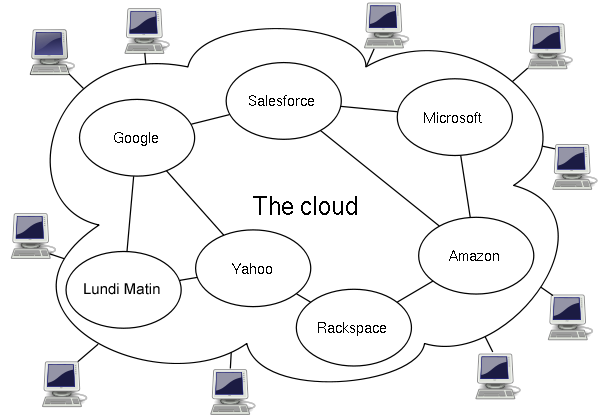
That's the basic idea of cloud computing. It’s the delivery of computing services—like servers, storage, databases, and software—over the internet. Instead of owning and maintaining your own computing infrastructure, you can access these services from a cloud provider like Amazon Web Services (AWS), Google Cloud, or Microsoft Azure.
Simply put, cloud computing involves the delivery of IT services such as servers, databases, storage, applications, and networking ‘on the cloud’ or over the internet with the help of a Cloud services provider.
This shift frees companies from the expensive and complex task of managing their own hardware and software. They can rent the resources they need, when they need them.
From Server Rooms to the Cloud
Before the cloud became widespread, companies had to run their applications on their own physical servers. This meant buying expensive hardware, setting it up in a dedicated room (often called a server room or data center), and hiring a team to maintain it all.
This traditional approach had several major drawbacks:
- High Upfront Costs: Buying servers, networking equipment, and software licenses required a huge initial investment.
- Slow Deployment: Getting a new server up and running could take weeks or even months.
- Capacity Guessing Games: Companies had to predict their future needs. If they bought too much hardware, it would sit idle, wasting money. If they bought too little, their websites or applications could crash during traffic spikes.
Imagine a retail business. They had to buy enough servers to handle the massive traffic of Black Friday, even though that hardware would be underused for the other 364 days of the year. It was inefficient and expensive.
Cloud computing flipped this model on its head. It introduced the idea of treating computing power like a utility. Just as you don't build your own power plant to get electricity, you no longer need to build your own data center to run your applications.
The Five Pillars of the Cloud
Not every service offered over the internet is technically “cloud computing.” The National Institute of Standards and Technology (NIST) defines five essential characteristics that a service must have to be considered a true cloud service.
1. On-Demand Self-Service You can provision computing resources, like server time or network storage, automatically without needing to interact with a human at the service provider. Think of it like using a vending machine instead of going to a cashier.
2. Broad Network Access Services are available over the network and can be accessed through standard mechanisms by a wide variety of devices, such as mobile phones, tablets, laptops, and workstations.
3. Resource Pooling The provider's computing resources are pooled to serve multiple customers using a multi-tenant model. Resources are dynamically assigned and reassigned according to demand. You generally have no control or knowledge over the exact location of the provided resources but can specify location at a higher level of abstraction (e.g., country, state, or datacenter).
4. Rapid Elasticity Resources can be rapidly and elastically provisioned, in some cases automatically, to quickly scale out, and rapidly released to quickly scale in. To the customer, the capabilities available for provisioning often appear to be unlimited and can be purchased in any quantity at any time.
5. Measured Service Cloud systems automatically control and optimize resource use by leveraging a metering capability. Resource usage can be monitored, controlled, and reported, providing transparency for both the provider and consumer of the utilized service. You only pay for what you use.
Benefits and Challenges
Adopting the cloud offers significant advantages, but it's not without its own set of challenges. Understanding both sides is key to making smart decisions.
| Benefits | Challenges |
|---|---|
| Cost Savings: Pay only for what you use, avoiding large capital expenses on hardware. | Security and Privacy: Entrusting sensitive data to a third party requires careful management. |
| Scalability: Easily scale resources up or down to match business needs instantly. | Complexity: Managing cloud environments can be complex and require new skills. |
| Agility and Speed: Provision new resources in minutes, allowing for faster innovation. | Vendor Lock-in: Migrating from one cloud provider to another can be difficult and costly. |
| Global Reach: Deploy applications in multiple geographic locations easily. | Controlling Costs: The pay-as-you-go model can lead to unexpected bills if not monitored closely. |
These core concepts form the foundation of everything we build in the cloud. They explain why cloud computing has become the dominant model for delivering technology services for businesses of all sizes.