Cloud Computing Essentials
Introduction to Cloud Computing
What Is Cloud Computing?
Think about how you listen to music. A decade ago, you probably owned physical CDs or downloaded MP3 files to your personal computer. Your music library was tied to a specific device. Today, you likely use a streaming service like Spotify or Apple Music. Your songs aren't stored on your phone; they live on massive, powerful computers owned by those companies, and you access them over the internet.
That's the basic idea of cloud computing. It's about accessing computing resources—like servers, storage, databases, and software—over the internet instead of hosting them on your own physical hardware.
Cloud computing is the delivery of computing services—servers, storage, databases, networking, software, analytics, and intelligence—over the internet (“the cloud”).
Before the cloud, if a company wanted to launch a new website, they had to buy physical servers, install them in a dedicated room, set up networking, and manage all the software. It was expensive, slow, and required a lot of upfront planning. Cloud computing turns this model on its head. Instead of owning the computing infrastructure, you rent it from a cloud provider.
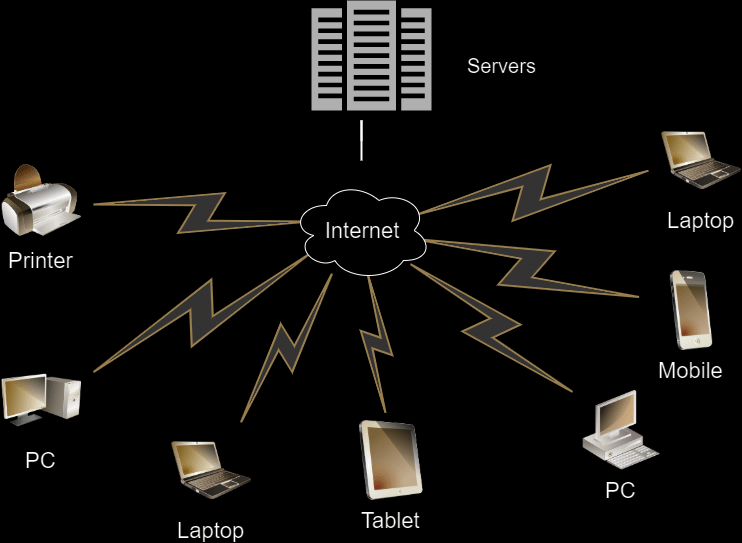
The Five Essential Traits
What really separates cloud computing from traditional hosting? The U.S. National Institute of Standards and Technology (NIST) defines it by five essential characteristics. These traits are the core of what makes the cloud so powerful.
1. On-Demand Self-Service You can access computing resources like server time or network storage automatically, without needing human interaction with the service provider. Think of it like a vending machine for computing power.
2. Broad Network Access Services are available over the network and can be accessed through standard devices like mobile phones, tablets, laptops, and workstations. If you have an internet connection, you can access the cloud.
3. Resource Pooling The provider's computing resources are pooled to serve multiple customers using a multi-tenant model. Physical and virtual resources are dynamically assigned and reassigned according to demand. You don't know (or need to know) the exact location of the server running your application, you just know it's running.
4. Rapid Elasticity You can scale resources up or down quickly, and in some cases, automatically. If your website suddenly gets a huge spike in traffic, the cloud can automatically provide more server power to handle it. When traffic dies down, it scales back down.
5. Measured Service Cloud systems automatically control and optimize resource use by leveraging a metering capability. Resource usage can be monitored, controlled, and reported, providing transparency for both the provider and the consumer. You only pay for what you use, like an electricity bill.
Cloud Service Models
Cloud computing isn't a one-size-fits-all solution. It's offered in three main service models, each representing a different level of management and control. A good way to understand them is by thinking about building a house.
| Service Model | Analogy | What You Manage | What Provider Manages |
|---|---|---|---|
| IaaS | Buying Land | The house, foundation, plumbing, electricity | The land itself |
| PaaS | Buying a Framed House | Interior design, furniture, appliances | Land, foundation, walls, roof |
| SaaS | Renting a Furnished Apartment | Your personal belongings | Everything else, including maintenance |
Infrastructure as a Service (IaaS) This is the most basic category. You rent IT infrastructure—servers, storage, and networking—from a cloud provider. It’s like being given a plot of land and raw building materials. You have the most control but also the most responsibility.
Platform as a Service (PaaS) This model provides an on-demand environment for developing, testing, delivering, and managing software applications. It’s like buying a pre-built house frame. The provider manages the underlying infrastructure, so developers can focus on building their apps without worrying about operating systems or server maintenance.
Software as a Service (SaaS) This is a method for delivering software applications over the Internet, on demand and typically on a subscription basis. This is the furnished apartment you rent. The provider handles everything, from the hardware to the software itself. Common examples include email services like Gmail or productivity tools like Google Docs.
Cloud Deployment Models
Finally, where does the cloud infrastructure live? The answer determines the deployment model. There are four main types.
Public Cloud: The cloud infrastructure is owned and operated by a third-party cloud service provider (like Amazon Web Services or Google Cloud) and delivered over the internet. This is the most common type.
Private Cloud: The cloud infrastructure is used exclusively by a single business or organization. It can be physically located in the company’s on-site data center or hosted by a third-party service provider.
Hybrid Cloud: This model combines public and private clouds, bound together by technology that allows data and applications to be shared between them. It gives businesses greater flexibility and more deployment options.
Community Cloud: A less common model where cloud infrastructure is shared by several organizations and supports a specific community that has shared concerns (e.g., mission, security requirements, policy, and compliance considerations).
Understanding these fundamental concepts—the five traits, the service models, and the deployment models—is the first step to understanding how cloud computing has reshaped our digital world.
Which of the following best describes the core concept of cloud computing?
A popular e-commerce website experiences a massive surge in traffic during a holiday sale. The website's performance remains stable because it automatically acquires more server capacity to handle the load and releases it when the sale is over. Which essential cloud characteristic does this scenario best illustrate?