Cloud Application Integration
Introduction to Cloud Integration
What is Cloud Integration?
Think of your different cloud applications as people in a multinational team. Your sales app speaks French, your marketing app speaks Japanese, and your finance app speaks Spanish. On their own, they're great at their jobs, but they can't collaborate effectively because they don't share a common language.
Cloud integration is the universal translator. It’s the process of connecting different cloud-based applications, services, and data sources so they can share information and work together as a unified system. It's not about replacing these tools, but about building bridges between them.
Essentially, cloud integration breaks down the walls between your software, allowing data to flow freely and automatically where it's needed most.
Why It's Essential Today
Businesses today rarely rely on a single, all-in-one software solution. Instead, they use a collection of specialized tools. There might be one for customer relationship management (CRM), another for human resources, a third for project management, and several more for marketing, analytics, and communication. This is often called a 'best-of-breed' approach.
The problem? Without integration, each of these tools becomes an isolated island of data, or a 'data silo.' Information gets trapped. Employees have to manually copy data from one system to another, which is slow, tedious, and prone to errors. Decisions are made with an incomplete picture because relevant data is scattered across different platforms.
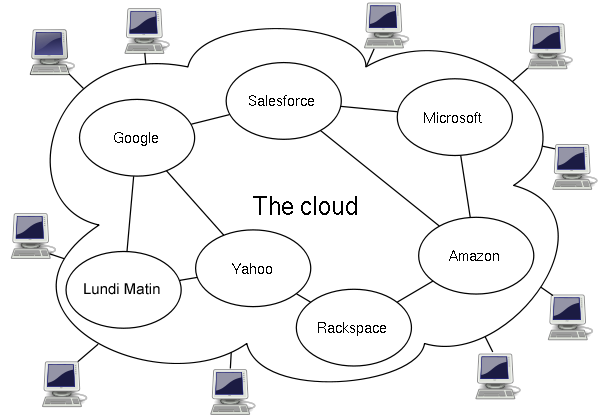
Effective cloud integration dismantles these silos. It creates a seamless digital ecosystem where information from different parts of the business is synchronized and accessible. This leads to more efficient workflows, a single source of truth for data, and a clearer, more holistic view of the entire organization.
Common Integration Scenarios
Cloud integration isn't just a theoretical concept. It powers everyday business processes that make companies run smoother. Here are a few practical examples.
| Scenario | Before Integration (Manual) | After Integration (Automated) |
|---|---|---|
| E-commerce Sale | An employee manually enters new customer and order details from the online store into the inventory and shipping systems. | A new order automatically updates inventory levels, notifies the warehouse for shipping, and adds the customer to a marketing list. |
| New Sales Lead | A salesperson copies a new lead's information from a website form into the company's CRM software. | The website form submission instantly creates a new lead record in the CRM, assigned to the correct salesperson. |
| Employee Onboarding | An HR manager sends emails to IT and department heads to create accounts and grant access for a new hire. | Adding a new hire in the HR system automatically creates their email account, adds them to company chat, and enrolls them in training. |
Challenges and Benefits
Connecting disparate cloud services isn't always straightforward. Each application has its own set of rules for communication, known as an Application Programming Interface (API). They may also store and format data differently. A customer's name might be a single field in one system ("Jane Doe") but two separate fields in another ("First Name: Jane", "Last Name: Doe").
Security is another major consideration. When you create pathways for data to move between systems, you must ensure those pathways are secure and that only authorized information is shared. Managing all these different connections can become complex as a company grows and adopts more tools.
Despite the challenges, the benefits of a well-executed integration strategy are transformative. Businesses that connect their cloud services effectively are more agile, efficient, and data-driven.
The key benefits include:
- Increased Productivity: Automating data transfer frees up employees from repetitive manual tasks, allowing them to focus on more strategic work.
- Improved Data Accuracy: Automation eliminates the human errors that come with manual data entry, leading to more reliable and trustworthy information.
- Enhanced Business Agility: With integrated systems, businesses can react faster to market changes, customer needs, and new opportunities. Workflows are streamlined, and decisions can be made more quickly with access to real-time, comprehensive data.
- Better Customer Experience: When sales, support, and marketing systems are connected, a company has a complete 360-degree view of its customers. This allows for more personalized communication and faster, more effective service.
Ready to check your understanding of these core concepts?
What is the primary goal of cloud integration?
Without integration, information can get trapped in isolated systems. What is the common term for these isolated systems?
Understanding these fundamentals is the first step. By seeing your cloud tools not as separate entities but as parts of a connected whole, you can unlock their true potential.