Claude Codec Explained
Introduction to Data Compression
Making Data Smaller
Every time you stream a movie, send a photo, or download a song, you're using data compression. It's the process of encoding information using fewer bits than the original representation. Essentially, it’s a way to shrink files.
Why bother? Smaller files are faster to send over the internet and take up less storage space on your devices. Without compression, streaming high-definition video would be nearly impossible for most internet connections, and your phone would run out of space after just a few pictures.
Think of it like packing a suitcase. You can either carefully fold and roll your clothes to fit more in, or you can just bring the essentials and leave some items behind. Data compression works in a similar way, using two main strategies: one that keeps everything perfectly intact, and one that's willing to sacrifice a little detail to save a lot of space.
Lossless vs. Lossy
The two primary types of compression are lossless and lossy. The one you use depends entirely on what you're trying to compress.
Lossless compression allows the original data to be perfectly reconstructed from the compressed data. Not a single bit is lost.
This method is crucial for things where every detail matters, like text documents, computer code, or certain types of medical images. A ZIP file is a common example of lossless compression. It finds repetitive patterns in the data and creates a shorthand to represent them. When you unzip the file, the process is reversed, and you get the exact original files back.
For example, instead of storing "AAAAA", a lossless algorithm might store "5A". The original information is preserved, just stored more efficiently.
Lossy compression permanently removes some data. The original can't be perfectly recovered, but the difference is often unnoticeable.
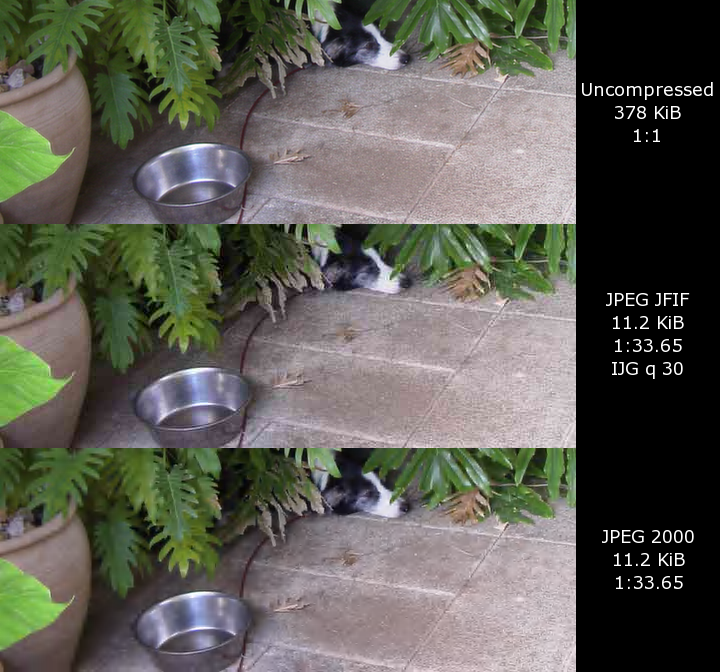
This is the go-to method for media files like photos, videos, and music. Our eyes and ears aren't perfect, so we can get away with throwing out information that we're unlikely to perceive. A JPEG image, for instance, discards subtle color information that the human eye isn't sensitive to. This allows for much higher compression ratios than lossless methods.
The trade-off is a small loss in quality, which can become more obvious if the file is compressed too much.
How It Works
Many different algorithms power data compression. One of the foundational ideas in lossless compression is Huffman coding. It works by assigning shorter codes to characters or symbols that appear more frequently and longer codes to those that appear less frequently.
Imagine the text "go go gophers". The letter 'g' and 'o' appear often, while 'p', 'h', 'e', 'r', and 's' appear only once. Huffman coding would give 'g' and 'o' very short binary codes, and the other letters longer ones, resulting in a smaller overall file size.
For video and audio, compression relies on standards that combine multiple techniques. The MPEG (Moving Picture Experts Group) series is a famous example. MPEG standards use sophisticated methods to reduce data, like predicting motion between video frames. If a background is static for several seconds, the system doesn't need to store it over and over again. It just stores it once and notes that it doesn't change for a while. This, combined with lossy compression of individual frames, makes modern video streaming possible.
Ready to check your understanding?
What is the primary goal of data compression?
Which of the following file types would be the most appropriate candidate for lossy compression?
Understanding these core ideas of compression is the first step toward grasping how digital media is stored, shared, and consumed.