Class 7 Computing Week One Instructional Roadmap
Modern System Architecture
The Computer's Blueprint
You know that a computer is made of parts like a CPU, memory, and storage. But how do they work together? It’s not just a random collection of components; it’s a system designed around a classic blueprint called the Von Neumann architecture.
Think of it like a kitchen. You have your ingredients (input), a countertop to work on (memory), a chef to do the work (CPU), and the finished meal (output). Every computer, from your phone to a supercomputer, follows this fundamental pattern of taking in data, processing it, and sending it back out.
While this blueprint is old, it’s not outdated. Modern systems are just a supercharged version of it. The chef is faster, the countertop is bigger, and the connections between them are like a futuristic highway system.
The CPU's Internal Team
The CPU, or Central Processing Unit, is the engine of the computer. It doesn't work alone, though. Inside, it has two key specialists: the Control Unit (CU) and the Arithmetic Logic Unit (ALU).
The Control Unit (CU) is the project manager. It fetches instructions from memory, decodes them, and directs all the other components. It tells the memory what data to send, instructs the ALU what calculation to perform, and routes the result to the right place. It doesn't do the math itself, but it ensures everything happens in the right order and at the right time.
The Arithmetic Logic Unit (ALU) is the mathematician. It handles all calculations—addition, subtraction, multiplication—and logical comparisons, like checking if one number is greater than another. The CU gives the ALU its tasks, and the ALU crunches the numbers.
Think of it this way: when you click a button to open a game, the CU is what finds the game's code. It then sends specific instructions, like 'calculate character position,' to the ALU to execute.
The Data Superhighway
All these parts need to communicate, and they do it through the motherboard. The motherboard is a giant circuit board with built-in pathways called buses. These are the computer's nervous system, carrying information between every component.
There are three main types of buses:
- Address Bus: When the CPU needs data from RAM, it sends the memory address (like a street address) along this bus.
- Data Bus: This is the highway the actual data travels on, moving between the CPU, RAM, and other components.
- Control Bus: This carries commands from the CU and signals from other devices to keep everything in sync.
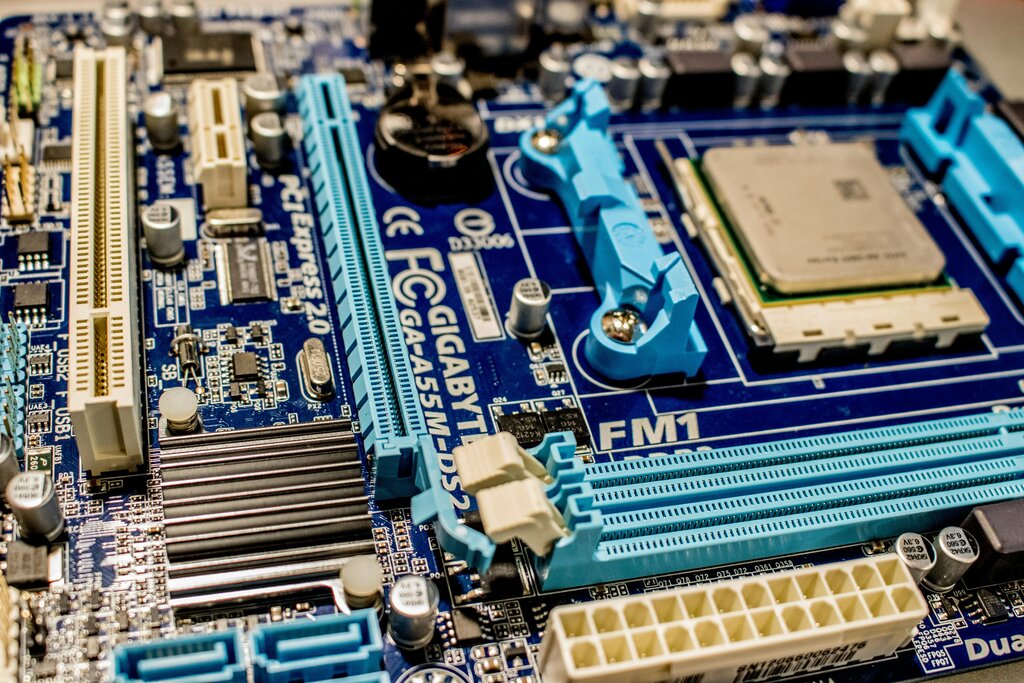
The speed of these buses is critical. The bus width determines how much data can be sent at once, like the number of lanes on a highway. A 64-bit bus can carry twice as much data in one go as a 32-bit bus. The speed is also measured in clock cycles, which is how many times per second the system can send a batch of data. More lanes and faster cycles mean a quicker computer.
Connecting the Components
Buses are the general pathways, but specific devices connect to the motherboard through specialized ports or slots. These interfaces are designed for different speeds and purposes.
SATA (Serial ATA) has long been the standard for connecting storage drives like hard disk drives (HDDs) and older solid-state drives (SSDs). It’s reliable but slower than modern alternatives.
PCIe (Peripheral Component Interconnect Express) is a much faster, more versatile interface. It's used for high-performance components like graphics cards, which need to transfer huge amounts of data very quickly. A graphics card might use a PCIe x16 slot, which means it has 16 data lanes for maximum speed.
NVMe (Non-Volatile Memory Express) is a protocol, not a physical slot, designed specifically for modern SSDs. It allows an SSD to communicate directly with the CPU over the PCIe bus, bypassing the slower SATA interface. This makes NVMe SSDs incredibly fast, perfect for loading operating systems and games almost instantly.
| Interface | Used For | Speed Analogy |
|---|---|---|
| SATA | HDDs, older SSDs, optical drives | A city street |
| PCIe | Graphics cards, network cards, NVMe SSDs | A multi-lane highway |
| NVMe | High-speed SSDs | A direct maglev train |
This leads to important trade-offs. An HDD connected via SATA is cheap and offers lots of storage, but it's slow because it has mechanical moving parts. An NVMe SSD is much more expensive per gigabyte but offers blazing-fast speeds that can dramatically improve your computer's responsiveness. The 'path of a click' is much shorter and faster when your data is on an NVMe drive.
Keeping it Cool
All this high-speed data transfer generates a lot of heat. The CPU and graphics card can get especially hot when they're working hard. If they get too hot, they will automatically slow down to protect themselves from damage. This is called thermal throttling.
To prevent this, computers use thermal management systems. This usually includes heatsinks (metal fins that draw heat away) and fans that blow cool air over them. In high-performance gaming PCs, you might even see liquid cooling systems, which use water to transfer heat even more efficiently. Good airflow and cooling are essential for getting the maximum performance out of your components.
What is the fundamental blueprint for modern computers, which organizes them into a system of input, processing, memory, and output?
In a CPU, the ________ is the 'project manager' that fetches and decodes instructions, while the ________ is the 'mathematician' that performs calculations.
So, a computer isn't just a collection of parts, but a carefully balanced system. The speed of the CPU, the width of the buses, the type of storage interface, and even the cooling system all work together to determine how fast and efficiently your computer can turn a click into an action.