Cisco Switching and Routing Mastery
Networking Fundamentals
A Tale of Two Models
When computers talk to each other, it’s not magic. It’s a highly organized process, much like a global postal service. To make sure every computer, from any manufacturer, can communicate, engineers created standardized frameworks. The two most important ones are the OSI and TCP/IP models.
Think of them as blueprints for communication. They break down the complex task of sending information across a network into smaller, manageable steps called layers. Each layer has a specific job and only talks to the layers directly above and below it.
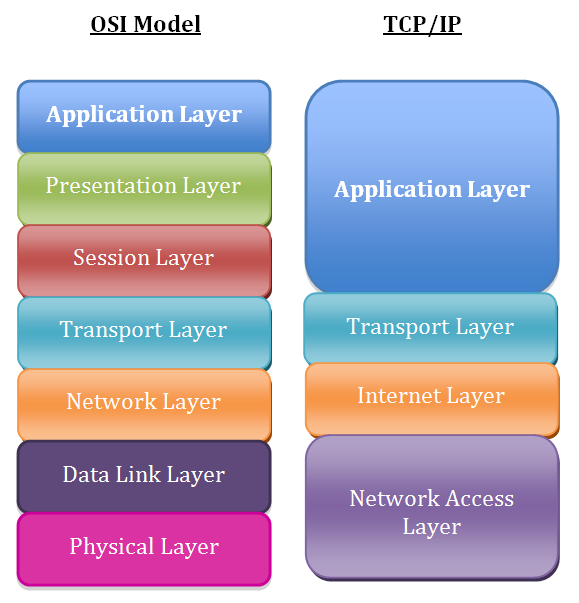
The Open Systems Interconnection (OSI) model has seven layers. It's a great theoretical guide for understanding how networks work, from the physical wires to the applications you use. The TCP/IP model is a more streamlined, four-layer version that the modern internet is actually built on.
Here’s a quick look at the TCP/IP layers:
- Link Layer: This is the physical layer. It deals with the hardware that sends signals, like Ethernet cables or Wi-Fi radios.
- Internet Layer: This layer’s job is to move data packets across networks. It uses Internet Protocol (IP) addresses to figure out the best path for data to travel.
- Transport Layer: This layer ensures data arrives reliably and in the right order. It uses protocols like TCP (Transmission Control Protocol), which is careful and checks for errors, and UDP (User Datagram Protocol), which is faster but less reliable.
- Application Layer: This is the layer you interact with. It includes protocols like HTTP for web browsing and SMTP for email.
IP Addresses and Subnets
Every device connected to the internet needs a unique identifier, just like every house needs a mailing address. This is its IP address. An IP address allows data to be sent to and from the correct device.
The most common format you'll see is IPv4, which looks like this: 192.168.1.101. It’s made of four numbers, each ranging from 0 to 255.
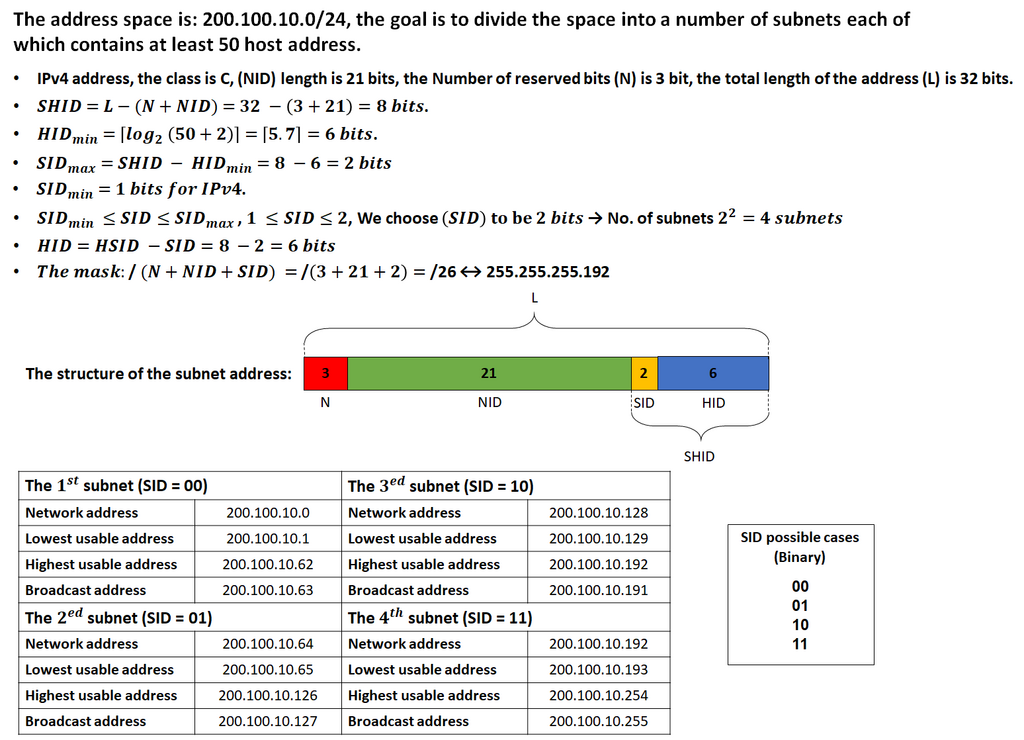
A single network can have thousands of devices. To keep things organized and efficient, networks are often broken down into smaller mini-networks called subnets. This process is called subnetting. It helps reduce network traffic and makes the network easier to manage.
Subnetting works by using a 'subnet mask'. A subnet mask, like 255.255.255.0, tells a device which part of the IP address is the network's address and which part identifies the specific device (the host).
Think of it this way: An IP address is like a full street address. The subnet mask separates the street name (the network) from the house number (the host).
Let's see it in action. An IP address is a 32-bit number. The subnet mask also has 32 bits. Where the mask has a '1', that part of the IP address belongs to the network. Where it has a '0', that part belongs to the host.
For an IP address 192.168.1.101 and a mask 255.255.255.0:
- IP Address (Binary):
11000000.10101000.00000001.01100101 - Subnet Mask (Binary):
11111111.11111111.11111111.00000000
The first three sections (octets) define the network, which is 192.168.1. The last section, 101, is the host ID on that network. All devices on this subnet will have an IP address that starts with 192.168.1.
Network Layouts
How you connect devices together physically and logically is called network topology. The layout you choose affects a network's cost, reliability, and speed. There are several basic types, each with its own strengths and weaknesses.
Here are the most common topologies:
- Bus Topology: All devices are connected to a single central cable, called the bus. It’s simple and cheap to set up, but if the main cable fails, the entire network goes down. It's an older design and not commonly used today.
- Ring Topology: Devices are connected in a circle. Data travels in one direction from device to device until it reaches its destination. A single cable break can disrupt the whole network, though some more advanced ring networks can handle this.
- Star Topology: This is the most common topology in modern networks. All devices are connected to a central device, like a switch or a hub. It’s reliable because if one cable fails, only that one device is affected. However, if the central hub fails, the network goes down.
Now that you have a grasp of the basic models, addressing schemes, and layouts, let's test your knowledge.
Which layer of the TCP/IP model is responsible for routing data packets across different networks using IP addresses?
What is the primary function of a subnet mask?
Understanding these core concepts is the first step toward mastering how networks operate. They provide the foundation for everything from a simple home Wi-Fi setup to the complex infrastructure of the entire internet.