Cisco CCNA Networking Fundamentals
Network Fundamentals
Building Blocks of a Network
Every network, from the one in your home to the global internet, is built from specialized components. Each piece has a specific job, and they all work together to move data from point A to point B.
Let's break down what each of these components does.
Endpoints and Servers: These are the start and end points of network communication. An endpoint is any device you interact with, like your laptop, smartphone, or smart TV. A server is a powerful computer that provides data or services to other devices, like hosting a website or storing files.
Switches: Think of a switch as a traffic controller for a local neighborhood (your local network). It connects multiple devices, such as computers and printers, and forwards data only to the specific device that needs it. This creates efficient, direct lines of communication.
Routers: While a switch manages traffic within one network, a router connects different networks together. It's like the postal service for data, figuring out the best path to send information from your local network to another one, like the internet.
Firewalls: A firewall is the network's security guard. It sits between your trusted internal network and an untrusted outside network (like the internet), monitoring all incoming and outgoing traffic. It blocks malicious data based on a set of security rules, protecting you from threats.
Access Points (APs): These devices allow others to connect to the network wirelessly. Your home Wi-Fi router is actually a combination of a router, a switch, and an access point all in one box. In larger business networks, APs are standalone devices managed centrally.
Controllers: In modern networks with many switches and APs, a controller acts as a central brain. It allows administrators to manage, configure, and monitor all the network devices from a single place, which is far more efficient than logging into each device individually.
Network Blueprints
Just as a building needs an architectural plan, a network needs a logical structure. This is called a network topology. The topology defines how all the components are connected and how data flows between them.
| Topology | Best For | Key Idea |
|---|---|---|
| Two-Tier | Small to medium businesses | Combines core and distribution layers for simplicity and cost-savings. |
| Three-Tier | Large enterprise networks | A hierarchical design with distinct access, distribution, and core layers. |
| Spine-Leaf | Modern data centers | A flat design where every leaf switch connects to every spine switch for high speed and low latency. |
| WAN | Connecting distant locations | Connects multiple smaller networks (like office branches) over a large geographical area. |
| SOHO | Home or small offices | A simple, all-in-one setup, usually with a single device acting as a router, switch, and AP. |
Another important distinction is where the network lives. An on-premises network means all the hardware—servers, switches, routers—is physically located in the building. In contrast, a cloud network relies on infrastructure hosted by a third-party provider, like Amazon Web Services or Microsoft Azure. Many organizations use a hybrid approach, combining both.
The Rules of Communication
For devices made by different companies to communicate, they need to follow a common set of rules, or protocols. Two conceptual models, the OSI model and the TCP/IP model, provide a framework for understanding these rules. They break down the complex process of network communication into a series of layers. Each layer has a specific job and only talks to the layers directly above and below it.
The OSI model is a 7-layer framework that's great for teaching and understanding the theory of networking. The TCP/IP model is a more practical, 4-layer model that reflects how modern networks, including the internet, actually work. For the CCNA, it's important to know both.
Cables and Connections
Data travels through the network over physical media. The type of cable used depends on factors like distance, speed, and cost.
Copper: This is the most common type of cabling, used in Ethernet cables you'd plug into your laptop or router. It transmits data using electrical signals. It's inexpensive and effective for shorter distances, but can be susceptible to electrical interference.
Fiber Optic: Instead of electricity, fiber optic cables transmit data using pulses of light. This makes them much faster and capable of covering vastly longer distances than copper. They are also immune to electrical interference.
There are two main types of fiber: single-mode, which uses a laser light source for very long distances (think miles), and multimode, which uses an LED light source and is used for shorter distances within a building or campus.
Each of these cables connects to a physical interface, or port, on a network device. These ports are what allow devices to plug into the network.
Reliable vs. Fast
At the Transport layer, data is prepared for transmission. Two main protocols do this job: TCP and UDP. They offer a trade-off between reliability and speed.
TCP (Transmission Control Protocol) is reliable and connection-oriented. Before sending any data, it establishes a formal connection with the receiving device in a process called a three-way handshake. It then numbers each piece of data, tracks its delivery, and re-sends anything that gets lost. This makes it perfect for applications where data integrity is critical, like web browsing, email, and file transfers.
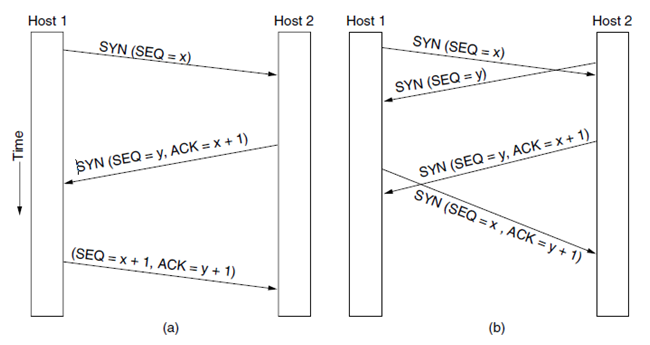
UDP (User Datagram Protocol) is the opposite. It's connectionless and fast. It doesn't establish a connection first; it just sends the data and hopes for the best. There's no error checking or re-sending of lost packets. This might sound risky, but it's ideal for speed-sensitive applications where losing a tiny bit of data isn't a disaster, such as live video streaming, online gaming, and DNS lookups.
| Feature | TCP (Transmission Control Protocol) | UDP (User Datagram Protocol) |
|---|---|---|
| Connection | Connection-oriented (establishes a session) | Connectionless (just sends) |
| Reliability | High (guarantees delivery) | Low (no delivery guarantee) |
| Speed | Slower (due to overhead) | Faster (less overhead) |
| Use Case | Web browsing, file transfer, email | Video streaming, online gaming, DNS |
And that's a quick tour of the essentials. Understanding these components, layouts, and rules is the first step toward mastering networking.