Choosing Your Home Assistant Setup
Hardware Performance Comparison
Choosing Your Engine
As your smart home grows from a few lights to a complex ecosystem of sensors, cameras, and automations, the hardware running it becomes critical. A sluggish system can mean a light takes five seconds to turn on, or a security automation fails to trigger. This is about choosing the right engine for your specific needs, balancing power, cost, and reliability.
We'll look at three popular tiers of hardware for Home Assistant: the official plug-and-play boxes, the versatile Raspberry Pi, and the powerful Mini-PCs.
The Official Route
For a guaranteed smooth experience, Home Assistant offers its own hardware. The Home Assistant Green is a simple, efficient box designed to get you started with minimal fuss. It's a great choice for a moderately sized setup.
The Home Assistant Yellow is a step up, based on a Raspberry Pi Compute Module 4. It's more of a powerful, all-in-one hub with built-in Zigbee/Thread support and an M.2 slot for fast storage, making it a flexible and future-proof option.
| Feature | Home Assistant Green | Home Assistant Yellow (CM4) |
|---|---|---|
| CPU | 1.5 GHz Quad-core ARM Cortex-A55 | 1.5 GHz Quad-core ARM Cortex-A72 |
| RAM | 4 GB DDR4 | Up to 8 GB LPDDR4 |
| Storage | 32 GB eMMC | M.2 NVMe Socket (CM4 provides SD slot) |
| Onboard Radios | None | Zigbee & Thread (Silicon Labs MGM210P) |
| Best For | Beginners, reliable core system | Power users wanting an all-in-one hub |
The DIY Powerhouse
The has long been the heart of DIY Home Assistant setups. The Raspberry Pi 4 was a game-changer, but the Raspberry Pi 5 offers a significant performance leap, with a CPU that's 2-3 times faster and much quicker microSD card access. This extra power is noticeable in faster restarts, quicker UI loading, and smoother handling of many integrations.
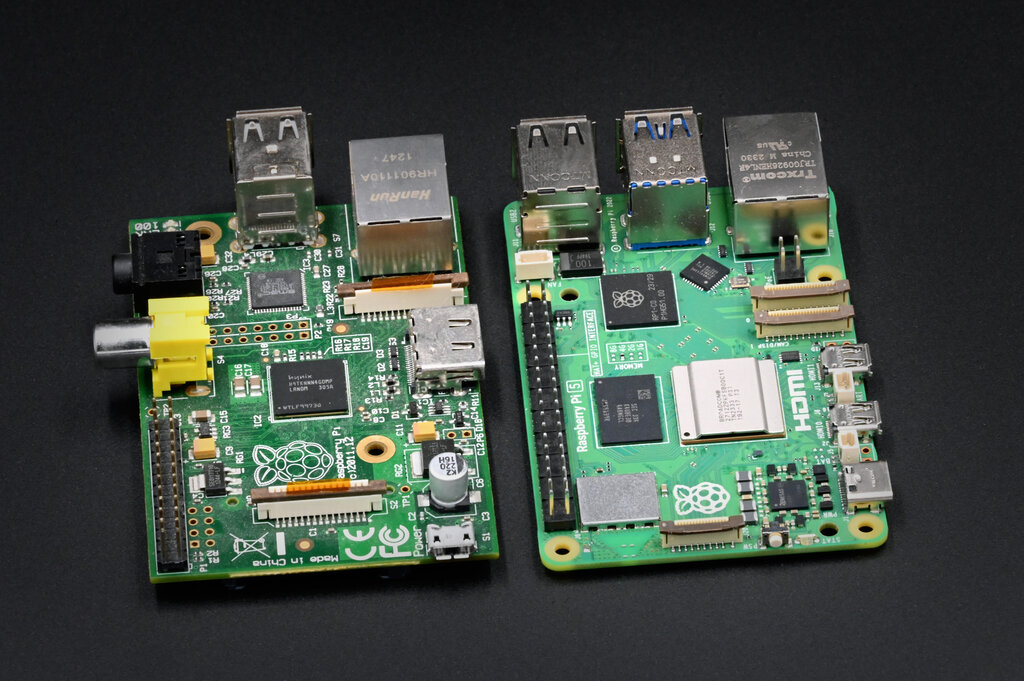
However, both models share a critical weakness for database-intensive applications like Home Assistant: reliance on SD cards. These cards are not designed for the constant small read/write operations of a database and can fail unexpectedly, leading to data loss.
A common and highly recommended upgrade is to boot from a proper Solid-State Drive (SSD) via a USB adapter. This drastically improves reliability and speed, especially when viewing history graphs or running complex automations.
Peak Performance
For the ultimate Home Assistant experience, especially with dozens of cameras, complex add-ons, or long-term data storage, a Mini-PC is the answer. These compact computers, often built around Intel NUCs or similar hardware, run on an architecture, the same as most desktop and laptop computers.
This provides a massive performance boost over ARM-based systems like the Raspberry Pi. You get faster processing, the ability to use much more RAM (16 GB or more is common), and native support for fast storage. This eliminates storage bottlenecks, which are often the source of sluggishness in large setups.
The trade-off is higher cost and power consumption. A Mini-PC might idle at 10-15 watts, whereas a Raspberry Pi 5 could be closer to 3-5 watts. Over a year, this can add up, but for those who need the power, it's a worthy investment.
A key term you might see when diagnosing performance issues is (input/output wait). This measures the time the CPU is idle because it's waiting for a storage device to read or write data. High I/O wait on a Raspberry Pi is a classic sign that the SD card can't keep up. Moving to an SSD, especially an NVMe drive on a Mini-PC, will make I/O wait disappear for nearly all Home Assistant tasks.
Your storage is the foundation of your system's stability. Don't build your smart home on sand. An SSD is the single most important reliability upgrade you can make.
Ready to test your knowledge on choosing the right hardware?
A user is setting up a large smart home with over 30 security cameras, numerous complex automations, and plans to store data for several years. Which hardware option would provide the best performance for this setup?
What does a high "I/O wait" value typically indicate in a Home Assistant system running on a Raspberry Pi?
Ultimately, the best hardware is the one that fits your needs and budget. Start with what makes sense for you now, but plan for growth. A system that is responsive and reliable is one you'll enjoy using for years to come.