CCNA Networking Fundamentals
Network Fundamentals
Core Network Components
Think of a large office building. To get mail from one person to another, you need a system. Computer networks are similar, relying on specialized devices to direct traffic. The three main players you'll encounter are routers, switches, and firewalls.
A router is like the building's mailroom supervisor. Its job is to look at the address on a package (a data packet) and decide whether it needs to go to a different building (another network) or stay within this one. Routers connect different networks together, making it possible for you to access the internet, which is just a massive collection of networks.
A switch is like the internal mail carrier for a single floor or department. Once a packet is inside the correct network, the switch takes over. It knows the exact location of every device (like a computer or printer) on its local network and delivers the packet directly to the correct recipient. This creates efficient, direct lines of communication between devices on the same network.
A firewall acts as the security guard at the building's entrance. It inspects incoming and outgoing traffic, checking it against a set of security rules. It blocks anything that looks suspicious or violates the rules, protecting the internal network from unauthorized access and potential threats. Firewalls can be dedicated hardware devices or software programs.

Network Layouts
The way devices are physically or logically arranged in a network is called its topology. Different layouts offer different benefits in terms of cost, reliability, and complexity. While you might see hybrid designs, most are based on a few core concepts.
The most common topology in modern local area networks (LANs) is the star topology. All devices connect to a central device, like a switch. It's easy to manage and troubleshoot; if one cable fails, only one device is affected. However, if the central switch fails, the entire network goes down.
A bus topology uses a single main cable to connect all devices. It's simple and cheap to set up, but it's not very robust. A break in the main cable can disrupt the whole network, and it can be difficult to pinpoint the problem.
Physical Connections
Networks rely on physical connections to transmit data. This involves the ports on devices, called interfaces, and the cables that connect them. The most familiar interface is the Ethernet port, which accepts an RJ-45 connector. The cables themselves come in a few main varieties, each with different characteristics.
| Cable Type | Description | Common Use | Speed & Distance |
|---|---|---|---|
| Twisted Pair | Contains pairs of copper wires twisted together to reduce interference. | LANs (e.g., Cat5e, Cat6) | Good for up to 10 Gbps over ~100 meters. |
| Fiber Optic | Transmits data as pulses of light through glass or plastic strands. | High-speed backbones, long distances | Very high speeds (100+ Gbps) over many kilometers. |
| Coaxial | Has a central copper core surrounded by insulation and shielding. | Cable internet and TV | Slower than modern twisted pair for LANs. |
Choosing the right cable depends on the needs of the network. For a typical office or home network, twisted pair cable is the standard. For connecting buildings across a campus or for the core infrastructure of an internet service provider, the speed and distance advantages of fiber optic cable are essential.
Rules of Communication
For devices to communicate successfully, they must agree on a set of rules, or protocols. At the Transport Layer of networking, two protocols do most of the work: the Transmission Control Protocol (TCP) and the User Datagram Protocol (UDP).
Think of TCP as sending a package that requires a signature upon delivery. You get confirmation it arrived, and if any part is missing, it gets resent. UDP is like sending a postcard. It's fast and simple, but there's no guarantee it will arrive, or that multiple postcards will arrive in the right order.
TCP is a connection-oriented protocol, meaning it establishes a formal connection before sending data. It ensures all data arrives in the correct order and without errors, a process called reliable delivery. This reliability comes with a bit of overhead, making it slightly slower.
UDP is connectionless. It just sends the data and hopes for the best. It's much faster because it doesn't bother with error-checking or ensuring the order of packets. The choice between them depends entirely on the application's needs.
| Feature | TCP (Transmission Control Protocol) | UDP (User Datagram Protocol) |
|---|---|---|
| Reliability | High (guaranteed delivery, error-checking, packet sequencing) | Low (no guaranteed delivery or sequencing) |
| Speed | Slower (due to overhead from establishing connections and checks) | Faster (less overhead, no connection required) |
| Use Cases | Web browsing (HTTP/S), email (SMTP), file transfer (FTP) | Video streaming, online gaming, DNS, voice over IP (VoIP) |
The Network Addressing System
Every device on a network needs a unique address to be identified, just like every house on a street needs a mailing address. This is the job of the Internet Protocol (IP). You'll work with two versions: IPv4 and IPv6.
IPv4
noun
The fourth version of the Internet Protocol. It uses a 32-bit address, which allows for approximately 4.3 billion unique addresses. It's written as four decimal numbers separated by dots, like 192.168.1.1.
The world has largely run out of available IPv4 addresses due to the explosive growth of the internet. The solution is IPv6, which uses a much larger 128-bit address space. An IPv6 address looks very different, for example: 2001:0db8:85a3:0000:0000:8a2e:0370:7334. This massive address space ensures we won't run out of addresses for the foreseeable future.
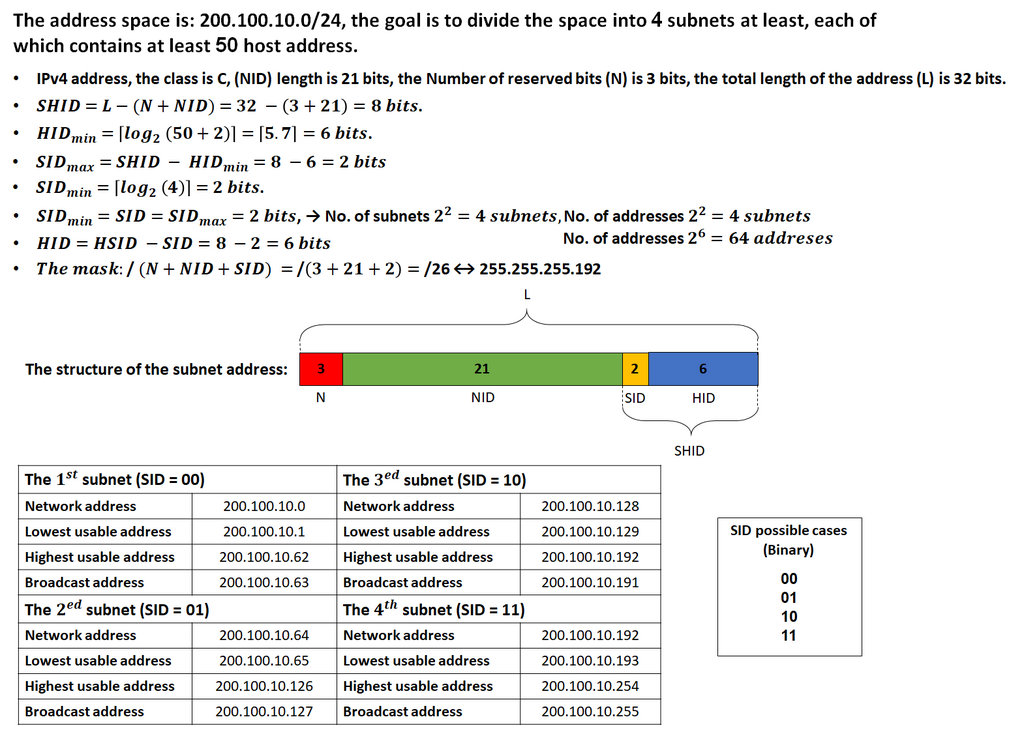
A key skill for any network administrator is subnetting. This is the process of taking a large block of IP addresses and dividing it into smaller, more manageable networks, or subnets. It's like taking a large office building's address range and assigning smaller blocks of addresses to the sales, marketing, and engineering departments.
Finally, not all IP addresses are public and reachable on the internet. To conserve IPv4 addresses and add a layer of security, we use private IP addressing for internal networks. Certain address ranges are reserved for this purpose, like 192.168.0.0 to 192.168.255.255 or 10.0.0.0 to 10.255.255.255. Your home router assigns these private addresses to your laptop, phone, and smart TV. When you access the internet, your router uses a technology called Network Address Translation (NAT) to translate your private IP into its single public IP.
With these foundational components, layouts, and rules in place, you have the basic building blocks for understanding how any network operates.