CCNA Network Models Explained
OSI Model Overview
A Framework for Communication
When two computers talk to each other, a lot has to happen behind the scenes. It's not just about sending a stream of ones and zeros; it's a highly organized process. To make sure different devices from different manufacturers can all speak the same language, computer scientists developed a conceptual framework called the Open Systems Interconnection (OSI) model.
The OSI (Open Systems Interconnection) model is a conceptual framework that standardizes the functions of a communication system into seven layers.
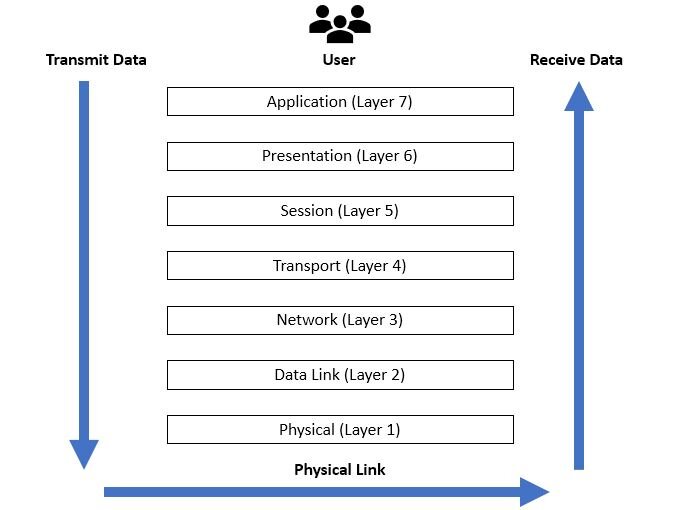
Think of it as a seven-story building. Each floor has a specific job to do, and it only communicates with the floor directly above and below it. This layering approach breaks down the complex task of network communication into smaller, more manageable parts. When you send an email, your data starts at the top floor (Layer 7) of your computer, travels all the way down to the bottom (Layer 1), zips across the network, and then goes up the seven floors on the receiving computer.
The Seven Layers
The OSI model is organized from top to bottom, starting with the layer closest to the user and ending with the physical hardware. A common mnemonic to remember the layers from top (7) to bottom (1) is All People Seem To Need Data Processing. Going from bottom (1) to top (7), you can use Please Do Not Throw Sausage Pizza Away.
Let's look at each layer's role, starting from the bottom up.
Layer 1: Physical Layer This is where communication becomes tangible. The Physical Layer is all about the physical stuff: electrical signals, radio waves, and light pulses. It defines the specifications for cables (like Ethernet), connectors, and wireless signals. Its job is simple but crucial: to send and receive raw bits—the ones and zeros—over a physical medium. It doesn't know what the bits mean; it just moves them.
Layer 2: Data Link Layer This layer takes the raw bits from the Physical Layer and organizes them into structured packets called frames. It's responsible for reliable communication between two directly connected devices on the same network, like your computer and your Wi-Fi router. This layer adds physical addresses, known as MAC addresses, to the frames to ensure they reach the correct device on the local network. It also performs error checking to catch any bits that might have been garbled during transit.
Layer 3: Network Layer This is the layer of routing. While the Data Link Layer handles local delivery, the Network Layer is in charge of moving data packets between different networks. This is where the internet part of the internet happens. It uses logical addresses, like IP addresses, to determine the best path for data to travel from its source to its final destination. Routers operate at this layer, making decisions about where to send packets next on their journey across the globe.
The Upper Layers
The top four layers are often called the upper layers. They deal less with the nuts and bolts of hardware and more with the software and applications you use.
Layer 4: Transport Layer This layer ensures that messages are delivered error-free, in sequence, and with no losses or duplications. It takes large chunks of data from the upper layers and breaks them into smaller segments. Two key protocols here are TCP (Transmission Control Protocol) and UDP (User Datagram Protocol). TCP is reliable and connection-oriented, making sure every packet arrives. UDP is faster but less reliable, used for things like video streaming where speed is more important than perfect accuracy.
Layer 5: Session Layer This layer is the conversation manager. It creates, maintains, and terminates sessions, or dialogues, between two applications. For example, when you log into a website, the Session Layer makes sure you stay logged in as you navigate from page to page. It places checkpoints in the data stream, so if a connection is lost, the transfer can resume from the last checkpoint instead of starting all over.
Layer 6: Presentation Layer This layer is the translator of the network. It takes the data from the Application Layer and converts it into a standard format that the rest of the network can understand. This is where tasks like data compression, decompression, encryption, and decryption happen. It ensures that data sent from one system can be read by another, even if they use different internal data representations.
Layer 7: Application Layer The top of the stack is the Application Layer. This is the layer that interacts directly with the end-user's software. It provides the protocols that applications use to get work done over the network. When you use a web browser (HTTP), send an email (SMTP), or transfer files (FTP), you're interacting with protocols at the Application Layer.
| Layer | Name | Primary Function | Example |
|---|---|---|---|
| 7 | Application | User-facing network services | HTTP, FTP, SMTP |
| 6 | Presentation | Data translation & encryption | SSL/TLS, JPEG |
| 5 | Session | Manages communication sessions | APIs, Sockets |
| 4 | Transport | Reliable end-to-end data delivery | TCP, UDP |
| 3 | Network | Routes packets across networks | IP, Routers |
| 2 | Data Link | Manages local frame delivery | MAC Addresses, Switches |
| 1 | Physical | Transmits raw bits | Ethernet Cables, Wi-Fi |
Now that you've seen how the layers stack up, let's test your knowledge.
Which layer of the OSI model is responsible for routing packets between different networks using logical addresses like IP addresses?
If you are streaming a live video where speed is more important than perfect accuracy, which Transport Layer protocol is most likely being used?
Understanding this model provides a powerful framework for troubleshooting network problems and grasping how the internet works from the ground up.